Samsung Art TV: Complete Guide to The Frame & Art Mode
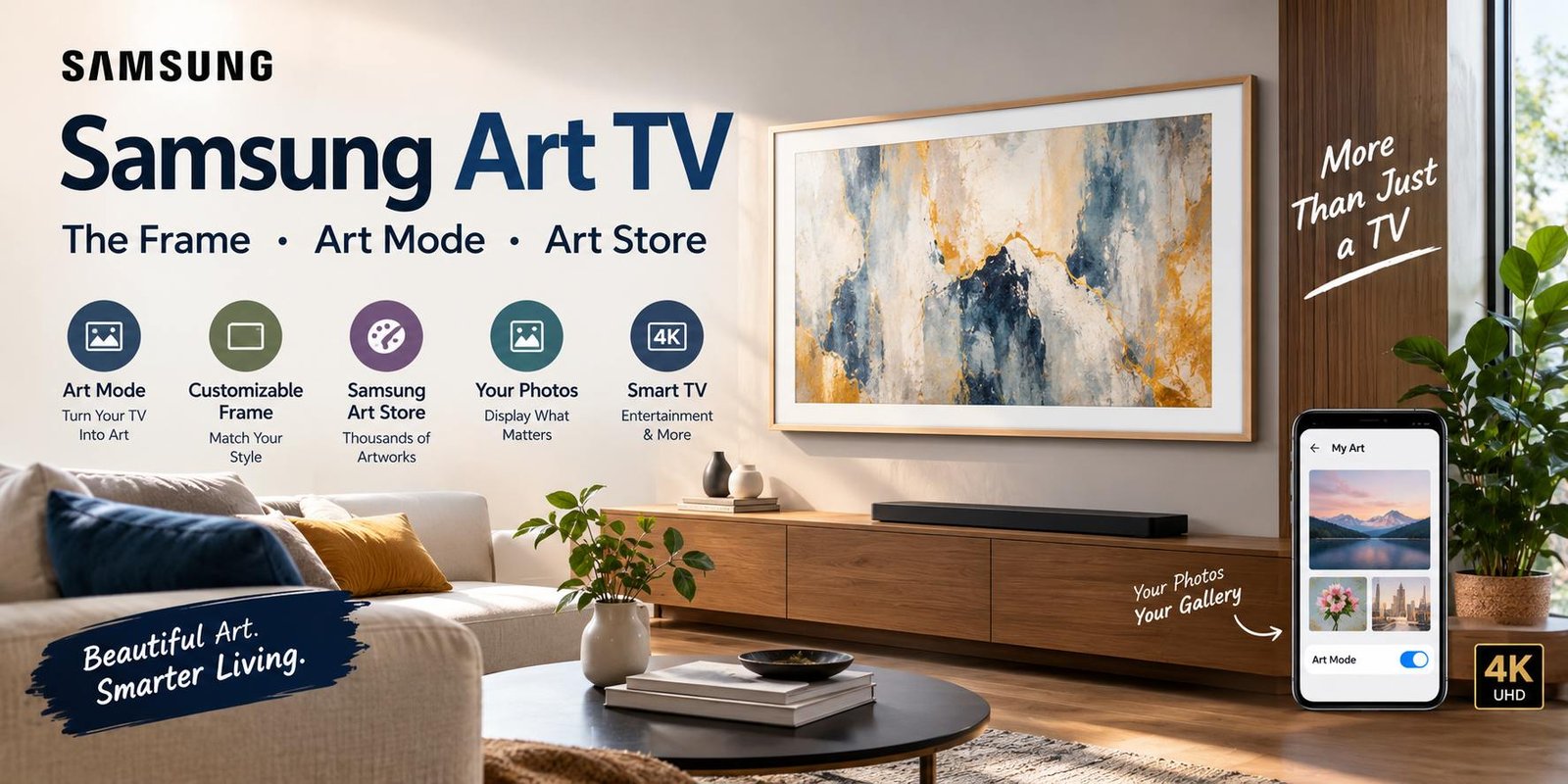
A television does not always have to look like a black rectangle sitting on the wall. Samsung Art TV models are designed to combine entertainment with home décor, allowing the screen to become a digital artwork display when you are not watching television.
The best-known example is Samsung The Frame, a lifestyle TV built around Art Mode. Instead of leaving a blank screen visible, Art Mode can display paintings, photography, and other artwork. Samsung’s current Art TV range also includes other compatible models and features, with availability varying by model and region.
This guide explains what Samsung Art TV means, how Art Mode works, what the Samsung Art Store offers, how personal photos can be displayed, and what you should consider before choosing one.
What Is Samsung Art TV?
Samsung Art TV refers to Samsung televisions designed to bring artwork and decorative content into the TV experience.
The concept is particularly associated with The Frame. When the TV is being used normally, it works as a smart television for movies, shows, sports, gaming, and other entertainment. When you are finished watching, Art Mode can transform the display into a digital art gallery.
Samsung describes The Frame as a television that becomes art when it is not being used for conventional TV viewing. Compatible models can display artwork from Samsung’s Art Store as well as personal photographs.
This makes the product different from a traditional television because its purpose extends beyond entertainment.
Samsung The Frame and the Art TV Concept
The Frame is the Samsung product most closely connected with the Art TV idea.
Its frame-inspired design is intended to make the television look more like a wall display. Depending on the model and market, users can choose different screen sizes and customizable bezel options.
Samsung’s 2026 lineup includes The Frame and The Frame Pro, with model-specific differences in display technology, connectivity, processors, and other features. The standard 2026 The Frame uses QLED 4K technology, while The Frame Pro uses Neo QLED 4K.
Because specifications can differ between generations and countries, it is important to check the exact model before purchasing.
How Does Samsung Art Mode Work?
Turning a TV Screen Into Artwork
Art Mode is the feature that gives Samsung Art TV its distinctive purpose.
Instead of displaying a conventional television interface after you finish watching, a compatible Samsung TV can show artwork or photographs. On The Frame, Art Mode is designed to make the screen blend more naturally with the surrounding room.
Samsung states that Art Mode can adjust brightness and color tone according to ambient lighting on compatible models. A motion sensor can also detect movement and help manage the display when the room is empty.
TV Mode and Art Mode
The basic experience is simple:
- Watch television normally.
- Finish watching your content.
- Switch to Art Mode.
- Display selected artwork or personal photographs.
- Return to TV mode whenever you want to watch something.
This combination allows one screen to serve two different purposes.
Samsung Art Store Explained
The Samsung Art Store is a digital collection designed for compatible Samsung Art TVs.
It provides access to artwork from artists, galleries, museums, and other partners. Samsung’s current Art TV information lists thousands of available works, although the exact collection can change and availability may vary by country and model.
The Art Store can be useful if you want your TV’s appearance to change regularly without manually preparing images yourself.
Is the Samsung Art Store Free?
Not all artwork requires payment.
Samsung provides selected free artwork and Art Store Streams on compatible products. Access to the complete premium collection requires an Art Store subscription, while users can also display their own photos without purchasing individual artwork.
Since subscription offers and artwork availability can change by region, check Samsung’s current terms for your specific market.
Can You Display Your Own Photos?
Yes. One of the useful features of Samsung The Frame is the ability to display personal photographs.
Samsung provides methods for adding personal images through compatible devices and the SmartThings app. USB storage can also be used on supported setups.
This means your TV can display:
- Family photographs
- Travel pictures
- Personal artwork
- Photography projects
- Digital illustrations
- Favorite memories
You are therefore not limited to Samsung’s artwork collection.
Samsung Art TV Display Quality
Art Mode is only part of the experience. The television still needs to perform well when you are watching normal content.
Current Samsung The Frame models use 4K resolution, while display technology varies by model. For example, Samsung lists QLED 4K for the 2026 The Frame and Neo QLED 4K for The Frame Pro.
Older generations may have different specifications, so shoppers should avoid assuming that every Samsung Art TV has exactly the same panel or processor.
Matte or Anti-Reflection Display
One important feature associated with The Frame is its matte display design on compatible models.
The goal is to reduce distracting reflections and make artwork appear more like a physical print or wall display. Samsung’s product information for The Frame also lists a matte display and anti-reflection characteristics.
This can be particularly useful in rooms with windows or strong indoor lighting.
Samsung Art TV Design
Traditional televisions are usually designed to disappear when they are switched off. Samsung’s Art TV approach takes the opposite direction.
The Frame is designed to become part of the room’s visual appearance.
Frame-Like Appearance
The television can be paired with customizable bezels on supported models. This gives owners the opportunity to change the appearance of the screen according to their interior design.
For a minimalist living room, bedroom, office, hallway, or creative space, the frame-style design can make the television look less like conventional electronics.
Wall-Mounted Appearance
The Frame is particularly suited to wall-mounted setups where the display can resemble framed artwork.
However, the final appearance depends on installation, wall position, lighting, bezel selection, and the particular model.
Samsung Art TV for Home Décor
One of the main reasons people search for Samsung Art TV is interior design.
A normal television can become a dominant visual element in a room. When switched off, its dark screen may attract attention even when nobody is watching.
Art Mode offers another approach by allowing the display to show artwork instead.
For example, you could use:
- Landscape artwork in a living room
- Abstract art in a modern interior
- Family photography in a hallway
- Minimal artwork in a bedroom
- Travel photography in a home office
The result depends heavily on the image you select and the surrounding décor.
Samsung Art TV for Apartments and Small Rooms
A large television can sometimes feel visually heavy in a small room.
An Art TV can help reduce that effect because the display does not have to remain a blank black rectangle when it is not being used.
For apartments, studios, bedrooms, and compact living areas, the decorative function may be particularly attractive.
Still, buyers should consider viewing distance and screen size rather than choosing a model purely for its appearance.
Samsung Art TV for Bedrooms
A Samsung Art TV can also work in a bedroom where a traditional television might look out of place.
Art Mode can make the display feel more decorative during the day. Personal photographs or calm artwork can create a different appearance without requiring a separate wall decoration.
If you intend to use the television in a bedroom, consider brightness, viewing distance, wall position, and how the display behaves when you are not actively watching it.
Samsung Art TV for Offices
The concept can also work in professional spaces.
A screen can be used for presentations and video content during working hours and then switched to artwork when it is not needed.
This may be useful for:
- Home offices
- Reception areas
- Creative studios
- Meeting rooms
- Waiting areas
- Hospitality spaces
The exact suitability depends on the model and the environment.
What Makes Samsung Art TV Different From a Regular Smart TV?
A conventional smart TV is primarily designed around entertainment.
Samsung Art TV adds a decorative function to that experience.
| Feature | Traditional Smart TV | Samsung Art TV |
|---|---|---|
| Streaming | Yes | Yes |
| Smart TV apps | Yes | Yes |
| 4K models | Common | Available |
| Artwork display | Usually limited | Major feature on compatible models |
| Art Mode | Usually no | Available on compatible models |
| Personal photos | Model dependent | Supported on compatible models |
| Interior-focused design | Limited | Major design focus |
The exact features depend on the specific television model and region.
Samsung Art TV and SmartThings
Samsung’s SmartThings ecosystem can be used with compatible televisions for managing certain features.
For The Frame, Samsung provides methods for sending personal photographs to the TV through SmartThings. Users can select images and save them for display in Art Mode.
This can make changing personal artwork more convenient than manually transferring files every time.
Does Samsung Art TV Use a Motion Sensor?
Compatible Samsung Art TVs can use motion-sensing technology as part of the Art Mode experience.
Samsung explains that the motion sensor can detect movement and automatically manage the display in Art Mode. The feature is intended to help avoid leaving the display active unnecessarily, although performance can vary depending on environmental conditions.
Availability and behavior can differ between models and countries.
Samsung Art Store Streams
Samsung also offers Art Store Streams on compatible products.
Rather than requiring you to select one artwork manually, the service can provide a curated stream of artwork. Samsung’s current information describes monthly curated artwork streams, with availability and quantities subject to regional and service changes.
This can be useful for people who want variety but do not want to spend time choosing new artwork themselves.
How to Choose a Samsung Art TV
Choosing the right Samsung Art TV requires more than looking at the phrase “Art TV.”
1. Check the Exact Model
Samsung’s Art TV lineup includes different models and generations. Features can vary significantly.
Check:
- Model number
- Screen technology
- Resolution
- Processor
- Refresh rate
- Connectivity
- Included accessories
- Art Mode availability
2. Choose the Right Screen Size
Screen size should match your room and viewing distance.
A larger display can create a stronger gallery effect, but it may overwhelm a small room.
Measure your available wall space before purchasing.
3. Consider the Display Finish
If your room has strong lighting, reflection control can become an important consideration.
The Frame models are particularly associated with matte display technology designed to reduce reflections.
4. Check Art Store Availability
Art Store services can vary by country and model.
Before buying, confirm that the artwork service and subscription options you want are available in your region.
Advantages of Samsung Art TV
Samsung Art TV has several characteristics that make it different from conventional televisions.
Decorative Appearance
The television can contribute to the room’s design instead of remaining a black screen.
Art Mode
Compatible models can display artwork when you are not watching television.
Personal Photos
You can use compatible methods to display your own images.
Large Artwork Collection
Samsung’s Art Store provides access to a large and changing collection of artwork on supported products.
Smart TV Functionality
The television remains a normal smart TV when you want to watch entertainment content.
Things to Consider Before Buying
Samsung Art TV is not automatically the right choice for every television buyer.
Art Features May Increase the Cost
You are paying for more than conventional TV hardware. The design and decorative features are part of the product concept.
Art Store Subscription
Access to the complete premium artwork collection may require a subscription. Free selections and personal photos provide alternatives.
Features Differ Between Models
A newer premium model may offer different display technology and processing compared with an older or standard The Frame model.
Regional Availability Matters
Samsung’s Art Store, subscriptions, artwork libraries, and some features may vary according to country and model.
Is Samsung Art TV Worth Considering?
The answer depends on what you want from a television.
If your main priority is simply getting the largest screen for entertainment at a particular budget, you may want to compare conventional Samsung TVs as well.
If you care about interior design and want a television that can become artwork when not in use, the Samsung Art TV concept offers a different experience.
The Frame is especially designed around this idea, combining smart TV functionality with Art Mode and access to artwork and personal photos.
Frequently Asked Questions
What is Samsung Art TV?
Samsung Art TV is a category of Samsung televisions designed to combine television viewing with artwork and decorative display features. The Frame is the most recognizable example.
Is Samsung The Frame an Art TV?
Yes. The Frame is Samsung’s signature Art TV product and includes Art Mode on compatible models.
Can I put my own pictures on Samsung The Frame?
Yes. Samsung supports adding personal photos through compatible methods such as SmartThings and USB storage.
Do I need an Art Store subscription?
Not necessarily. You can use your own photos and access selected free artwork on compatible products. A subscription is required for full access to the premium Art Store collection.
Does Samsung Art TV work as a normal television?
Yes. Compatible Samsung Art TVs can be used for regular television and smart entertainment, while Art Mode provides the decorative display experience when you are not watching.
What is Samsung Art Mode?
Art Mode is a feature that allows compatible Samsung TVs, especially The Frame, to display artwork instead of a conventional blank screen when the TV is not being used for normal viewing.
Does every Samsung TV have Art Mode?
No. Art Mode availability depends on the model and region. Samsung’s current lineup lists Art Mode on specific compatible models.
Final Thoughts
Samsung Art TV brings together two ideas that are normally separate: television entertainment and home decoration.
The Frame remains the central product for this concept, offering Art Mode, artwork collections, personal photo support, and a design intended to complement a room. Current Samsung Art TV products can also include advanced display and smart-TV technologies, but features differ between models and regions.
Before purchasing, compare the exact model, screen size, display technology, Art Store availability, subscription requirements, and connectivity options. That approach will help you choose a Samsung Art TV based on both its entertainment capabilities and its role as part of your home décor.