
How to Get Water Out of Phone Safely: Easy Tips
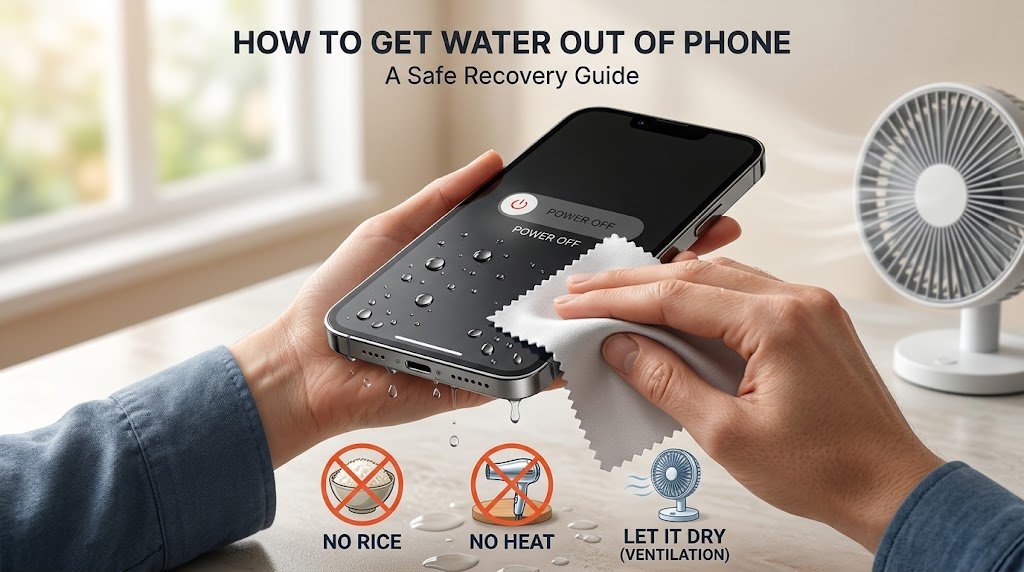
If you want to learn how to get water out of phone safely, the best approach is to switch off the device, remove visible moisture, and allow it to dry in a well-ventilated place.
If you need to know how to get water out of phone safely, begin by reducing the risks to its electronic components. Avoid experimenting with household remedies, and do not assume that a working screen means everything inside is fine.
This guide explains what to do after water exposure, how to handle charging and sound problems, and when a professional should examine your device.
Your First Steps After Water Reaches Your Phone
Following these steps for how to get water out of phone safely can help reduce the risk of further damage, although some water-related problems require professional repair.
How to Get Water Out of Phone Safely at Home
If the phone is still on, switch it off if you can do so safely. If it has already powered down, leave it that way instead of repeatedly pressing the power button.
Do not test games, cameras, speakers, or other features while the device may contain moisture. If the phone becomes unusually hot or shows signs of battery damage, stop handling it and seek professional help.
Separate the Phone From Accessories
Disconnect wired accessories and unplug the charging cable. Remove the protective case, because water can collect in the narrow space between the case and the phone.
Take out a removable battery only if the device was specifically designed for user removal and you can follow its instructions safely. Do not dismantle a sealed smartphone.
Remove Water You Can See
Use a soft, absorbent cloth to collect droplets from the phone’s exterior. Gently wipe around the edges, buttons, and back panel.
Keep the phone steady during this process. Vigorous shaking is unnecessary and may move liquid into other openings.
How to Get Water Out of Phone Safely at Home
The following steps can help with surface moisture. They should not be treated as a guarantee that a submerged phone is dry internally.
Allow Loose Water to Drain
If you can see moisture near the charging connector, point the opening downward and gently tap the phone against your palm. This may help loose droplets escape.
Do not insert tissue, metal tools, wooden sticks, or cotton swabs into the connector. These objects can leave debris behind or damage the contacts.
Once visible moisture has drained, place the phone in a clean area with good airflow.
Choose a Suitable Drying Location
A shaded, dry room is preferable to a hot windowsill or a spot beside a heater. Set the phone on a clean surface where air can circulate around it.
Avoid sealing the device inside a bag or wrapping it tightly in fabric. Do not use a hair dryer or other heat-producing equipment to speed up evaporation.
Drying time varies with the amount of liquid and the design of the phone. If the device was immersed in water, a technician may need to inspect the internal components even after the outside feels dry.
Give the Charging Connector Time
A phone may prevent charging when it detects liquid near its connector. Treat this alert as a warning rather than an inconvenience.
Leave the cable disconnected and follow the manufacturer’s instructions for your exact model. Some manufacturers advise allowing up to 24 hours for a wet connector to dry, but this does not mean that a submerged phone is necessarily safe after that period.
If the warning remains, avoid repeatedly attempting to charge the device.
Check the Speaker Without Poking It
Moisture near a speaker can temporarily affect the way sound travels through its opening. You may notice quiet audio, crackling, or muffled voices.
Wipe the outside gently and position the affected opening downward. Leave it unobstructed while the phone dries.
Some phones have built-in speaker-cleaning functions that play particular tones. These may help with droplets near the speaker, but they cannot remove water from the battery area or repair internal damage.
If the sound does not return to normal after drying, arrange a professional inspection.
Common Remedies That Are Better Left Alone
Many home remedies sound convenient, but some create additional risks for a wet smartphone.
Why a Bowl of Rice Is Not the Answer
Rice is not a dependable way to remove moisture trapped inside a sealed electronic device. Dust and small particles can also enter the phone’s openings.
Instead of relying on rice, allow surface moisture to evaporate in a dry, ventilated environment. For significant water exposure, professional assessment is more appropriate.
Why Heat Can Create Another Problem
A hair dryer, radiator, oven, or heat gun can expose sensitive components to temperatures they were not designed to withstand. Heat may affect adhesives, seals, the display, and the battery.
Let the phone dry at room temperature. Do not place it in direct sunlight in an attempt to shorten the process.
Why You Should Avoid Compressed Air
Pressurised air may push liquid farther into the phone rather than removing it. It can also affect delicate openings and components.
Use nozzles, needles, and other tools only when a qualified repair procedure specifically calls for them. For ordinary home care, keep the openings clear and let loose moisture escape naturally.
Signs That Water May Have Affected Internal Components
The outside of a phone does not always reveal the extent of the damage. Pay attention to changes in how the device behaves.
The Display Looks Different
Unexpected lines, dark areas, flickering, or unreliable touch response can indicate a display problem. Water beneath the screen cannot be removed by wiping the glass.
Switch off the device if possible and arrange a repair assessment rather than pressing the affected area.
Charging Becomes Unreliable
A persistent moisture alert or failure to charge after water exposure may indicate that the connector needs more drying time or inspection.
Do not keep reconnecting the cable to see whether it works. If the problem continues after following the manufacturer’s instructions, seek qualified help.
Sound or Camera Quality Changes
A speaker may sound different after moisture reaches its opening. Fogging inside the camera assembly can also affect photographs.
These symptoms do not all have the same cause, so avoid assuming that more drying time will fix everything. Persistent faults deserve professional attention.
What to Do With Different Types of Smartphones
General precautions apply to most phones, but the exact recovery instructions depend on the manufacturer.
Recovering an iPhone After Water Exposure
Disconnect all cables and remove visible water with a soft cloth. Apple advises positioning the connector downward, gently tapping the phone against your hand to remove excess liquid, and leaving it in a dry place with airflow.
Do not use rice, compressed air, or external heat. Follow Apple’s current instructions if a liquid-detection alert appears.
Recovering a Samsung or Other Android Phone
Switch off the device if possible, disconnect accessories, and remove its case. Wipe the exterior without inserting anything into the charging connector or speaker openings.
Consult the guidance for your particular model. Water-resistance ratings and charging instructions differ across devices, so one phone’s advice may not apply to another.
Does Water Resistance Protect Every Phone?
No smartphone should be considered completely safe from water damage in every situation. Water resistance is tested under defined conditions, and protection can weaken as seals age or the device suffers damage.
The liquid itself also matters. Salt water, sugary drinks, and cleaning products can leave residues that ordinary evaporation does not remove.
If a phone has been exposed to one of these liquids or submerged for a significant period, turn it off and contact the manufacturer or a qualified repair service. Do not rely solely on the phone’s advertised water-resistance rating.
When Should You Visit a Phone Repair Specialist?
Professional help is advisable when water exposure is followed by any of these problems:
- The phone no longer starts.
- The display shows persistent abnormalities.
- Charging remains unavailable.
- The microphone or speaker stops working correctly.
- The camera becomes foggy internally.
- The device repeatedly shuts down or becomes unusually hot.
Tell the technician what kind of liquid reached the phone and whether it was splashed or completely submerged. This information may help determine the appropriate inspection.
If the battery swells, smoke appears, or the phone gives off a strong chemical smell, stop using and charging it, move away, and seek appropriate assistance.
Frequently Asked Questions
Can I save a phone that has fallen into water?
Recovery is possible in some cases, but the outcome depends on the liquid, exposure time, and damage to the internal components. A device that still turns on may nevertheless develop problems later.
Should I charge my phone once the outside is dry?
Not necessarily. Water may remain inside the connector or elsewhere in the device. Follow the manufacturer’s drying guidance and do not ignore a liquid-detection alert.
Will a wet speaker return to normal?
It may recover when droplets near the opening evaporate. If the audio remains distorted, the speaker or another component may require inspection.
Is it safe to open a phone to dry it faster?
Opening a sealed phone without the right tools and experience can damage its screen, seals, or battery. Professional disassembly is the safer option when internal moisture is suspected.
Can water damage appear several days later?
Yes. Corrosion or other internal problems may become noticeable after the initial incident. If new symptoms develop following water exposure, arrange an inspection.
Final Thoughts
When water reaches a smartphone, avoid rushing to restart it or find a quick household remedy. Disconnect accessories, switch it off when possible, remove visible moisture, and leave it in a dry environment with good airflow.
Do not rely on rice, direct heat, or compressed air. Most importantly, remember that drying the exterior does not guarantee that the internal components are safe. If the phone was submerged or starts behaving differently, professional inspection can help identify the problem before further damage occurs.




One Comment