Google Pixel Watch 4: Features, Battery & Full Review
Introduction to Google Pixel Watch 4
Smartwatches have become an important part of modern technology because they combine everyday convenience, fitness tracking, communication, and smartphone connectivity in a compact wearable device. Among the latest products in this category, the Google Pixel Watch 4 stands out as an advanced smartwatch designed to work closely with Google’s ecosystem.
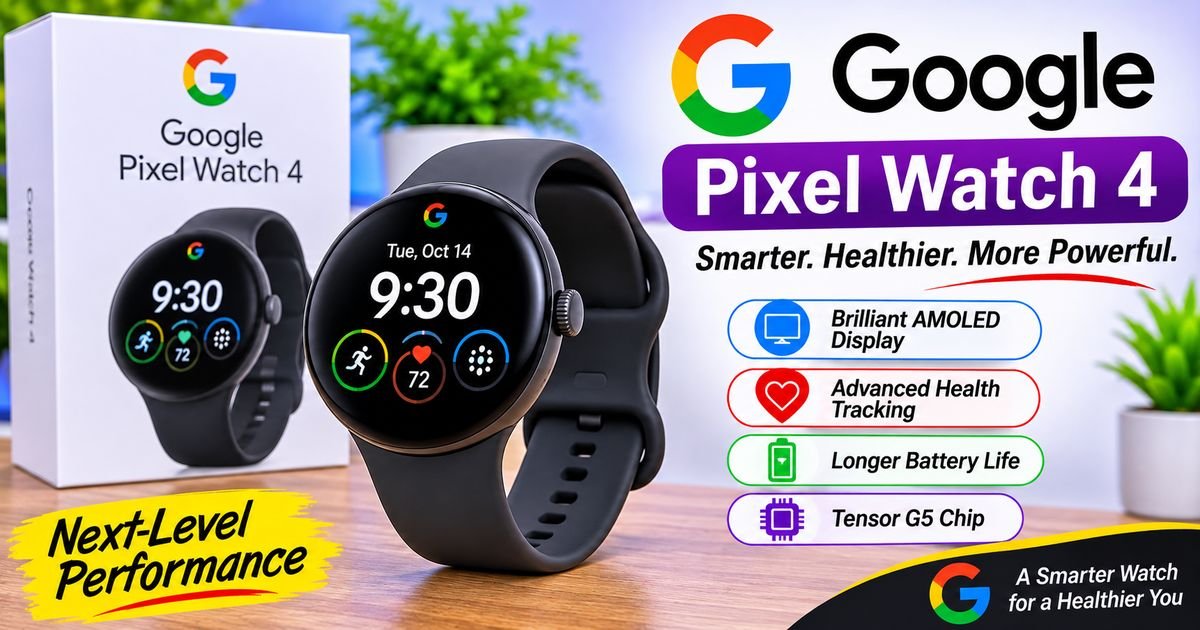
The Google Pixel Watch 4 brings together a redesigned display, improved charging experience, updated software, health monitoring capabilities, and smart features powered by Google’s AI technology. It is designed for people who want more than a traditional wristwatch. Users can check notifications, monitor daily activity, access selected applications, track workouts, and interact with Google services directly from their wrists.
Google has continued developing its smartwatch lineup by improving the relationship between hardware and software. The Pixel Watch 4 reflects this direction through its integration with Wear OS, Google Assistant’s newer Gemini experience, and Fitbit health and fitness tools.
The device is available in two sizes, giving buyers different options depending on their preferences. Its rounded appearance maintains the recognizable Pixel Watch design while introducing improvements to the display and internal components.
However, choosing a smartwatch requires more than looking at its appearance. Battery performance, smartphone compatibility, health features, application support, and regional availability can all influence the buying decision.
This guide explores the Google Pixel Watch 4 in detail, including its design, display, specifications, battery, software, health capabilities, fitness tracking, connectivity, advantages, limitations, and comparisons with other smartwatches.
What Is Google Pixel Watch 4?
The Google Pixel Watch 4 is a smartwatch developed by Google as part of its Pixel wearable product family. It combines traditional watch functions with modern digital capabilities.
Instead of functioning only as a timekeeping device, the smartwatch connects with compatible smartphones and online services to provide additional information and controls.
Users can view notifications, monitor physical activity, check health-related measurements, access supported applications, and interact with Google services.
The watch runs Wear OS 6 and uses Google’s software ecosystem to provide a connected experience.
Its design includes a circular display, a rotating crown, a side button, and a comfortable wrist-worn structure.
Google offers two main case sizes: 41mm and 45mm. This gives users the opportunity to choose a version that suits their wrist and display preferences.
The Pixel Watch 4 is especially relevant to Android users who already use Google applications and services.
Google Pixel Watch 4 Design and Build Quality
The design of the Google Pixel Watch 4 continues Google’s recognizable circular smartwatch appearance.
Its rounded body gives it a traditional watch-like appearance while the touchscreen provides access to modern digital functions.
The overall design focuses on simplicity rather than using an unnecessarily complicated exterior.
Circular Watch Design
The circular shape is one of the most recognizable characteristics of the Pixel Watch family.
Unlike rectangular smartwatches, the Pixel Watch 4 uses a rounded display that resembles a conventional wristwatch.
This appearance makes it suitable for different situations, including everyday activities, office environments, and exercise sessions.
The curved display also contributes to the product’s distinctive visual identity.
Two Available Sizes
Google offers the Pixel Watch 4 in 41mm and 45mm versions.
The smaller model provides a more compact option, while the larger version offers additional display space and a larger battery.
Choosing between these versions depends on individual preferences, comfort, and how much screen space a user wants.
Both sizes provide access to the main smartwatch experience.
Materials and Construction
The Pixel Watch 4 uses an aluminum case with a carefully designed exterior.
Its construction is intended to balance appearance, comfort, and everyday durability.
The watch includes a protected display and interchangeable band options.
However, users should remember that a smartwatch remains an electronic device. Avoiding unnecessary impacts and following Google’s care recommendations can help maintain its condition.
Comfortable Everyday Wear
Comfort is particularly important because smartwatches are often worn throughout the day.
The Pixel Watch 4 is designed to support continuous everyday use, including notifications, activity monitoring, and sleep-related tracking.
The choice of band can influence how the watch feels during different activities.
Users should select a suitable strap and adjust it comfortably rather than wearing it excessively tight.
Google Pixel Watch 4 Display
The display is one of the most important improvements highlighted in the Pixel Watch 4.
Google introduced its Actua 360 display technology to provide a bright, detailed, and visually appealing viewing experience.
The screen is designed to make notifications, watch faces, menus, and fitness information easier to view.
Actua 360 Display Technology
The Actua 360 display is designed around the watch’s circular shape.
Its curved construction gives the device a distinctive appearance and helps create a more integrated screen design.
The display is an important part of the overall user experience because users interact with almost every smartwatch feature through it.
Whether checking a message or viewing workout information, screen clarity matters.
Brightness
Google advertises peak brightness of up to 3,000 nits for the Pixel Watch 4.
This high brightness level is intended to improve outdoor visibility.
A bright screen can make it easier to read information when using the watch outside during daylight.
Actual visibility can still depend on sunlight, display settings, watch-face design, and viewing conditions.
Always-On Display
The Pixel Watch 4 supports an Always-On Display experience.
This allows selected information to remain visible without requiring the user to activate the screen manually every time.
It is useful for checking the time and other supported information quickly.
However, keeping the display active can influence battery consumption.
Users who want longer battery life may prefer adjusting display settings according to their daily needs.
Display Size and Resolution
The 41mm and 45mm models provide different screen dimensions and resolutions.
The larger model offers more physical display space, which can make reading notifications and interacting with certain applications more convenient.
Both versions are designed to provide a detailed smartwatch interface.
Google Pixel Watch 4 Performance and Processor
Smartwatch performance depends on several hardware components working together.
The processor handles application operations, interface navigation, communication, and other background tasks.
The Pixel Watch 4 uses Qualcomm’s Snapdragon W5 Gen 2 wearable platform alongside Google’s supporting hardware and software.
This platform is designed specifically for wearable devices rather than conventional desktop computers or smartphones.
Everyday Performance
For ordinary smartwatch activities, performance should be evaluated through practical tasks.
These include opening applications, checking notifications, navigating menus, viewing fitness information, and interacting with supported services.
The Pixel Watch 4 is designed to provide a responsive experience across these activities.
However, performance can vary depending on software updates, application requirements, and background processes.
Application Support
Wear OS provides access to a range of compatible applications.
Depending on availability, users can access services related to communication, navigation, entertainment, fitness, and productivity.
Popular Google services help connect the watch with the wider Android experience.
Application availability may vary by country and software version.
Efficient Processing
Wearable processors are designed to balance performance with power consumption.
A smartwatch has much less physical space for a battery than a smartphone.
For this reason, efficient hardware is important for maintaining a useful balance between responsiveness and battery life.
Wear OS 6 and Google Pixel Watch 4 Software
Software is a major part of the Pixel Watch 4 experience.
The smartwatch runs Wear OS 6, Google’s operating system designed for wearable devices.
Wear OS provides the interface used to access applications, settings, notifications, and other smartwatch functions.
Updated User Interface
The operating system provides a touch-friendly interface that works with the circular display.
Users can move between different screens, open supported applications, and access important information.
The interface is designed to make common smartwatch activities convenient.
Google Services Integration
Google’s ecosystem is one of the main advantages of using a Pixel smartwatch.
Compatible services can provide access to information and features through the wrist.
Depending on regional availability and account configuration, these may include Google Maps, Google Wallet, Google Calendar, and other supported applications.
This integration can make everyday activities more convenient for people who already use Google services.
Notifications
The Pixel Watch 4 can display notifications from a connected smartphone.
Users can check incoming messages, application alerts, and other supported information without immediately taking out their phones.
Some notifications also provide interactive options.
For example, compatible applications may allow users to respond to messages or manage alerts directly from the watch.
Software Updates
Google can provide software updates that improve functionality, fix problems, and introduce supported changes.
Keeping the operating system updated is important for security and compatibility.
Users should install official updates when available and review any important changes to application permissions or settings.
Gemini on Google Pixel Watch 4
Artificial intelligence is becoming an important part of Google’s product ecosystem.
The Pixel Watch 4 brings Google’s Gemini experience to the smartwatch.
Gemini is designed to provide a more conversational way of interacting with supported Google AI services.
Instead of relying only on traditional commands, users can interact through natural language.
Conversational Interaction
A conversational interface allows users to communicate with an AI assistant using ordinary language.
For example, a user may ask a supported question or request assistance with an everyday task.
This can be useful when using a smartphone is inconvenient.
The experience depends on the available Gemini functionality, connectivity, account settings, and regional support.
Everyday Assistance
AI assistants can help users find information, organize certain activities, and interact with supported services.
On a smartwatch, the main advantage is accessibility.
A user may be able to request information without navigating several different application screens.
However, not every smartphone Gemini function is necessarily available on the watch.
Integration With Google Services
Gemini’s usefulness can increase when it works with supported Google services.
Depending on permissions and availability, connected services may provide additional context for certain requests.
Users should review permissions and understand what information is shared with connected applications.
Connectivity Requirements
AI-powered services may require an internet connection and an eligible account.
Some functions may depend on the connected phone or the watch’s available connectivity.
Therefore, the experience can differ between Wi-Fi, Bluetooth, and cellular configurations.
Google Pixel Watch 4 Health Tracking Features
Health-related monitoring is one of the major reasons people consider purchasing a smartwatch.
The Pixel Watch 4 includes several sensors and software features designed to provide information about selected health measurements and daily activity.
Its health experience is closely connected to Fitbit.
Heart Rate Monitoring
The watch includes optical heart rate monitoring.
It can measure heart rate during supported activities and provide information through compatible health applications.
Heart rate information can help users understand how their body responds to different levels of physical activity.
However, smartwatch measurements are intended for general wellness purposes and should not replace professional medical evaluation.
ECG Functionality
The Pixel Watch 4 supports an ECG application in supported regions.
An electrocardiogram records information about the electrical activity of the heart.
The feature is designed to help identify certain irregular heart rhythm patterns.
Its availability depends on country approval, software support, and applicable requirements.
An ECG reading from a smartwatch is not a complete medical examination.
Blood Oxygen Monitoring
The device includes hardware supporting blood oxygen-related measurements.
This type of measurement is commonly known as SpO2.
Blood oxygen information may be available through supported Fitbit health features.
Availability and measurement conditions can vary.
Users should not rely on smartwatch readings alone when evaluating a medical concern.
Skin Temperature Tracking
The Pixel Watch 4 includes a skin temperature sensor.
Temperature information can help provide additional context about changes over time.
However, skin temperature is not identical to core body temperature.
Environmental conditions, sleep arrangements, and other factors can influence measurements.
Sleep Tracking
Sleep tracking is another important Fitbit-related feature.
The smartwatch can collect information associated with sleep duration and sleep patterns.
Users can review supported sleep information through the Fitbit experience.
Sleep tracking can help people understand their general routines and identify changes over time.
However, these measurements should be treated as estimates rather than definitive medical assessments.
Stress and Recovery Information
Fitbit provides wellness features that can help users understand different aspects of their daily activity and recovery.
Depending on available sensors and supported software, the Pixel Watch 4 can contribute information related to stress monitoring and other wellness measurements.
These features can provide useful context, but they do not replace professional medical advice.
Google Pixel Watch 4 Fitness Tracking
Fitness tracking is another major part of the Pixel Watch 4 experience.
The smartwatch is designed to support people who want to monitor their physical activities and review workout information.
Multiple Workout Activities
A smartwatch can support different exercise categories through its fitness applications.
These may include walking, running, cycling, and other supported workout types.
Different activities can use different tracking methods.
For example, outdoor running may use GPS information, while indoor exercise may depend more heavily on motion and heart rate sensors.
GPS Tracking
The Pixel Watch 4 supports GPS-based activity tracking.
GPS can help record location-related information during outdoor workouts.
This is useful for people who want to review routes and distance information.
Location accuracy can vary because of buildings, trees, environmental conditions, and satellite availability.
Activity Goals
Fitness applications often allow users to establish personal activity goals.
These can relate to movement, exercise time, and other supported measurements.
The purpose of activity goals is to provide a convenient way to review daily movement.
Users should choose realistic targets that match their circumstances.
Workout Information
During compatible workouts, the watch can display selected information such as duration, heart rate, and activity progress.
After completing an exercise session, supported applications may provide a summary.
This information can help users review their activity over time.
Fitbit Integration
Fitbit is an important part of Google’s smartwatch fitness ecosystem.
The integration provides access to activity information and supported wellness tools.
Some advanced features may require an eligible Fitbit subscription.
Users should review the current subscription terms before assuming every feature is included at no additional cost.
Google Pixel Watch 4 Battery Life
Battery performance is one of the most important factors when choosing a smartwatch.
The Pixel Watch 4 is designed to provide improved battery performance compared with previous models.
Google advertises up to 30 hours of battery life for the 41mm version and up to 40 hours for the 45mm version with the Always-On Display enabled.
These are estimated figures under specified usage conditions.
Actual battery life can vary depending on screen brightness, GPS use, cellular connectivity, notifications, applications, and health tracking settings.
Battery Capacity
The two sizes use different battery capacities.
The larger version has a bigger battery, which contributes to its higher advertised endurance.
This is one reason some users may prefer the 45mm model.
However, battery size is only one factor. Software settings and usage patterns also influence overall performance.
Improved Charging Experience
Google has introduced a redesigned charging arrangement for the Pixel Watch 4.
The new charging system is designed to make charging more convenient and improve charging speed.
Google advertises substantially faster charging compared with the previous generation.
This can be useful for people who need to recharge their watch during short breaks.
Charging Time
Charging performance depends on the battery level, temperature, power source, and other conditions.
Users should follow Google’s recommended charging arrangements to achieve the expected experience.
The watch should also be allowed to cool appropriately if it becomes unusually warm during charging.
Battery Management
Several settings can influence battery consumption.
Keeping brightness at an appropriate level, managing unnecessary notifications, and reviewing background activity can help improve endurance.
Users who frequently use GPS or cellular connectivity may experience different results from people who mainly use Bluetooth connectivity.
Connectivity and Communication
Connectivity determines how a smartwatch interacts with smartphones and other digital services.
The Pixel Watch 4 supports modern wireless communication options.
Bluetooth
Bluetooth allows the watch to communicate with a compatible smartphone.
This connection supports several everyday features, including notifications and synchronized information.
The phone and watch should remain within a suitable connection range for reliable communication.
Wi-Fi
Wi-Fi provides another way for the smartwatch to access supported online services.
Its availability can be useful when the watch is connected to a known network.
The actual experience depends on network access and software support.
LTE Connectivity
Google offers cellular connectivity on supported Pixel Watch 4 configurations.
An LTE model can provide certain connected functions without relying entirely on a nearby smartphone.
However, cellular service normally requires a compatible carrier and an eligible plan.
Not every mobile operator supports smartwatch connectivity.
Users in Pakistan should confirm local carrier support before purchasing an LTE model.
GPS
GPS functionality supports outdoor activity tracking and location-related features.
It can be particularly useful for people who regularly walk, run, or cycle outdoors.
Google Pixel Watch 4 Water Resistance and Durability
A smartwatch should be suitable for ordinary daily activities.
The Pixel Watch 4 includes water resistance and a design intended to handle typical situations associated with everyday wear.
Google specifies a 5 ATM water-resistance rating.
It also carries an IP68 rating for dust and water resistance.
These ratings provide information about the device’s tested resistance under specified conditions.
However, water resistance does not mean the watch is suitable for every possible water activity.
Users should follow Google’s official guidance concerning swimming, water exposure, cleaning, and maintenance.
Water resistance can also change over time because of normal wear or physical damage.
Google Pixel Watch 4 Compatibility
Compatibility is an important consideration before purchasing the Pixel Watch 4.
The watch is designed for compatible Android smartphones.
It does not provide the same native compatibility with iPhones as some competing smartwatch products.
Users should check Google’s official compatibility requirements before buying the device.
The required Android version, Google account setup, application availability, and regional services can affect the setup process.
Connection With Google Pixel Phones
The Pixel Watch 4 is designed to work particularly well within Google’s Pixel ecosystem.
Compatible Pixel phones can provide a connected experience through supported Google applications and services.
Users may find it convenient if they already use Google Maps, Google Wallet, Google Calendar, and other supported services.
Compatibility With Other Android Phones
The watch is not limited to Google Pixel smartphones.
Compatible Android phones from other manufacturers can also work with the device.
However, certain experiences may depend on software versions, manufacturer settings, and application availability.
iPhone Compatibility
The Pixel Watch 4 is not designed as an iPhone-compatible smartwatch.
People using Apple devices should consider this limitation before making a purchase.
An Apple Watch is generally a more suitable option for people who want native integration with an iPhone.
Google Pixel Watch 4 vs. Previous Pixel Watch Models
Google has continued improving its smartwatch lineup with each generation.
The Pixel Watch 4 builds on the features of earlier models while introducing changes to its display, battery experience, and software capabilities.
Pixel Watch 4 vs. Pixel Watch 3
The Pixel Watch 3 already offered two sizes and a strong selection of health and fitness functions.
The Pixel Watch 4 focuses on improvements such as its brighter Actua 360 display, updated charging system, newer software experience, and redesigned internal architecture.
The newer model is particularly relevant to people who want the latest Google smartwatch features.
However, Pixel Watch 3 owners may not need to upgrade immediately if their existing device already meets their needs.
Pixel Watch 4 vs. Pixel Watch 2
The Pixel Watch 2 belongs to an earlier stage of Google’s wearable development.
The Pixel Watch 4 introduces a newer overall experience through updated hardware, display technology, and software.
People using the Pixel Watch 2 may find the newer model more attractive if they want additional capabilities and longer-term software support.
Pixel Watch 4 vs. Original Pixel Watch
The original Pixel Watch introduced Google’s modern smartwatch design.
The Pixel Watch 4 represents several generations of development beyond that first model.
Its improved screen, updated software, and additional hardware capabilities make it a more advanced product.
For users still using the original Pixel Watch, the newer generation offers a substantially refreshed experience.
Google Pixel Watch 4 vs. Samsung Galaxy Watch
Samsung’s Galaxy Watch family is one of the major competitors in the Android smartwatch market.
Both product families offer health tracking, smartphone connectivity, fitness tools, and application support.
However, their software experiences differ.
Google’s Pixel Watch focuses closely on Google’s services and Fitbit integration.
Samsung’s Galaxy Watch products provide strong integration with Samsung’s ecosystem and health applications.
The right option depends on smartphone compatibility, personal preferences, available features, and regional support.
People who already use a Google Pixel phone may prefer the Pixel Watch experience.
Samsung smartphone owners may find certain Galaxy Watch integrations more convenient.
Google Pixel Watch 4 Price and Availability
The price of the Google Pixel Watch 4 depends on the model, connectivity configuration, country, and retailer.
Google’s official pricing should be checked for the relevant market because prices can change over time.
The 41mm Bluetooth/Wi-Fi and LTE versions may have different prices, while the 45mm versions can also vary according to configuration.
Availability is another important consideration.
Google does not sell every Pixel product directly in every country.
For buyers in Pakistan, the watch may be available through selected importers or independent retailers, depending on local stock.
Before purchasing, check the seller’s reputation, warranty arrangements, product condition, and compatibility.
An imported model may have different warranty and cellular support arrangements from a product officially sold in another market.
Advantages of Google Pixel Watch 4
The Pixel Watch 4 offers several advantages for people interested in Google’s smartwatch ecosystem.
Bright Display
The Actua 360 display provides a high advertised brightness level, helping improve outdoor visibility.
Two Size Options
The 41mm and 45mm versions provide more flexibility when choosing a smartwatch.
Fitbit Integration
The connection with Fitbit provides access to supported activity and wellness information.
Gemini Support
The integration of Google’s AI experience adds another way to interact with supported services.
Updated Charging System
The redesigned charging experience is useful for people who want shorter charging sessions.
Google Services
The smartwatch works with supported Google applications and services, making it convenient for Android users.
Comprehensive Smartwatch Functions
The combination of notifications, applications, fitness tracking, and health-related features provides a broad range of everyday functions.
Disadvantages of Google Pixel Watch 4
Despite its capabilities, the Pixel Watch 4 also has limitations that buyers should understand.
Limited iPhone Compatibility
The watch is designed for Android rather than Apple’s smartphone ecosystem.
Battery Still Requires Regular Charging
Although battery performance has improved, the device still needs regular charging.
Users who prefer watches that operate for several days without charging may want to compare alternatives.
Regional Feature Restrictions
Some health features and cellular functions depend on regional approval and service availability.
Subscription-Dependent Features
Certain Fitbit experiences may require a paid subscription.
Import and Warranty Considerations
Buyers in countries without official Google hardware sales may need to depend on third-party retailers.
These factors should be considered before purchasing.
Who Should Buy Google Pixel Watch 4?
The Pixel Watch 4 may be suitable for Android users who want a smartwatch with Google services and Fitbit integration.
It can be useful for people who want to check notifications, monitor daily activity, and access selected applications from their wrists.
Fitness enthusiasts may also appreciate the available workout tracking and GPS features.
People who regularly use Google’s applications may find the software integration particularly convenient.
However, someone who mainly wants a basic watch for telling time may not need all the advanced features.
Similarly, iPhone owners should consider a smartwatch designed specifically for Apple’s ecosystem.
The best purchasing decision depends on the user’s smartphone, budget, preferred features, and local service availability.
Frequently Asked Questions About Google Pixel Watch 4
When Was Google Pixel Watch 4 Released?
Google introduced the Pixel Watch 4 in August 2025 as part of its latest Pixel hardware lineup.
What Sizes Are Available?
The Google Pixel Watch 4 is available in 41mm and 45mm case sizes.
Does Pixel Watch 4 Support Gemini?
Yes. The smartwatch brings Google’s Gemini experience to compatible users and supported configurations.
How Long Does the Battery Last?
Google advertises up to 30 hours for the 41mm version and up to 40 hours for the 45mm version with Always-On Display enabled. Actual results vary according to usage.
Does Pixel Watch 4 Work With iPhone?
No. The Pixel Watch 4 is designed for compatible Android smartphones rather than native iPhone integration.
Is Google Pixel Watch 4 Waterproof?
It has a 5 ATM water-resistance rating and an IP68 rating. Users should follow Google’s official water-exposure guidance.
Does It Support GPS?
Yes. The Pixel Watch 4 includes GPS functionality for supported location-based activities.
Can Pixel Watch 4 Track Sleep?
Yes. It supports sleep tracking through its Fitbit-related health experience.
Does It Support ECG?
Yes. ECG functionality is available in supported regions, subject to applicable requirements.
Does Pixel Watch 4 Support LTE?
Yes. Google offers LTE configurations in supported markets. Carrier compatibility and an eligible plan are required for cellular service.
Is Pixel Watch 4 Good for Fitness?
It provides fitness tracking, heart rate monitoring, GPS-based activity information, and Fitbit integration, making it a useful option for compatible fitness activities.
Can You Make Calls With Pixel Watch 4?
Calling capabilities depend on the model, smartphone connection, cellular configuration, carrier support, and available services.
Is Pixel Watch 4 Available in Pakistan?
Availability in Pakistan depends on local retailers and import arrangements. Buyers should check warranty, compatibility, and regional service restrictions before purchasing.
Does Pixel Watch 4 Require a Fitbit Subscription?
Basic health and activity functions are available without necessarily requiring a paid subscription, but some advanced Fitbit features may require Fitbit Premium.
Final Thoughts
The Google Pixel Watch 4 represents an important development in Google’s smartwatch lineup. Its brighter Actua 360 display, two available sizes, updated charging experience, Wear OS 6 software, Gemini integration, and Fitbit health features create a comprehensive wearable experience.
The device is designed for people who want convenient access to smartphone notifications, everyday applications, fitness information, and selected health measurements.
Its biggest strengths include its integration with Google’s ecosystem, attractive circular design, and broad selection of smartwatch functions.
However, buyers should also consider battery requirements, Android compatibility, regional feature availability, and potential subscription costs.
For Android users who prefer Google’s services and want a modern smartwatch, the Pixel Watch 4 is an interesting option. Before purchasing, it is worth comparing the 41mm and 45mm versions and confirming that the features you need are supported in your country.
Ultimately, the Google Pixel Watch 4 combines everyday smartwatch convenience with fitness and wellness technology in a compact device designed for the connected lifestyle.