Budget Gaming Laptop: Buying Guide
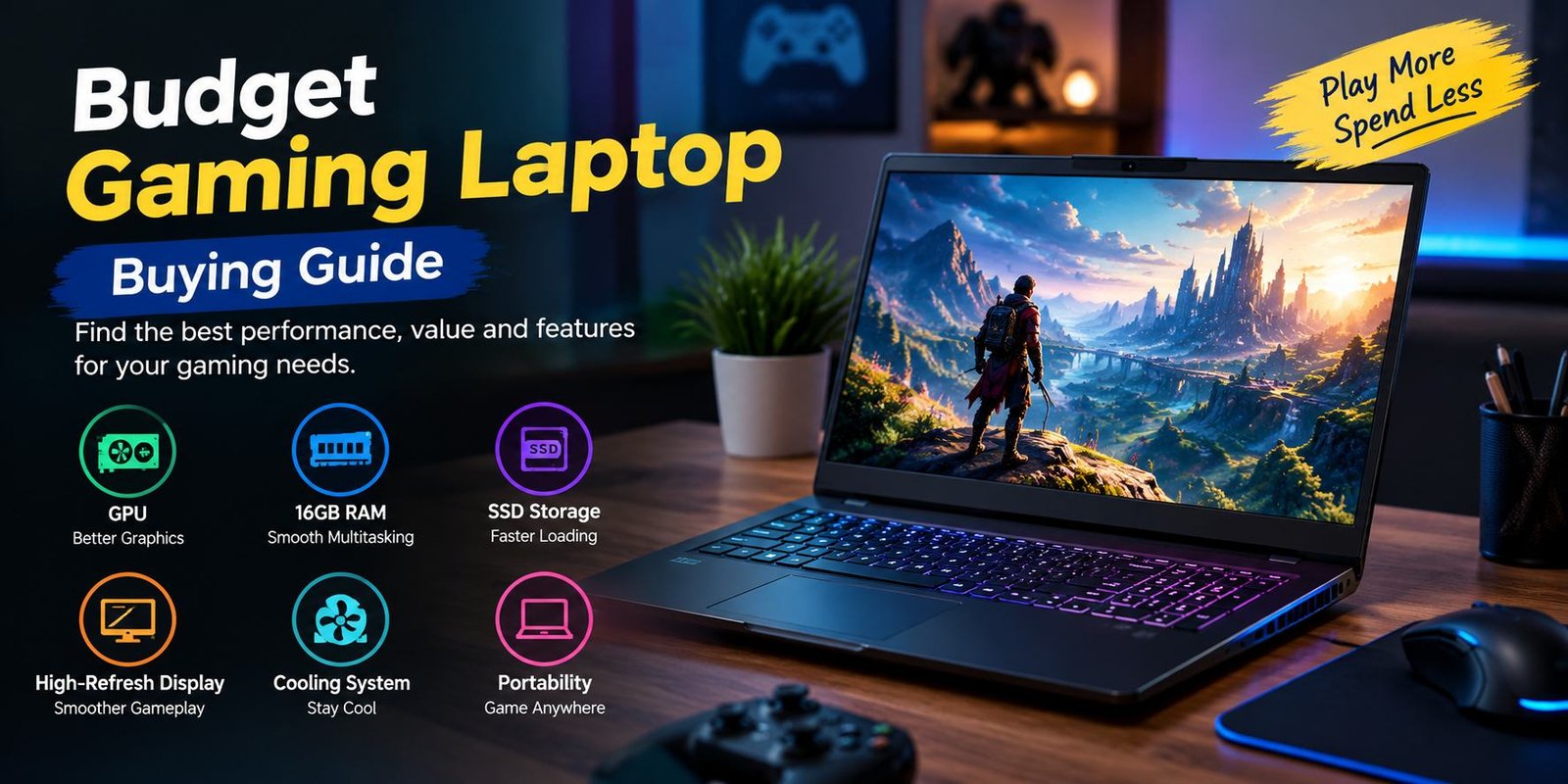
Buying a gaming laptop does not always mean spending several thousand dollars. A carefully selected budget gaming laptop can provide enough performance for popular games, school or office work, entertainment, and everyday computing without moving into the premium price range.
The challenge is knowing where to spend your money.
A laptop may advertise a powerful processor but have a weak graphics chip. Another model may offer plenty of RAM but use a slow or limited display. Some inexpensive machines also cut costs through smaller storage drives, weaker cooling systems, dim screens, or limited upgrade options.
For gaming, the graphics processor deserves particular attention because it has a major influence on frame rates and visual quality. Current 2026 buying guides also emphasize the importance of checking the GPU, display, memory, storage, and upgradeability rather than judging a laptop by its processor name alone.
This guide explains what to look for, which specifications matter, what compromises to expect, and how to avoid common buying mistakes.
What Is a Budget Gaming Laptop?
A budget gaming laptop is a portable computer designed to run PC games while keeping its price below premium gaming machines.
Unlike a basic everyday laptop, it normally includes dedicated gaming hardware such as a discrete graphics processor, a faster display, stronger cooling, and hardware designed to handle sustained workloads.
The exact meaning of “budget” changes over time because component prices and new hardware generations constantly change. In 2026, for example, finding a current-generation gaming system below $1,000 can be more difficult than it was in previous years. Tom’s Hardware notes that truly inexpensive current gaming laptops have become harder to find, although deals and older-generation hardware can still provide useful value.
That means shoppers should focus on the complete configuration instead of using a fixed price number as the only definition.
Why Are Budget Gaming Laptops Popular?
Gaming notebooks sit between traditional laptops and desktop gaming PCs.
A desktop can often deliver more performance for the same amount of money, but it is not convenient for people who need portability. A notebook can be carried to school, university, work, a friend’s house, or another room without transporting an entire desktop setup.
There are several reasons people consider this type of computer.
Gaming and Everyday Work in One Device
A gaming notebook can also handle everyday activities such as:
- Web browsing
- Video streaming
- Microsoft Office
- Online classes
- Programming
- Photo editing
- Video calls
- Music
- General productivity
This makes it useful for people who do not want separate machines for gaming and normal computing.
Portable Gaming
The biggest advantage over a desktop is portability.
You can close the lid, pack the charger, and move the computer wherever you need it. The trade-off is that gaming performance, battery life, weight, and thermals have to be balanced within a relatively small chassis.
Better Hardware for the Money
Affordable gaming systems generally prioritize components that have a direct effect on gaming performance.
The GPU is particularly important. Current buying guides recommend paying close attention to the graphics processor rather than spending too much of the budget on the CPU while neglecting graphics performance.
What Should You Look for in a Budget Gaming Laptop?
Before buying, look at the machine as a complete system.
The most important areas include:
- GPU
- CPU
- RAM
- SSD storage
- Display
- Cooling
- Upgradeability
- Keyboard and build quality
- Connectivity
- Battery and power requirements
Each component affects the experience differently.
GPU: The Most Important Gaming Component
The graphics processing unit is one of the first specifications to investigate.
Games use the GPU to render environments, characters, lighting, textures, effects, and other visual elements. A stronger graphics processor generally gives you more room to increase image quality or frame rate.
Current 2026 budget-laptop guides commonly discuss GPUs such as Nvidia’s RTX 5050 and RTX 5060 in this segment, although the exact performance depends on the laptop’s power configuration and cooling.
Why the Same GPU Can Perform Differently
Do not assume two laptops with the same GPU will perform identically.
Laptop manufacturers can configure graphics processors with different power limits. Cooling design also affects sustained performance.
For that reason, the name of the GPU is only part of the story.
When comparing two models, check:
- GPU model
- GPU power configuration
- Cooling design
- Independent benchmarks
- Display resolution
- Available graphics features
This is especially important when comparing thin laptops with thicker gaming-oriented models.
CPU: Important, But Don’t Overspend
The processor handles game logic, applications, background tasks, and general system workloads.
A modern Core or Ryzen processor can provide excellent everyday performance, but gaming shoppers should avoid sacrificing a much better GPU just to obtain a slightly stronger CPU.
Current buying advice generally places more emphasis on the graphics processor for gaming at this price level.
What CPU Should You Choose?
Look for a recent-generation processor with enough cores and strong sustained performance.
For a gaming-focused machine, a capable mid-range processor is often a sensible balance.
Consider a stronger CPU if you also plan to use the laptop for:
- Video editing
- 3D rendering
- Software development
- Virtual machines
- Heavy multitasking
- Content creation
If gaming is your primary activity, putting more of the budget toward graphics performance can make more sense.
RAM: How Much Memory Do You Need?
RAM affects multitasking and how comfortably the system handles games and other applications.
For a new gaming machine, 16GB is a practical target. Tom’s Hardware currently lists 16GB as a baseline for budget gaming systems and warns against treating 8GB as an ideal configuration for modern gaming.
Is 8GB Enough?
Eight gigabytes can work for lighter gaming and basic computing, but it gives you less room for demanding modern games and background applications.
If the laptop has upgradeable memory, starting with a smaller configuration may be less problematic.
Is 32GB Necessary?
For gaming alone, 32GB is not essential for everyone.
It becomes more useful if you also:
- Edit video
- Run multiple demanding applications
- Work with large creative projects
- Use virtual machines
- Stream while gaming
- Keep many applications open simultaneously
Storage: Choose an SSD
Modern gaming laptops should use an SSD rather than relying on a traditional mechanical hard drive as the primary drive.
An NVMe SSD provides fast system startup, quick application loading, and generally better responsiveness.
512GB vs 1TB
A 512GB SSD can be a reasonable starting point, but modern games can consume substantial storage.
Current gaming-laptop buying guides generally recommend avoiding very small 256GB drives and point toward 512GB as a practical minimum, with 1TB being more comfortable for a gaming library.
Remember that the operating system and preinstalled software also consume part of the advertised capacity.
Can Storage Be Upgraded?
Sometimes.
Many gaming laptops provide an additional M.2 slot or allow the existing SSD to be replaced. Others have more restricted designs.
Before buying, check the manufacturer’s service documentation if future upgrades matter to you.
Display: Don’t Ignore the Screen
A powerful internal configuration is less useful if the screen is poor.
Important display specifications include:
- Resolution
- Refresh rate
- Brightness
- Color coverage
- Response time
- Panel type
- Screen size
- Adaptive-sync support
Budget gaming laptops commonly use Full HD or 1920 × 1200-class displays, with refresh rates above the traditional 60Hz standard. Current 2026 models can offer 120Hz, 144Hz, 165Hz, or higher depending on price and configuration.
Why Refresh Rate Matters
A higher refresh rate allows the screen to display more frames per second when the hardware can produce them.
This can be particularly useful in:
- Competitive shooters
- Racing games
- Fast multiplayer games
- Esports titles
However, a high refresh rate does not automatically mean a better display.
Brightness and color quality still matter.
1080p or Higher Resolution?
For affordable gaming systems, 1080p remains a sensible target because it places less demand on the GPU than higher resolutions.
A higher-resolution screen can look sharper, but it may require more graphics performance to run games at native resolution.
The right choice depends on the GPU and the games you plan to play.
Cooling Is Extremely Important
Gaming creates significantly more heat than basic web browsing.
The processor and GPU can consume substantial power during demanding sessions, so the cooling system has to move that heat away from the components.
A good design may include:
- Multiple heat pipes
- Large heatsinks
- Several fans
- Carefully positioned vents
- Separate cooling paths
- Software-based performance modes
Why Temperature Matters
When components become too hot, the system may reduce performance to control temperatures.
This means a laptop that looks powerful on paper may not maintain its maximum performance during long gaming sessions if its cooling system is inadequate.
Look beyond specifications and check independent reviews for thermal testing when possible.
Keyboard and Build Quality
The keyboard is easy to overlook when comparing hardware specifications.
Gaming notebooks often include features such as:
- RGB lighting
- Anti-ghosting
- Highlighted gaming keys
- Adjustable lighting zones
- Full-size or compact layouts
However, lighting should not be treated as a substitute for keyboard quality.
Pay attention to key travel, layout, rigidity, and comfort.
Build quality also matters if you plan to carry the computer frequently.
Battery Life: Set Realistic Expectations
Gaming laptops generally do not provide their best gaming performance while running only from the battery.
The discrete GPU and processor can consume significant power, especially during demanding games.
Many systems therefore perform best when connected to their AC adapter.
Battery life can still matter for everyday tasks such as:
- Browsing
- Writing
- Watching videos
- Schoolwork
- Office applications
But you should not expect a gaming machine to behave like an ultra-thin productivity laptop when playing demanding games away from a charger.
Current gaming-laptop guides also note that strong battery life and maximum gaming performance can involve trade-offs.
Ports and Connectivity
A gaming laptop should have enough ports for the accessories you actually use.
Check for:
- USB-A
- USB-C
- HDMI
- Headphone jack
- Ethernet
- SD or microSD
- Wi-Fi
- Bluetooth
The exact selection varies by model.
If you plan to connect an external monitor, wired internet, gaming mouse, keyboard, controller, headset, or external storage, make sure the laptop can support your setup without requiring multiple adapters.
Upgradeability Can Save Money
A laptop that allows RAM and storage upgrades can remain useful for longer.
Before purchasing, check whether:
- RAM is soldered
- RAM slots are available
- An additional SSD slot exists
- The Wi-Fi card can be replaced
- The manufacturer provides service documentation
Some modern thin systems have limited upgrade options, while larger gaming designs may offer more flexibility.
Current reviews also highlight upgradeability as an important factor when comparing affordable gaming systems.
What Games Can a Budget Gaming Laptop Run?
The answer depends heavily on the GPU, processor, resolution, graphics settings, and the specific game.
Esports Games
Competitive games are generally easier to run than visually demanding AAA releases.
Titles in this category can often benefit from high refresh-rate displays because the hardware may be capable of producing high frame rates.
Indie Games
Many independent games have modest hardware requirements and can run comfortably on affordable gaming machines.
Older AAA Games
Older demanding games can often perform well on newer budget hardware, especially when settings are adjusted appropriately.
Modern AAA Games
Recent graphically intensive games may require compromises.
You may need to reduce:
- Texture quality
- Shadow quality
- Ray tracing
- Resolution
- Effects
- View distance
Upscaling technologies can also help on supported hardware.
Should You Buy an RTX 5050 or RTX 5060 Laptop?
There is no universal answer because price, GPU power configuration, display resolution, and the rest of the system all matter.
The RTX 5050 can appear in lower-priced gaming machines, while RTX 5060 systems generally target a higher performance tier. Current 2026 testing shows both appearing in gaming laptops, with the actual results varying by laptop implementation.
If the price difference is small and the stronger configuration provides noticeably more gaming performance, it may be worth considering.
If the price gap is large, a less expensive configuration combined with a better display, larger SSD, or upgradeable memory may make more sense for your needs.
New vs Older Gaming Laptop
Buying an older model is not automatically a bad decision.
A previous-generation machine can become attractive when retailers reduce the price after newer hardware arrives.
However, check:
- GPU generation
- CPU generation
- Warranty
- Battery condition
- Storage
- RAM
- Display
- Upgrade options
- Remaining software support
An older laptop with a substantially reduced price can sometimes offer more useful hardware per dollar than a newer model with an entry-level configuration.
Refurbished or Used Gaming Laptop
A used or refurbished machine can lower the purchase cost, but it requires additional inspection.
Check:
Battery Health
Gaming batteries lose capacity over time.
Screen Condition
Look for dead pixels, backlight problems, scratches, and uneven brightness.
Keyboard and Trackpad
Test every important key and input device.
Cooling System
Listen for abnormal fan noise and check temperatures under load when possible.
Charger
Make sure the correct charger is included and functions properly.
Warranty
A warranty or return period can reduce the risk associated with buying used hardware.
Common Mistakes to Avoid
Buying the Laptop With the Biggest CPU Number
A powerful CPU cannot compensate for a weak gaming GPU.
Choosing Only by RAM
32GB of RAM does not automatically make a laptop faster for gaming than a properly configured 16GB system.
Ignoring GPU Power Limits
The same GPU model can perform differently between laptops.
Buying a 256GB SSD
A small drive can become frustrating once several large games are installed.
Assuming Every High-Hz Display Is Good
Refresh rate is only one part of display quality.
Forgetting the Charger
Gaming notebooks often need their included high-wattage power adapter for full performance.
Ignoring Upgrade Options
A slightly more expensive machine with accessible RAM and SSD upgrades may provide more flexibility later.
How to Choose a Budget Gaming Laptop Step by Step
Step 1: Set Your Real Budget
Decide how much you can actually spend, including accessories if needed.
Step 2: Choose Your Games
Make a list of the games you want to play.
Step 3: Prioritize the GPU
Compare graphics hardware before getting distracted by cosmetic features.
Step 4: Check RAM
Aim for 16GB where possible for a new gaming machine.
Step 5: Check SSD Capacity
Prefer 512GB or more, with 1TB offering considerably more breathing room for a larger game library.
Step 6: Inspect the Display
Compare resolution, refresh rate, brightness, and color quality.
Step 7: Research Cooling
Look for independent reviews that test temperatures and sustained performance.
Step 8: Check Upgradeability
Confirm whether RAM and storage can be expanded.
Step 9: Compare the Complete Configuration
Do not compare two laptops using only their CPU or GPU names.
Step 10: Check the Warranty
A gaming laptop is a significant purchase, so warranty coverage can be important.
What Is a Good Budget Gaming Laptop Specification?
There is no single specification list that works for everyone, but a sensible modern starting point can look like this:
| Component | Practical Target |
|---|---|
| GPU | Modern dedicated gaming GPU |
| CPU | Recent mid-range Intel or AMD processor |
| RAM | 16GB |
| Storage | 512GB SSD or more |
| Display | 1080p/1200p class |
| Refresh rate | 120Hz or higher when affordable |
| Wi-Fi | Modern Wi-Fi standard |
| Upgradeability | Accessible RAM/SSD preferred |
These are guidelines rather than strict requirements. A lower-priced machine may offer 8GB RAM or 256GB storage, while a discounted higher-tier model may provide substantially more.
Current 2026 buying guides particularly recommend treating 16GB RAM and adequate SSD capacity as important targets for modern gaming systems.
Budget Gaming Laptop for Students
Students often need a machine that can perform multiple roles.
A suitable configuration can be useful for:
- Gaming
- Research
- Online classes
- Programming
- Presentations
- Video editing
- General productivity
Portability becomes more important if the laptop travels between home and school.
A smaller 14- or 15-inch machine may be easier to carry, while a larger model can provide a bigger screen and potentially stronger cooling.
Budget Gaming Laptop for Esports
Esports players may prioritize:
- High refresh rate
- Low input latency
- Strong GPU performance
- Good keyboard
- Stable cooling
- Reliable networking
A 144Hz or faster display can be useful when the hardware can produce enough frames.
However, buying the fastest display available is unnecessary if the GPU cannot consistently drive the required frame rates.
Budget Gaming Laptop for AAA Games
Players interested in visually demanding games should concentrate more heavily on GPU performance.
Look for:
- Dedicated graphics
- Adequate VRAM
- Strong cooling
- 16GB RAM or more
- Fast SSD
- Good display
- Support for modern graphics technologies
You may also need to adjust graphics settings to maintain smoother gameplay.
Can a Budget Gaming Laptop Replace a Desktop?
For some people, yes.
A notebook can replace a desktop when portability matters and the user is comfortable with the performance and upgrade limitations.
A desktop still has major advantages in:
- Upgradeability
- Cooling
- Component selection
- Maximum performance
- Long-term repairability
The choice depends on how you use your computer.
Frequently Asked Questions
What is the best budget gaming laptop?
There is no single model that is best for every buyer. Prices, specifications, games, display requirements, and availability change frequently. Compare the GPU, CPU, RAM, SSD, display, cooling, and upgrade options together.
Is 16GB RAM enough for gaming?
For many modern gaming laptops, 16GB is a sensible baseline. Current 2026 buying guidance also uses 16GB as a practical target for budget systems.
Is 512GB enough for a gaming laptop?
It can be enough for a smaller game library, but 1TB gives you considerably more space. Large modern games can consume substantial storage.
Is a 120Hz display good for gaming?
A 120Hz display can provide smoother motion than a 60Hz panel when the hardware can produce enough frames. Higher refresh rates can be particularly useful for competitive games.
Can you upgrade a gaming laptop?
Some models allow RAM and SSD upgrades, while others have limited or soldered components. Always check the specific model before buying.
Is a gaming laptop good for everyday work?
Yes. Gaming hardware can also handle browsing, office applications, programming, streaming, and many other everyday tasks.
Do gaming laptops have good battery life?
Battery life varies considerably. Gaming itself can drain the battery quickly, and maximum performance usually requires the AC adapter.
Should you buy an older gaming laptop?
An older model can make sense when it offers a substantial discount and still meets your gaming requirements. Check the GPU, CPU, battery, warranty, storage, and overall condition before purchasing.
Final Thoughts
Choosing a budget gaming laptop is really about finding the right balance.
Instead of chasing the biggest processor, the most RGB lighting, or the highest RAM number, concentrate on the components that affect your actual use. The GPU, display, RAM, SSD, cooling system, and upgrade options all deserve attention.
For a modern machine, 16GB RAM and at least a 512GB SSD are sensible targets, while a capable dedicated GPU should be near the top of your priority list. Current 2026 testing also shows why laptop-specific GPU power, display quality, and cooling can make a meaningful difference between systems with similar headline specifications.
Most importantly, buy according to the games you actually play. A laptop designed around competitive 1080p gaming does not need the same hardware as a machine intended for demanding AAA titles at high resolution.
A careful comparison can help you spend less on features you do not need and put more of your budget toward the hardware that actually improves your gaming experience.
Buying a gaming laptop does not always mean spending several thousand dollars. A carefully selected budget gaming laptop can provide enough performance for popular games, school or office work, entertainment, and everyday computing without moving into the premium price range.
The challenge is knowing where to spend your money.
A laptop may advertise a powerful processor but have a weak graphics chip. Another model may offer plenty of RAM but use a slow or limited display. Some inexpensive machines also cut costs through smaller storage drives, weaker cooling systems, dim screens, or limited upgrade options.
For gaming, the graphics processor deserves particular attention because it has a major influence on frame rates and visual quality. Current 2026 buying guides also emphasize the importance of checking the GPU, display, memory, storage, and upgradeability rather than judging a laptop by its processor name alone.
This guide explains what to look for, which specifications matter, what compromises to expect, and how to avoid common buying mistakes.
What Is a Budget Gaming Laptop?
A budget gaming laptop is a portable computer designed to run PC games while keeping its price below premium gaming machines.
Unlike a basic everyday laptop, it normally includes dedicated gaming hardware such as a discrete graphics processor, a faster display, stronger cooling, and hardware designed to handle sustained workloads.
The exact meaning of “budget” changes over time because component prices and new hardware generations constantly change. In 2026, for example, finding a current-generation gaming system below $1,000 can be more difficult than it was in previous years. Tom’s Hardware notes that truly inexpensive current gaming laptops have become harder to find, although deals and older-generation hardware can still provide useful value.
That means shoppers should focus on the complete configuration instead of using a fixed price number as the only definition.
Why Are Budget Gaming Laptops Popular?
Gaming notebooks sit between traditional laptops and desktop gaming PCs.
A desktop can often deliver more performance for the same amount of money, but it is not convenient for people who need portability. A notebook can be carried to school, university, work, a friend’s house, or another room without transporting an entire desktop setup.
There are several reasons people consider this type of computer.
Gaming and Everyday Work in One Device
A gaming notebook can also handle everyday activities such as:
- Web browsing
- Video streaming
- Microsoft Office
- Online classes
- Programming
- Photo editing
- Video calls
- Music
- General productivity
This makes it useful for people who do not want separate machines for gaming and normal computing.
Portable Gaming
The biggest advantage over a desktop is portability.
You can close the lid, pack the charger, and move the computer wherever you need it. The trade-off is that gaming performance, battery life, weight, and thermals have to be balanced within a relatively small chassis.
Better Hardware for the Money
Affordable gaming systems generally prioritize components that have a direct effect on gaming performance.
The GPU is particularly important. Current buying guides recommend paying close attention to the graphics processor rather than spending too much of the budget on the CPU while neglecting graphics performance.
What Should You Look for in a Budget Gaming Laptop?
Before buying, look at the machine as a complete system.
The most important areas include:
- GPU
- CPU
- RAM
- SSD storage
- Display
- Cooling
- Upgradeability
- Keyboard and build quality
- Connectivity
- Battery and power requirements
Each component affects the experience differently.
GPU: The Most Important Gaming Component
The graphics processing unit is one of the first specifications to investigate.
Games use the GPU to render environments, characters, lighting, textures, effects, and other visual elements. A stronger graphics processor generally gives you more room to increase image quality or frame rate.
Current 2026 budget-laptop guides commonly discuss GPUs such as Nvidia’s RTX 5050 and RTX 5060 in this segment, although the exact performance depends on the laptop’s power configuration and cooling.
Why the Same GPU Can Perform Differently
Do not assume two laptops with the same GPU will perform identically.
Laptop manufacturers can configure graphics processors with different power limits. Cooling design also affects sustained performance.
For that reason, the name of the GPU is only part of the story.
When comparing two models, check:
- GPU model
- GPU power configuration
- Cooling design
- Independent benchmarks
- Display resolution
- Available graphics features
This is especially important when comparing thin laptops with thicker gaming-oriented models.
CPU: Important, But Don’t Overspend
The processor handles game logic, applications, background tasks, and general system workloads.
A modern Core or Ryzen processor can provide excellent everyday performance, but gaming shoppers should avoid sacrificing a much better GPU just to obtain a slightly stronger CPU.
Current buying advice generally places more emphasis on the graphics processor for gaming at this price level.
What CPU Should You Choose?
Look for a recent-generation processor with enough cores and strong sustained performance.
For a gaming-focused machine, a capable mid-range processor is often a sensible balance.
Consider a stronger CPU if you also plan to use the laptop for:
- Video editing
- 3D rendering
- Software development
- Virtual machines
- Heavy multitasking
- Content creation
If gaming is your primary activity, putting more of the budget toward graphics performance can make more sense.
RAM: How Much Memory Do You Need?
RAM affects multitasking and how comfortably the system handles games and other applications.
For a new gaming machine, 16GB is a practical target. Tom’s Hardware currently lists 16GB as a baseline for budget gaming systems and warns against treating 8GB as an ideal configuration for modern gaming.
Is 8GB Enough?
Eight gigabytes can work for lighter gaming and basic computing, but it gives you less room for demanding modern games and background applications.
If the laptop has upgradeable memory, starting with a smaller configuration may be less problematic.
Is 32GB Necessary?
For gaming alone, 32GB is not essential for everyone.
It becomes more useful if you also:
- Edit video
- Run multiple demanding applications
- Work with large creative projects
- Use virtual machines
- Stream while gaming
- Keep many applications open simultaneously
Storage: Choose an SSD
Modern gaming laptops should use an SSD rather than relying on a traditional mechanical hard drive as the primary drive.
An NVMe SSD provides fast system startup, quick application loading, and generally better responsiveness.
512GB vs 1TB
A 512GB SSD can be a reasonable starting point, but modern games can consume substantial storage.
Current gaming-laptop buying guides generally recommend avoiding very small 256GB drives and point toward 512GB as a practical minimum, with 1TB being more comfortable for a gaming library.
Remember that the operating system and preinstalled software also consume part of the advertised capacity.
Can Storage Be Upgraded?
Sometimes.
Many gaming laptops provide an additional M.2 slot or allow the existing SSD to be replaced. Others have more restricted designs.
Before buying, check the manufacturer’s service documentation if future upgrades matter to you.
Display: Don’t Ignore the Screen
A powerful internal configuration is less useful if the screen is poor.
Important display specifications include:
- Resolution
- Refresh rate
- Brightness
- Color coverage
- Response time
- Panel type
- Screen size
- Adaptive-sync support
Budget gaming laptops commonly use Full HD or 1920 × 1200-class displays, with refresh rates above the traditional 60Hz standard. Current 2026 models can offer 120Hz, 144Hz, 165Hz, or higher depending on price and configuration.
Why Refresh Rate Matters
A higher refresh rate allows the screen to display more frames per second when the hardware can produce them.
This can be particularly useful in:
- Competitive shooters
- Racing games
- Fast multiplayer games
- Esports titles
However, a high refresh rate does not automatically mean a better display.
Brightness and color quality still matter.
1080p or Higher Resolution?
For affordable gaming systems, 1080p remains a sensible target because it places less demand on the GPU than higher resolutions.
A higher-resolution screen can look sharper, but it may require more graphics performance to run games at native resolution.
The right choice depends on the GPU and the games you plan to play.
Cooling Is Extremely Important
Gaming creates significantly more heat than basic web browsing.
The processor and GPU can consume substantial power during demanding sessions, so the cooling system has to move that heat away from the components.
A good design may include:
- Multiple heat pipes
- Large heatsinks
- Several fans
- Carefully positioned vents
- Separate cooling paths
- Software-based performance modes
Why Temperature Matters
When components become too hot, the system may reduce performance to control temperatures.
This means a laptop that looks powerful on paper may not maintain its maximum performance during long gaming sessions if its cooling system is inadequate.
Look beyond specifications and check independent reviews for thermal testing when possible.
Keyboard and Build Quality
The keyboard is easy to overlook when comparing hardware specifications.
Gaming notebooks often include features such as:
- RGB lighting
- Anti-ghosting
- Highlighted gaming keys
- Adjustable lighting zones
- Full-size or compact layouts
However, lighting should not be treated as a substitute for keyboard quality.
Pay attention to key travel, layout, rigidity, and comfort.
Build quality also matters if you plan to carry the computer frequently.
Battery Life: Set Realistic Expectations
Gaming laptops generally do not provide their best gaming performance while running only from the battery.
The discrete GPU and processor can consume significant power, especially during demanding games.
Many systems therefore perform best when connected to their AC adapter.
Battery life can still matter for everyday tasks such as:
- Browsing
- Writing
- Watching videos
- Schoolwork
- Office applications
But you should not expect a gaming machine to behave like an ultra-thin productivity laptop when playing demanding games away from a charger.
Current gaming-laptop guides also note that strong battery life and maximum gaming performance can involve trade-offs.
Ports and Connectivity
A gaming laptop should have enough ports for the accessories you actually use.
Check for:
- USB-A
- USB-C
- HDMI
- Headphone jack
- Ethernet
- SD or microSD
- Wi-Fi
- Bluetooth
The exact selection varies by model.
If you plan to connect an external monitor, wired internet, gaming mouse, keyboard, controller, headset, or external storage, make sure the laptop can support your setup without requiring multiple adapters.
Upgradeability Can Save Money
A laptop that allows RAM and storage upgrades can remain useful for longer.
Before purchasing, check whether:
- RAM is soldered
- RAM slots are available
- An additional SSD slot exists
- The Wi-Fi card can be replaced
- The manufacturer provides service documentation
Some modern thin systems have limited upgrade options, while larger gaming designs may offer more flexibility.
Current reviews also highlight upgradeability as an important factor when comparing affordable gaming systems.
What Games Can a Budget Gaming Laptop Run?
The answer depends heavily on the GPU, processor, resolution, graphics settings, and the specific game.
Esports Games
Competitive games are generally easier to run than visually demanding AAA releases.
Titles in this category can often benefit from high refresh-rate displays because the hardware may be capable of producing high frame rates.
Indie Games
Many independent games have modest hardware requirements and can run comfortably on affordable gaming machines.
Older AAA Games
Older demanding games can often perform well on newer budget hardware, especially when settings are adjusted appropriately.
Modern AAA Games
Recent graphically intensive games may require compromises.
You may need to reduce:
- Texture quality
- Shadow quality
- Ray tracing
- Resolution
- Effects
- View distance
Upscaling technologies can also help on supported hardware.
Should You Buy an RTX 5050 or RTX 5060 Laptop?
There is no universal answer because price, GPU power configuration, display resolution, and the rest of the system all matter.
The RTX 5050 can appear in lower-priced gaming machines, while RTX 5060 systems generally target a higher performance tier. Current 2026 testing shows both appearing in gaming laptops, with the actual results varying by laptop implementation.
If the price difference is small and the stronger configuration provides noticeably more gaming performance, it may be worth considering.
If the price gap is large, a less expensive configuration combined with a better display, larger SSD, or upgradeable memory may make more sense for your needs.
New vs Older Gaming Laptop
Buying an older model is not automatically a bad decision.
A previous-generation machine can become attractive when retailers reduce the price after newer hardware arrives.
However, check:
- GPU generation
- CPU generation
- Warranty
- Battery condition
- Storage
- RAM
- Display
- Upgrade options
- Remaining software support
An older laptop with a substantially reduced price can sometimes offer more useful hardware per dollar than a newer model with an entry-level configuration.
Refurbished or Used Gaming Laptop
A used or refurbished machine can lower the purchase cost, but it requires additional inspection.
Check:
Battery Health
Gaming batteries lose capacity over time.
Screen Condition
Look for dead pixels, backlight problems, scratches, and uneven brightness.
Keyboard and Trackpad
Test every important key and input device.
Cooling System
Listen for abnormal fan noise and check temperatures under load when possible.
Charger
Make sure the correct charger is included and functions properly.
Warranty
A warranty or return period can reduce the risk associated with buying used hardware.
Common Mistakes to Avoid
Buying the Laptop With the Biggest CPU Number
A powerful CPU cannot compensate for a weak gaming GPU.
Choosing Only by RAM
32GB of RAM does not automatically make a laptop faster for gaming than a properly configured 16GB system.
Ignoring GPU Power Limits
The same GPU model can perform differently between laptops.
Buying a 256GB SSD
A small drive can become frustrating once several large games are installed.
Assuming Every High-Hz Display Is Good
Refresh rate is only one part of display quality.
Forgetting the Charger
Gaming notebooks often need their included high-wattage power adapter for full performance.
Ignoring Upgrade Options
A slightly more expensive machine with accessible RAM and SSD upgrades may provide more flexibility later.
How to Choose a Budget Gaming Laptop Step by Step
Step 1: Set Your Real Budget
Decide how much you can actually spend, including accessories if needed.
Step 2: Choose Your Games
Make a list of the games you want to play.
Step 3: Prioritize the GPU
Compare graphics hardware before getting distracted by cosmetic features.
Step 4: Check RAM
Aim for 16GB where possible for a new gaming machine.
Step 5: Check SSD Capacity
Prefer 512GB or more, with 1TB offering considerably more breathing room for a larger game library.
Step 6: Inspect the Display
Compare resolution, refresh rate, brightness, and color quality.
Step 7: Research Cooling
Look for independent reviews that test temperatures and sustained performance.
Step 8: Check Upgradeability
Confirm whether RAM and storage can be expanded.
Step 9: Compare the Complete Configuration
Do not compare two laptops using only their CPU or GPU names.
Step 10: Check the Warranty
A gaming laptop is a significant purchase, so warranty coverage can be important.
What Is a Good Budget Gaming Laptop Specification?
There is no single specification list that works for everyone, but a sensible modern starting point can look like this:
| Component | Practical Target |
|---|---|
| GPU | Modern dedicated gaming GPU |
| CPU | Recent mid-range Intel or AMD processor |
| RAM | 16GB |
| Storage | 512GB SSD or more |
| Display | 1080p/1200p class |
| Refresh rate | 120Hz or higher when affordable |
| Wi-Fi | Modern Wi-Fi standard |
| Upgradeability | Accessible RAM/SSD preferred |
These are guidelines rather than strict requirements. A lower-priced machine may offer 8GB RAM or 256GB storage, while a discounted higher-tier model may provide substantially more.
Current 2026 buying guides particularly recommend treating 16GB RAM and adequate SSD capacity as important targets for modern gaming systems.
Budget Gaming Laptop for Students
Students often need a machine that can perform multiple roles.
A suitable configuration can be useful for:
- Gaming
- Research
- Online classes
- Programming
- Presentations
- Video editing
- General productivity
Portability becomes more important if the laptop travels between home and school.
A smaller 14- or 15-inch machine may be easier to carry, while a larger model can provide a bigger screen and potentially stronger cooling.
Budget Gaming Laptop for Esports
Esports players may prioritize:
- High refresh rate
- Low input latency
- Strong GPU performance
- Good keyboard
- Stable cooling
- Reliable networking
A 144Hz or faster display can be useful when the hardware can produce enough frames.
However, buying the fastest display available is unnecessary if the GPU cannot consistently drive the required frame rates.
Budget Gaming Laptop for AAA Games
Players interested in visually demanding games should concentrate more heavily on GPU performance.
Look for:
- Dedicated graphics
- Adequate VRAM
- Strong cooling
- 16GB RAM or more
- Fast SSD
- Good display
- Support for modern graphics technologies
You may also need to adjust graphics settings to maintain smoother gameplay.
Can a Budget Gaming Laptop Replace a Desktop?
For some people, yes.
A notebook can replace a desktop when portability matters and the user is comfortable with the performance and upgrade limitations.
A desktop still has major advantages in:
- Upgradeability
- Cooling
- Component selection
- Maximum performance
- Long-term repairability
The choice depends on how you use your computer.
Frequently Asked Questions
What is the best budget gaming laptop?
There is no single model that is best for every buyer. Prices, specifications, games, display requirements, and availability change frequently. Compare the GPU, CPU, RAM, SSD, display, cooling, and upgrade options together.
Is 16GB RAM enough for gaming?
For many modern gaming laptops, 16GB is a sensible baseline. Current 2026 buying guidance also uses 16GB as a practical target for budget systems.
Is 512GB enough for a gaming laptop?
It can be enough for a smaller game library, but 1TB gives you considerably more space. Large modern games can consume substantial storage.
Is a 120Hz display good for gaming?
A 120Hz display can provide smoother motion than a 60Hz panel when the hardware can produce enough frames. Higher refresh rates can be particularly useful for competitive games.
Can you upgrade a gaming laptop?
Some models allow RAM and SSD upgrades, while others have limited or soldered components. Always check the specific model before buying.
Is a gaming laptop good for everyday work?
Yes. Gaming hardware can also handle browsing, office applications, programming, streaming, and many other everyday tasks.
Do gaming laptops have good battery life?
Battery life varies considerably. Gaming itself can drain the battery quickly, and maximum performance usually requires the AC adapter.
Should you buy an older gaming laptop?
An older model can make sense when it offers a substantial discount and still meets your gaming requirements. Check the GPU, CPU, battery, warranty, storage, and overall condition before purchasing.
Final Thoughts
Choosing a budget gaming laptop is really about finding the right balance.
Instead of chasing the biggest processor, the most RGB lighting, or the highest RAM number, concentrate on the components that affect your actual use. The GPU, display, RAM, SSD, cooling system, and upgrade options all deserve attention.
For a modern machine, 16GB RAM and at least a 512GB SSD are sensible targets, while a capable dedicated GPU should be near the top of your priority list. Current 2026 testing also shows why laptop-specific GPU power, display quality, and cooling can make a meaningful difference between systems with similar headline specifications.
Most importantly, buy according to the games you actually play. A laptop designed around competitive 1080p gaming does not need the same hardware as a machine intended for demanding AAA titles at high resolution.
A careful comparison can help you spend less on features you do not need and put more of your budget toward the hardware that actually improves your gaming experience.