
iPad 11th Gen: Features, Specs, Performance & Guide
The iPad 11th Gen brings a familiar tablet design together with a faster A16 chip, a larger starting storage option, and the flexibility of iPadOS. Introduced in 2025, this iPad is designed for everyday activities such as studying, browsing, streaming, note-taking, video calls, gaming, and creative work.
For people looking for a versatile Apple tablet without moving into the higher-end iPad models, the iPad 11th Gen offers a practical combination of performance, portability, and features.
What Is the iPad 11th Gen?
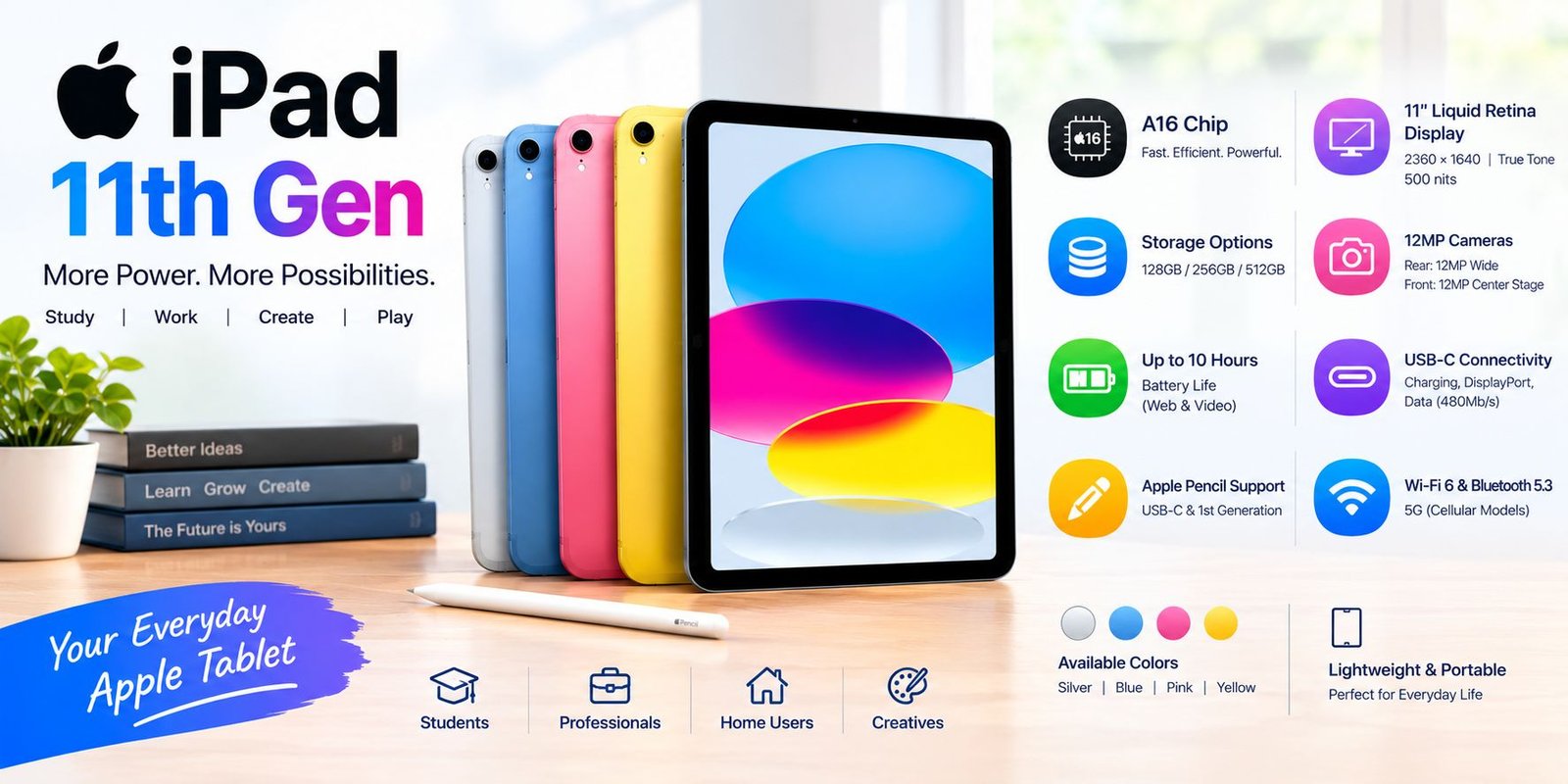
The iPad 11th Gen is the standard iPad model featuring Apple’s A16 chip. Apple lists storage capacities of 128GB, 256GB, and 512GB, giving users more space than the previous entry-level configuration. It is available in Silver, Blue, Pink, and Yellow finishes.
The tablet is available in both Wi-Fi and Wi-Fi + Cellular configurations, allowing buyers to choose between a Wi-Fi-focused model and a version that can connect to supported cellular networks.
iPad 11th Gen Display
One of the main attractions of the iPad 11th Gen is its Liquid Retina display.
The tablet has an 11-inch display, although Apple notes that the actual diagonal measurement as a rectangle is 10.86 inches because of the rounded corners. It uses LED-backlit IPS technology with a 2360 × 1640 resolution, 264 pixels per inch, True Tone, and up to 500 nits of brightness.
This makes the screen suitable for everyday activities such as:
- Watching videos
- Reading articles and ebooks
- Browsing websites
- Taking notes
- Viewing photos
- Playing games
- Working with documents
True Tone can adjust the display’s color and intensity according to surrounding light, which can make viewing more comfortable in different environments.
A16 Chip and Performance
The A16 chip is one of the biggest hardware features of the iPad 11th Gen.
Apple’s specifications list a 5-core CPU, 4-core GPU, and 16-core Neural Engine.
For everyday users, this hardware can support tasks such as:
- Web browsing
- Multitasking
- Streaming
- Video calls
- Photo editing
- Gaming
- Schoolwork
- Office and productivity apps
The actual experience can vary depending on the apps being used and how demanding the workload is.
Storage Options
Storage is an important consideration when choosing an iPad. The iPad 11th Gen comes with three storage options:
- 128GB
- 256GB
- 512GB
The 128GB version may be suitable for people who mainly browse the web, stream content, use cloud storage, and install a moderate number of apps.
Users who regularly keep large video files, games, photos, or creative projects on the tablet may prefer one of the larger capacities.
iPad 11th Gen Camera
The rear camera features a 12MP Wide camera with an ƒ/1.8 aperture. Apple also lists autofocus with Focus Pixels, Smart HDR 4, panorama support, and digital zoom up to 5x.
The camera can record 4K video at up to 60 frames per second under supported settings.
On the front, the iPad includes a 12MP landscape Center Stage camera. Center Stage is designed to keep the user in view during compatible video calls by automatically adjusting the framing.
This can be especially useful for online classes, meetings, and FaceTime calls.
Battery Life
Apple states that the iPad 11th Gen can provide up to 10 hours of web surfing on Wi-Fi or video watching. Wi-Fi + Cellular models are rated for up to 9 hours of web surfing using cellular data.
Actual battery life depends on factors such as brightness, network activity, applications, settings, and the type of work being performed.
The tablet uses a built-in rechargeable lithium-polymer battery and charges through USB-C.
USB-C Connectivity
The iPad 11th Gen uses a USB-C connector. Apple specifies support for charging, DisplayPort, and USB 2.0 data transfer up to 480Mb/s.
USB-C makes it easier to connect compatible accessories and displays using the appropriate cables or adapters.
The iPad can also support one external display at up to 4K resolution at 60Hz according to Apple’s specifications.
Apple Pencil Support
For users who enjoy handwriting, drawing, or annotating documents, the iPad 11th Gen supports Apple Pencil (USB-C) and Apple Pencil (1st generation). Apple notes that the first-generation Pencil requires a USB-C to Apple Pencil Adapter for pairing and charging.
This makes the tablet useful for:
- Digital notes
- Sketching
- Marking documents
- Classroom work
- Simple illustrations
- Handwritten planning
The Apple Pencil itself is an additional purchase rather than a standard feature included with the iPad.
Design and Weight
The iPad 11th Gen measures approximately 248.6 mm in height, 179.5 mm in width, and 7 mm in depth. The Wi-Fi version weighs about 477 grams, while the Wi-Fi + Cellular version weighs about 481 grams.
Its relatively compact size makes it practical for carrying between home, school, work, or other locations.
Wi-Fi and Cellular Connectivity
All models support Wi-Fi 6 and Bluetooth 5.3. Wi-Fi + Cellular versions also support 5G connectivity and use eSIM rather than a physical SIM card.
The Wi-Fi model can be a straightforward choice for people who normally have access to wireless internet. A cellular model can provide additional flexibility when Wi-Fi is unavailable.
iPadOS Experience
The iPad 11th Gen runs iPadOS and supports a wide range of applications through Apple’s ecosystem. Users can browse the web, communicate, manage documents, watch media, play games, and use productivity applications.
Features such as multitasking, widgets, file management, and Apple Pencil compatibility can make the tablet useful beyond simple entertainment.
Software features can change over time as Apple releases new versions of iPadOS, so available functions may depend on the installed software version.
Who Can Benefit From the iPad 11th Gen?
The iPad 11th Gen can fit several everyday use cases.
Students
Students can use it for research, online classes, reading, note-taking, presentations, and educational applications. Apple Pencil compatibility can also be useful for handwritten notes.
Casual Users
For browsing, streaming, social media, email, video calls, and general entertainment, the tablet provides a larger screen than a typical smartphone.
Remote Workers
With a keyboard accessory and suitable applications, the iPad can be used for emails, documents, meetings, calendars, and other lightweight work tasks.
Creative Users
The large display, A16 chip, camera system, and Apple Pencil support provide tools for drawing, photo editing, note-taking, and other creative activities.
iPad 11th Gen Pros and Considerations
Before buying, it is useful to look at both the advantages and limitations.
Key Benefits
- A16 chip
- 11-inch-class Liquid Retina display
- 128GB starting storage
- USB-C connectivity
- 12MP rear camera
- 12MP Center Stage front camera
- Apple Pencil support
- Wi-Fi 6
- Optional 5G connectivity
- Multiple storage options
These specifications are based on Apple’s published technical information.
Things to Consider
The iPad 11th Gen is not designed to replace every type of computer. People who need a full desktop operating system, specialized professional software, or extensive workstation capabilities may have different requirements.
It is also important to remember that accessories such as an Apple Pencil or keyboard may add to the overall cost.
Frequently Asked Questions
What chip does the iPad 11th Gen use?
The iPad 11th Gen uses Apple’s A16 chip, with a 5-core CPU, 4-core GPU, and 16-core Neural Engine.
How much storage does the iPad 11th Gen have?
It is available with 128GB, 256GB, or 512GB of storage.
Does the iPad 11th Gen support Apple Pencil?
Yes. It supports Apple Pencil (USB-C) and Apple Pencil (1st generation).
Does the iPad 11th Gen have a USB-C port?
Yes. The iPad uses USB-C for charging and supported connectivity.
Is there a cellular version?
Yes. Apple offers Wi-Fi + Cellular configurations with 5G support.
What colors are available?
Apple lists Silver, Blue, Pink, and Yellow finishes for the iPad 11th Gen.
Final Thoughts
The iPad 11th Gen combines a familiar tablet format with Apple’s A16 chip, a Liquid Retina display, flexible storage options, USB-C connectivity, and support for Apple Pencil. Its combination of portability and everyday performance makes it suitable for studying, entertainment, browsing, communication, and a variety of productivity tasks.
Before purchasing, consider the storage capacity, Wi-Fi or cellular connectivity, accessory requirements, and the type of applications you expect to use. That approach can help you select the configuration that fits your own needs rather than focusing on specifications alone.

One Comment