Coze: What It Is, Features, Uses, and How AI Agents Work
Artificial intelligence is changing the way people create software, automate tasks, and interact with digital services. However, building an AI-powered application can seem complicated when it requires programming, APIs, databases, and different AI models.
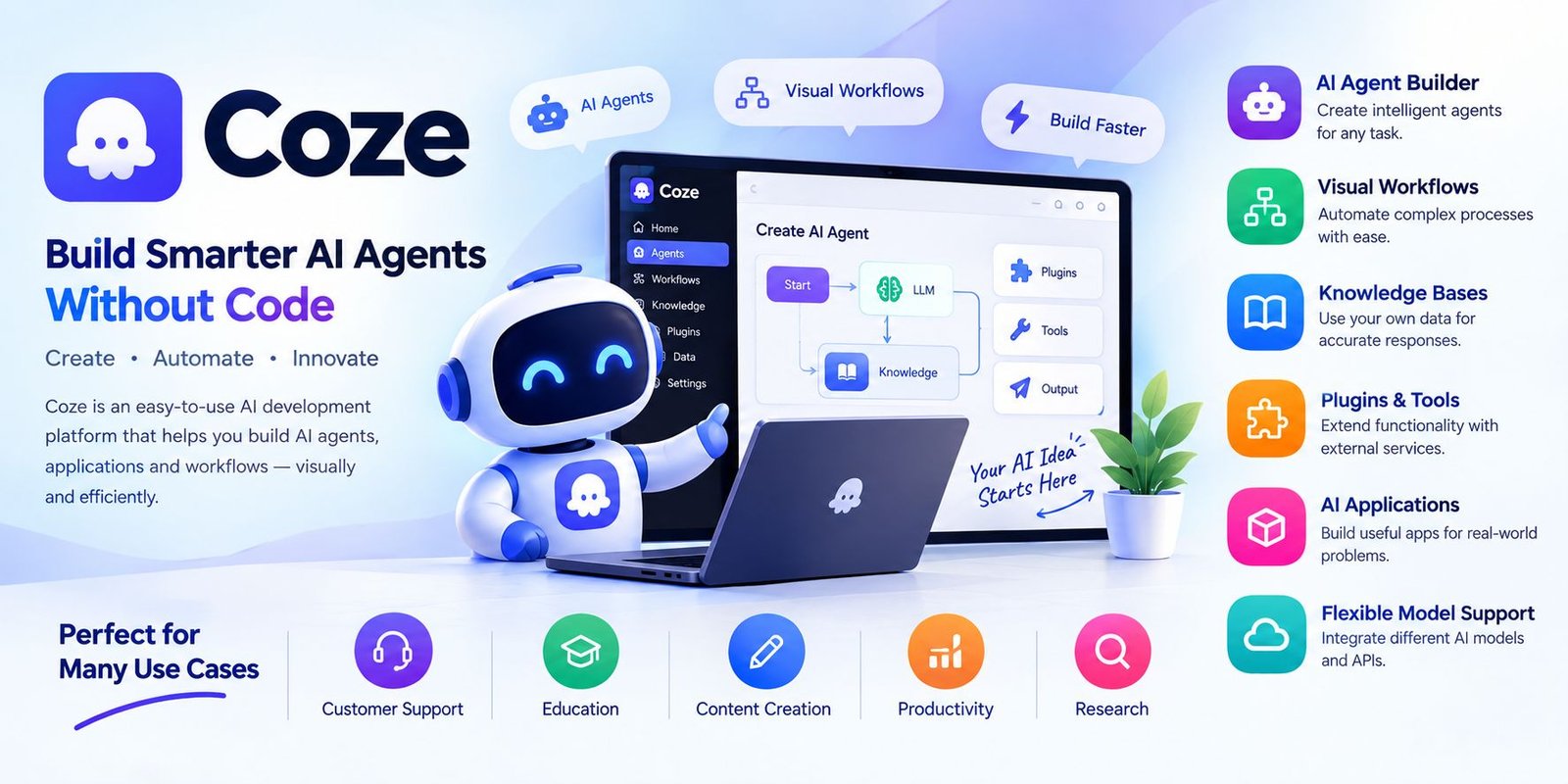
Coze is designed to make AI agent development more accessible. It provides visual tools that can help users create AI agents, applications, and automated workflows without needing to build everything from scratch. Coze’s development environment includes capabilities such as prompts, workflows, plugins, knowledge bases, and model services.
Whether you are exploring artificial intelligence for the first time or looking for a way to prototype an AI application, understanding how Coze works can help you decide whether the platform fits your project.
What Is Coze?
Coze is an AI development platform focused on creating AI agents and applications. Its visual approach allows users to configure different components of an AI project instead of writing every part of the application manually.
The platform can be used to build conversational agents, AI-powered applications, and workflows that combine different steps to complete a task. Coze Studio, the open-source development platform, describes itself as an all-in-one environment for developing, debugging, and deploying AI agents.
This makes Coze particularly interesting for people who want to experiment with AI without starting with a completely blank coding project.
How Does Coze Work?
Coze uses a visual development approach in which different AI components can be combined to create a working agent or application.
A typical project may include:
- An AI model
- Instructions or prompts
- A knowledge source
- Plugins or external tools
- A workflow
- Memory or variables
- An interface for users
These components can work together to determine how an AI agent responds to questions or performs tasks.
For example, an AI assistant could be configured to answer questions from a specific collection of documents. A workflow could then determine what information the assistant should retrieve and what action should happen next.
Main Features of Coze
Coze provides several tools for AI agent development. The exact capabilities available can depend on the version and environment being used.
AI Agent Builder
One of the central concepts is the AI agent. An agent can be configured with instructions and resources so that it can interact with users and perform specific tasks.
Instead of creating a general chatbot, users can design an agent around a particular purpose.
Examples include:
- Customer support assistants
- Educational helpers
- Research assistants
- Writing assistants
- Personal productivity tools
- Information-based chatbots
Visual Workflows
Workflows allow users to organize multiple steps into a structured process.
Rather than asking an AI model to handle everything in a single prompt, a workflow can divide a task into separate stages.
For example, a research workflow could:
- Receive a question.
- Process the user’s request.
- Retrieve relevant information.
- Ask an AI model to analyze it.
- Generate a final response.
Coze Studio supports visual workflow construction and provides different nodes for handling logic and AI-related operations.
Knowledge Bases
AI agents can sometimes produce incorrect or incomplete information when they do not have access to relevant source material.
Knowledge bases can help an agent work with specific information supplied to the project. This can be useful for organizations that want an assistant to answer questions based on internal documents or specialized material.
A knowledge-based AI assistant could be designed for:
- Product documentation
- Company information
- Educational material
- Frequently asked questions
- Technical documentation
- Internal resources
The usefulness of the results still depends on the quality and relevance of the information provided to the system.
Plugins and Tools
Another important part of an AI agent is its ability to use external tools.
Plugins can extend what an AI application can do beyond generating text. Depending on the available integrations, an agent may be able to interact with external services or perform additional operations.
Coze Studio lists plugins among the resources that developers can create and manage alongside workflows, databases, knowledge bases, and prompts.
This can make an AI agent more useful for tasks that require actions rather than simple conversation.
AI Applications
Coze can also be used to create AI-powered applications rather than only conversational bots.
An AI application can have a defined input, processing logic, and output. Workflows can be used to control how information moves through the application.
Possible examples include:
- AI writing tools
- Translation applications
- Research assistants
- Content analysis tools
- Information search applications
- Productivity assistants
Coze Studio documentation describes AI apps as projects with their own business logic and visual interfaces.
Support for Different AI Models
AI applications can depend heavily on the underlying language model.
Coze Studio’s documentation describes model-service management and integration with different model providers. This allows developers to configure model services rather than building an entire AI model infrastructure themselves.
The models and integrations available can change over time, so users should check the current platform documentation before selecting a model for a specific project.
Coze for Beginners
One reason people may explore Coze is its visual development approach.
A beginner can start with a relatively simple project and gradually add more functionality. Instead of trying to understand every part of AI development immediately, users can learn individual concepts such as prompts, agents, workflows, and knowledge bases.
A simple learning path could be:
Step 1: Define the Purpose
First, decide what the AI agent should accomplish.
For example, you might want an assistant that answers questions about a particular subject.
Step 2: Create the Agent
Set up the agent and provide clear instructions about its role and behavior.
Step 3: Add Relevant Knowledge
If the agent needs specialized information, connect an appropriate knowledge source.
Step 4: Test Responses
Ask different questions and examine whether the responses match the intended purpose.
Step 5: Add Tools or Workflows
Once the basic agent works, additional tools and workflows can be introduced to handle more complicated tasks.
What Can You Build With Coze?
The flexibility of AI agent platforms makes them suitable for many different experiments and projects.
Customer Support
Businesses can create assistants that answer frequently asked questions and guide users toward relevant information.
Education
An AI tutor can be designed to explain concepts, answer questions, and provide learning assistance.
Content Creation
Writers and creators can experiment with agents that help organize ideas, summarize information, or produce drafts.
Productivity
An AI assistant can be configured around repetitive information-processing tasks.
Research
Agents can be connected to relevant knowledge sources and workflows to help organize information.
The actual capabilities depend on the tools, models, instructions, and data connected to the project.
Benefits of Using Coze
Coze’s visual approach can offer several practical advantages.
Easier AI Development
Users do not necessarily need to build every component manually from the beginning.
Visual Workflows
Complex processes can be organized into connected steps.
Flexible AI Projects
The platform can be used for agents, applications, and workflows rather than a single type of chatbot.
Reusable Components
Resources such as prompts, plugins, workflows, and knowledge bases can become building blocks for larger projects.
Development and Deployment Tools
Coze Studio provides tools covering development, debugging, and deployment of AI projects.
Things to Consider Before Using Coze
Although visual AI development can make experimentation easier, there are still important factors to consider.
AI Accuracy
An AI agent can generate incorrect information. Important outputs should be reviewed, especially when they affect business, financial, legal, medical, or other high-impact decisions.
Data Privacy
Users should understand what information they are providing to an AI platform and review the applicable privacy and data-handling policies before uploading sensitive material.
Platform Limitations
The available models, integrations, usage limits, and features can change over time.
Workflow Complexity
A visual interface does not automatically make every project simple. Large workflows may still require careful planning, testing, and troubleshooting.
Coze vs Traditional AI Development
Traditional AI application development can involve programming languages, APIs, databases, model integrations, hosting, authentication, and other technical components.
Coze aims to bring many of these development concepts into a more visual environment.
This does not mean traditional programming is unnecessary. Developers may still need code for specialized requirements, custom integrations, or applications that demand greater control.
Instead, Coze can serve as another approach for building and testing AI-powered ideas.
Is Coze Useful for Developers?
Coze can be useful for developers who want to prototype AI applications quickly or explore agent-based architectures.
Coze Studio also provides API and SDK capabilities, allowing agents or applications to be integrated into other software.
This creates a possible path from a visual prototype toward a more integrated application.
Frequently Asked Questions
What is Coze used for?
Coze is used to create AI agents, chatbots, applications, and workflows. Its tools can combine AI models with prompts, knowledge bases, plugins, and other resources.
Do you need coding experience to use Coze?
Coze’s visual tools are designed to lower the barrier to AI development, and many tasks can be approached through no-code or low-code methods. More advanced projects may still benefit from programming knowledge.
Can Coze create AI agents?
Yes. Building and managing AI agents is one of the core capabilities described by Coze Studio.
Can Coze use knowledge bases?
Yes. Knowledge bases are among the resources supported for AI agent development in Coze Studio.
Can Coze create workflows?
Yes. Coze Studio includes visual workflow development tools that allow users to organize multiple operations into structured processes.
Is Coze only for chatbots?
No. The platform can also be used to create AI applications and workflows in addition to conversational agents.
Final Thoughts
Coze provides a visual approach to AI development that can help users experiment with agents, applications, workflows, knowledge bases, and external tools. Its combination of visual building blocks and AI capabilities makes it possible to turn an idea into a working prototype without designing every technical component from scratch.
For beginners, Coze can provide a practical way to learn how AI agents are assembled. For developers, its workflow, resource, API, and SDK capabilities can provide additional options for building more customized AI projects.
As with any AI platform, the quality of the final result depends on the model, instructions, data, tools, and testing behind the project. Taking time to test an agent carefully and protect sensitive information can help create a more reliable AI application.