Speechify Cost: A Fresh Guide to Plans, Features, and Pricing
Reading does not always have to happen with your eyes on a screen. Text-to-speech technology gives users another way to consume written material by turning digital text into spoken audio.
Speechify is one of the services built around this idea. It can be used with written material and offers different features depending on the plan selected. For anyone considering a subscription, the first thing to understand is the difference between the free experience and the paid version.
So, what should you know about Speechify cost before choosing a plan?
This guide breaks down the available options, explains what changes when you move to Premium, and covers the practical points worth checking before you subscribe.
Speechify at a Glance
Speechify is a text-to-speech platform designed to make written content available in audio form.
Instead of spending all your time reading a page, you can use a supported Speechify experience to listen to the material. This type of tool can fit into different routines, including studying, browsing, document review, or general information consumption.
The service has a free option as well as a paid Premium plan. The two versions are aimed at different levels of use.
What Does Speechify Cost?
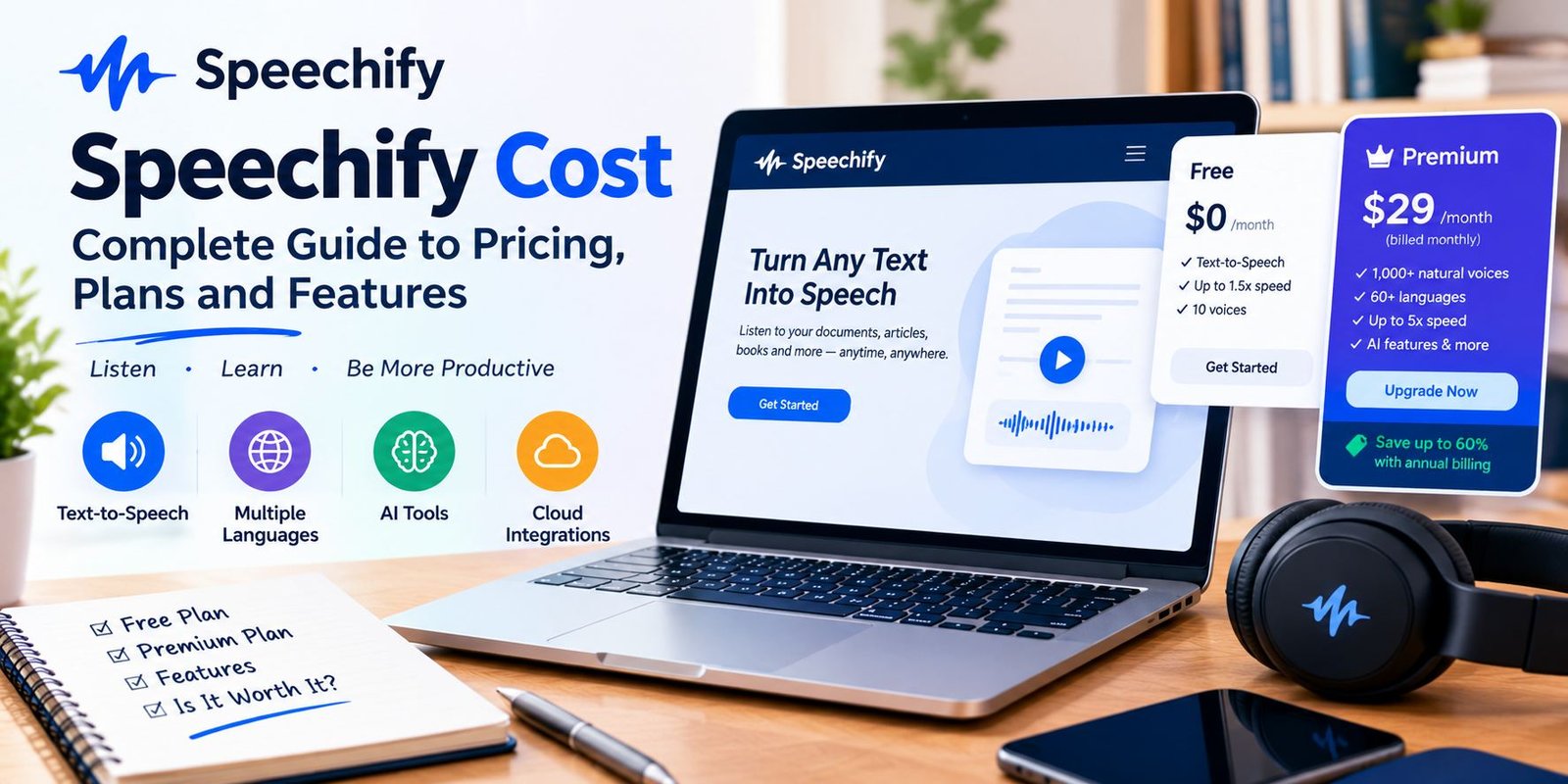
There are two main choices shown on Speechify’s current pricing page:
- Free: $0
- Premium: $29 per month when billed monthly
The pricing page also provides a yearly billing option and currently displays a savings message for annual billing.
Because subscription offers can change, it is worth checking the live pricing page before making a payment rather than relying on an old price found in another article.
The Free Option Explained
You do not have to purchase a subscription to try Speechify.
The free version costs nothing and provides access to its basic text-to-speech functionality. It is designed for people who want to experience spoken text without immediately committing to a paid plan.
The current free package includes listening at speeds of up to 1.5x and a selection of 10 voices described on the pricing page as robotic sounding.
There is an important limitation, however: the free package is centered on text-to-speech rather than the wider collection of Premium tools.
When the Free Version Makes Sense
A no-cost option can be useful when you:
- Want to test the service
- Only occasionally listen to written content
- Do not need a large voice library
- Are comfortable with slower playback
- Want basic text-to-speech functionality
For occasional use, starting with the free option also gives you an opportunity to decide whether the service fits your routine.
What Changes With Premium?
Premium is designed for users who want more than the basic reading experience.
The current monthly price shown by Speechify is $29. In return, the plan adds a considerably larger collection of voices, broader language support, faster listening and several additional tools.
Premium currently includes:
- More than 1,000 high-quality natural voices
- More than 60 languages
- Listening speeds of up to 5x
- Scan & Listen
- AI Summaries & Chats
- Selected cloud-storage integrations
- Voice Typing
- AI Podcasts
- Voice AI Assistant
The exact feature lineup can change, so users should confirm the current plan details when subscribing.
Why the Voice Library Matters
A text-to-speech tool is not only about converting words into sound. The voice used for playback can affect how comfortable the material feels during a long listening session.
The free plan has a small selection of voices, while Premium provides a much larger collection of natural voices.
This difference may matter more to someone who listens for extended periods than to a person who only uses text-to-speech occasionally.
If voice variety is important to you, this is one of the first Premium features worth examining.
Listening Speed and Speechify
Another noticeable difference between the plans is playback speed.
The Free option supports speeds up to 1.5x, while Premium currently lists playback of up to 5x.
A faster setting can be useful when reviewing familiar information or moving through material quickly. On the other hand, maximum speed is not automatically the ideal speed for every type of content.
A complicated technical document, for example, may require a more comfortable pace than a simple article.
The useful question is therefore not simply whether a service offers fast playback, but whether those speed controls fit the way you personally listen.
Language Support
Language availability can also influence the value of a text-to-speech subscription.
Speechify currently lists more than 60 languages with its Premium plan.
This can be relevant for people who regularly work with material written in different languages or who want more flexibility when selecting voices.
Before subscribing specifically for language support, it is still sensible to confirm that the particular language and voice style you need are available.
What Is Scan & Listen?
Scan & Listen is one of the additional tools included with Premium.
The name describes the basic concept: material can be scanned and then used as listening content.
This can be helpful when information is not already sitting inside a convenient digital text format.
For example, someone working with printed pages may prefer a workflow that lets them capture the text instead of manually typing everything into a reader.
The usefulness of the feature depends on the type of material you normally handle.
AI Features Included With Premium
Speechify’s current Premium package extends beyond traditional text-to-speech.
Several AI-focused features are listed as part of the plan.
AI Summaries and Chats
AI Summaries & Chats give users additional ways to interact with information.
Instead of treating every document as something that must simply be read from beginning to end, AI-based features can provide another layer of interaction with supported content.
This may be particularly useful when the goal is to quickly understand or explore information.
AI Podcasts
AI Podcasts are also included in the current Premium feature list.
This feature expands the service beyond straightforward read-aloud functionality and provides another audio-oriented way of consuming information.
Voice AI Assistant
Premium also includes a Voice AI Assistant.
The assistant is intended for conversational interaction and can be used to discuss subjects, including content found on websites or in books.
These AI additions make the Premium package broader than a basic text reader.
Cloud Storage Connections
Premium also lists integrations with:
- Google Drive
- Dropbox
- Microsoft OneDrive
For users who keep documents in cloud storage, integrations can make it easier to work with material without repeatedly moving files from one location to another.
This feature may be more valuable to someone who handles documents regularly than to a casual user.
Voice Typing
Speechify Premium also includes Voice Typing.
Instead of manually entering every word with a keyboard, users can use voice-based dictation as part of their workflow.
This makes the service more than a tool for listening. It also adds a method for creating written content through speech.
Whether this feature matters depends on how often you dictate notes, messages, drafts, or other text.
Free vs Premium: What Is Actually Different?
The simplest way to understand the plans is to look at what each level is designed to provide.
| Feature | Free | Premium |
|---|---|---|
| Price | $0 | $29/month when billed monthly |
| Text-to-speech | Yes | Yes |
| Maximum listed speed | 1.5x | 5x |
| Listed voices | 10 | 1,000+ |
| Language selection | Limited | 60+ languages |
| Scan & Listen | No | Yes |
| AI Summaries & Chats | No | Yes |
| Cloud integrations | No | Yes |
| Voice Typing | No | Yes |
| AI Podcasts | No | Yes |
| Voice AI Assistant | No | Yes |
The plan details above reflect the current information displayed by Speechify and may change in the future.
Should You Pay for Speechify?
The answer depends on how you intend to use it.
Someone who only wants occasional text-to-speech may have little reason to move immediately to a paid subscription.
A frequent user, however, may care about features that are not included in the free package.
Consider Premium if your regular workflow involves:
- Long listening sessions
- Multiple languages
- A wider selection of voices
- Faster playback
- Scanned material
- Cloud-stored documents
- Voice dictation
- AI-powered tools
On the other hand, if you simply want to hear a small amount of text from time to time, starting with the free option can be a simpler choice.
Is Monthly Billing the Only Option?
No.
Speechify’s pricing page currently offers a monthly and yearly billing view. The yearly option displays a savings promotion, while the monthly view lists Premium at $29 per month.
When comparing the two, look at the actual amount charged at checkout rather than judging the plans only by the displayed monthly figure.
Annual subscriptions can also involve a larger payment at one time, so the billing schedule is just as important as the advertised saving.
What Should You Check Before Subscribing?
Before entering payment information, take a few minutes to check the current offer.
Check the Billing Period
Make sure you know whether you are selecting monthly or annual billing.
Review the Final Price
Promotions and pricing displays can change. The checkout amount is the figure that matters when deciding whether the subscription fits your budget.
Look at the Features You Need
Do not choose Premium simply because it contains more features. First identify which tools you are actually going to use.
Confirm Language Availability
If language support is the main reason for subscribing, check the available options before completing the purchase.
Review Renewal Information
A subscription is an ongoing service, so pay attention to renewal details and the terms shown during checkout.
Who May Prefer the Free Version?
The free plan can be a reasonable starting point for people who want a basic introduction to text-to-speech.
It may suit someone who:
- Rarely uses audio reading tools.
- Wants to experiment before paying.
- Does not need many voices.
- Does not require AI features.
- Is comfortable with the available playback speed.
There is no need to purchase Premium simply to test whether text-to-speech fits your habits.
Who May Need More Features?
Premium becomes more relevant when basic playback is not enough.
For example, a person who listens to large amounts of material may appreciate higher speed settings. Someone who works across languages may be more interested in the larger language selection.
Likewise, users who want scanning, cloud connections, dictation, or AI features may find the additional tools more relevant than someone using Speechify casually.
Speechify Is More Than One Product
Another detail worth remembering is that Speechify’s website also presents other products, including Speechify Studio and Speechify API.
These are not necessarily the same thing as the standard reader experience.
Someone searching for pricing should therefore make sure they are looking at the product they actually intend to use.
A price associated with one Speechify service should not automatically be assumed to apply to every product offered by the company.
A Simple Way to Decide
Instead of asking only, “Is Speechify expensive?”, consider these questions:
How often will I use it?
If the answer is only once in a while, the free version may be sufficient.
Do I need advanced voices?
If yes, compare the voice options available under Premium.
Will I listen at high speeds?
If faster playback is important, the Premium limit may be relevant.
Do I need AI features?
If you are interested in summaries, chats, podcasts, or the voice assistant, check the Premium feature list.
Will I use cloud documents?
If your files are stored in supported cloud services, the integrations may be useful.
This approach gives you a clearer basis for choosing a plan than simply comparing the number of features.
Frequently Asked Questions
What is the current Speechify Premium price?
Speechify currently lists Premium at $29 per month when billed monthly.
Can I use Speechify without paying?
Yes. Speechify provides a Free plan priced at $0.
How fast can the Free plan read?
The current pricing page lists a maximum speed of 1.5x for the Free plan.
How fast is Premium?
Premium currently lists listening speeds of up to 5x.
Does Premium include more voices?
Yes. The current Premium listing includes more than 1,000 high-quality natural voices.
Does Speechify support multiple languages?
Premium currently lists support for more than 60 languages.
Does Premium include AI tools?
Yes. The current plan includes AI Summaries & Chats, AI Podcasts, and Voice AI Assistant.
Does Speechify offer yearly billing?
Yes. The pricing page provides a yearly billing option and currently advertises savings for annual billing.
Can pricing change?
Yes. Software subscription prices, promotions, and plan features can change, so the official pricing page should be checked before purchase.
Final Takeaway
Speechify offers a straightforward starting point for people who want written content converted into spoken audio. The Free plan costs nothing and focuses on basic text-to-speech functionality, while Premium adds a much broader collection of voices, languages, playback options, integrations, dictation tools, and AI features.
The current monthly Premium price is $29, while the website also provides a yearly billing option with a displayed savings promotion.
The most practical way to approach the subscription is to start with your actual needs. If basic listening is enough, there is no reason to overlook the Free option. If you regularly need advanced voices, faster playback, scanning, AI features, or additional tools, then the Premium feature set is the part worth examining.
Because pricing and promotions can change, always verify the current offer before subscribing.