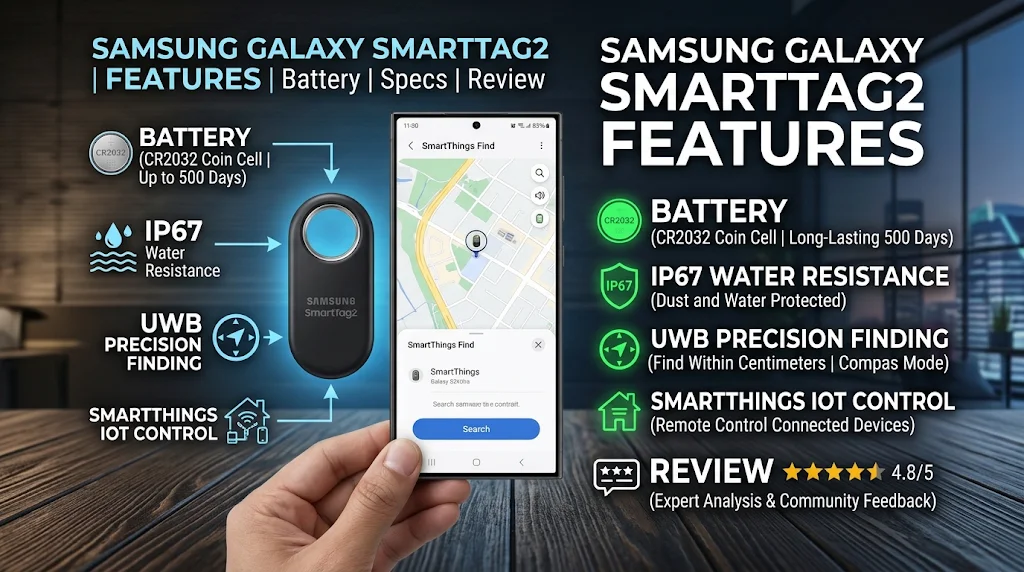
Samsung Galaxy SmartTag2: Features, Battery & Review
Losing everyday belongings can be frustrating, especially when you cannot remember where you last placed your keys, wallet, backpack, or luggage. The Samsung Galaxy SmartTag2 is designed to make finding these items easier through Bluetooth connectivity, Ultra-Wideband (UWB) technology, and Samsung’s SmartThings Find network.
Samsung introduced the Galaxy SmartTag2 as an improved version of its original SmartTag. It features a redesigned body, a longer-lasting replaceable battery, better tracking tools, and an upgraded user experience. Its built-in metal loop also makes it easier to attach the tracker to everyday belongings.
Unlike a smartphone GPS tracker, the Galaxy SmartTag2 is a small accessory that helps locate items using nearby Galaxy devices and compatible tracking technology. Users can check the last known location, search for nearby objects, activate a sound, and use Lost Mode to help someone return a misplaced item.
But is the Samsung Galaxy SmartTag2 worth buying? What makes it different from other Bluetooth trackers? Does it work with every Android smartphone, and how long does its battery last?
In this detailed guide, we explain its design, specifications, tracking features, compatibility, battery performance, setup process, advantages, disadvantages, and practical uses to help you decide whether it is the right accessory for your needs.
1. What Is Samsung Galaxy SmartTag2?
The Samsung Galaxy SmartTag2 is a compact Bluetooth item tracker designed to help users locate personal belongings. It works with Samsung Galaxy smartphones and tablets through the SmartThings Find service.
You can attach the device to objects that you frequently carry, such as keys, bags, luggage, or other valuable belongings. Once registered, the tag communicates with your compatible Galaxy device and helps you find the attached item.
For example, imagine leaving your house keys somewhere inside your home. Instead of searching every room, you can open the SmartThings app and ask the SmartTag2 to produce a sound. If your phone supports UWB, you can also use Compass View to get directional guidance.
The device is particularly useful for people who regularly misplace small objects or travel with multiple bags.
How Does It Work?
The SmartTag2 uses Bluetooth Low Energy (BLE) to communicate with compatible Galaxy devices.
When the tag is nearby, your smartphone can connect to it and help determine its location. When it is outside your phone’s direct Bluetooth range, the SmartThings Find network may help update its location through participating Galaxy devices.
This means the tracker does not need a built-in GPS receiver or its own cellular connection to provide its core tracking functions.
However, the availability of location updates depends on nearby participating devices, network connectivity, settings, and other conditions.
2. Samsung Galaxy SmartTag2 Design and Build Quality
Samsung redesigned the SmartTag2 to make it more practical for everyday use.
The previous generation had a smaller attachment area, which often required users to purchase an additional case or accessory. The SmartTag2 features a larger metal loop that makes attaching it to different objects more convenient.
Its overall shape is simple and lightweight. Users can attach it to a keychain, bag strap, luggage handle, or compatible accessory without carrying a bulky tracking device.
Dimensions and Weight
Here are the official physical specifications:
| Specification | Details |
|---|---|
| Product | Galaxy SmartTag2 |
| Width | 28.8 mm |
| Height | 52.44 mm |
| Thickness | 8.0 mm |
| Weight | 13.75 grams |
| Connectivity | Bluetooth 5.3 LE |
| UWB | Supported |
| Water Resistance | IP67 |
Its lightweight construction makes it suitable for daily use. At just 13.75 grams, it adds very little weight to a keychain or backpack.
Available Colors
Samsung offers the Galaxy SmartTag2 in different color options, including:
- Black
- White
Availability may differ depending on the country and retailer.
The black version provides a simple appearance, while the white version offers a lighter look that can be easier to notice when attached to certain belongings.
Metal Loop Design
One of the most useful design changes is the integrated metal loop.
It allows users to connect the tracker to a variety of accessories without needing a separate holder for basic attachment.
Samsung also offers compatible protective cases, including silicone and rugged options. These accessories can provide additional protection and make the device easier to carry.
3. Samsung Galaxy SmartTag2 Tracking Technology
Tracking is the main reason people purchase the Galaxy SmartTag2.
Samsung combines Bluetooth Low Energy, UWB technology, and its SmartThings Find network to provide different ways of locating tagged belongings.
Each technology serves a different purpose.
Bluetooth Low Energy 5.3
Bluetooth LE allows the SmartTag2 to communicate with compatible Galaxy devices.
Samsung lists a Bluetooth finding distance of up to 120 meters under suitable conditions.
However, this is not a guaranteed everyday range. Walls, furniture, vehicles, interference, and other obstacles can reduce the effective distance.
When the tracker is nearby, the SmartThings Find app can help users search for it and activate its built-in buzzer.
Ultra-Wideband Technology
Ultra-Wideband, commonly known as UWB, provides more precise nearby finding capabilities on supported devices.
When paired with a compatible UWB-enabled Galaxy smartphone, the SmartTag2 can provide directional guidance through Compass View.
Instead of relying only on a general map location, users can receive visual information about the direction and distance of the tag.
This can be especially helpful when looking for something inside a large room or unfamiliar location.
UWB features require a compatible Galaxy device and supported software. Not every Samsung smartphone includes UWB hardware.
SmartThings Find Network
What happens when your tagged belongings are no longer nearby?
Samsung’s SmartThings Find network can help.
When another participating Galaxy device detects a registered SmartTag2, its location information may be securely used to update the tag’s location for its owner.
This can be useful when luggage, keys, or another tagged item moves outside your phone’s direct Bluetooth range.
However, location updates are not guaranteed. They depend on participating Galaxy devices being nearby and the required network and privacy settings being enabled.
4. Search Nearby and Compass View
Search Nearby is one of the most convenient features of the Samsung Galaxy SmartTag2.
It helps users locate objects that are somewhere within the nearby Bluetooth finding area.
After opening SmartThings Find, users can select their registered tag and start searching for it.
How Compass View Helps
Compass View provides directional information to help guide users toward their tagged belongings.
On supported UWB-enabled Galaxy smartphones, the interface can show arrows and distance information.
For example, imagine placing your bag somewhere in a large office. You remember bringing it inside but cannot remember which room contains it.
Compass View can help guide you toward the tag when the required hardware and conditions are available.
Limitations of Compass View
This feature is not equally available on every Galaxy smartphone.
Samsung specifies that Compass View requires a UWB-enabled Galaxy device running Android 11 or later.
Accuracy may also decrease when the tag is inside a drawer, behind a wall, or inside a vehicle.
Therefore, users should understand that directional guidance is helpful but not always perfectly accurate.
5. Ring Your Tag Feature
Sometimes you know that an item is nearby but cannot see where it is.
For example, your keys might be under a sofa cushion or inside a backpack.
The Ring Your Tag feature can help solve this problem.
Through the SmartThings Find app, you can request the SmartTag2 to produce an audible signal using its built-in buzzer.
Follow these basic steps:
- Open the SmartThings app.
- Select the registered Galaxy SmartTag2.
- Open its finding options.
- Select the Ring option.
- Listen for the sound coming from the tracker.
- Follow the sound to locate your belongings.
The feature is especially useful inside homes, offices, classrooms, and other relatively quiet environments.
However, loud surroundings or objects covering the tag may make the sound harder to hear.
6. Lost Mode and NFC Support
Lost Mode is another useful feature of the Galaxy SmartTag2.
It allows owners to register contact information and a message that can help someone return a lost item.
For example, if you attach the tracker to your travel bag and accidentally leave it somewhere, another person may find it.
If Lost Mode has been activated, that person can use an NFC-compatible smartphone to read the information stored for the tag.
How Lost Mode Works
The process is straightforward:
- Register the SmartTag2 with your Samsung account.
- Open SmartThings and access the tag’s settings.
- Activate Lost Mode.
- Add your contact information.
- Write a short message for someone who finds the item.
- Save the information.
When someone finds your tagged belongings, they can tap the tag with a compatible NFC-enabled smartphone.
The registered message and contact information can then be displayed, provided the finder has an internet connection and their phone supports NFC reading.
One important point is that NFC does not provide live tracking. It simply helps someone access your registered contact details.
7. Samsung Galaxy SmartTag2 Battery Life
Battery performance is an important consideration for a tracker because users usually attach it to belongings and leave it there for long periods.
The Galaxy SmartTag2 uses a replaceable CR2032 coin-cell battery.
Samsung advertises up to 500 days of battery life under typical usage conditions.
It also offers Power Saving Mode, which can extend battery life to up to 700 days in supported usage conditions.
These figures are based on Samsung’s internal testing. Actual performance can vary depending on usage, environmental conditions, and the battery manufacturer.
Replaceable Battery
One advantage of the SmartTag2 is that users do not need to replace the entire tracker when its battery runs out.
Instead, they can replace the CR2032 battery.
This makes long-term ownership more practical and reduces the need to purchase a completely new tracking device simply because its battery has been depleted.
How to Replace the Battery
The general battery replacement process involves the following steps:
- Remove the tracker from its case, if applicable.
- Use the supplied tray eject tool to access the battery compartment.
- Carefully open the battery tray.
- Remove the old CR2032 battery.
- Insert a compatible replacement battery in the correct orientation.
- Reinstall the tray securely.
- Check the device using the SmartThings app.
Always follow Samsung’s instructions when replacing the battery. Keep coin-cell batteries away from children and pets because swallowing one can cause serious injury.
Does Power Saving Mode Affect Features?
Yes. Power Saving Mode reduces certain functions to extend battery life.
Samsung explains that some features, including Search Nearby and IoT control, may become unavailable in this mode, while basic finding functions remain available.
This means users should choose the battery mode according to their priorities.
8. IP67 Water and Dust Resistance
The Galaxy SmartTag2 has an IP67 rating for dust and water resistance.
This provides additional protection for a device that may be attached to bags, keys, and other belongings used outdoors.
What Does IP67 Mean?
The rating indicates that the tracker is protected against dust and has been tested for immersion in freshwater up to one meter deep for up to 30 minutes under controlled laboratory conditions.
This can help protect the tracker from certain accidental exposures.
However, IP67 does not mean that the device is completely waterproof.
Samsung does not recommend using it at the beach, in swimming pools, or in soapy water.
Water resistance may also decrease over time due to normal wear and damage.
For best results, avoid unnecessary exposure to liquids and inspect the device if it has suffered physical damage.
9. SmartThings App and Setup Process
The SmartThings app is essential for using the Galaxy SmartTag2.
It provides access to tracking information, device settings, finding options, and supported smart-home controls.
Before using the tracker, users need a compatible Galaxy smartphone or tablet, a Samsung account, and the SmartThings application.
How to Set Up Samsung Galaxy SmartTag2
Setting up the device is relatively simple.
Step 1: Install SmartThings
Download or open the SmartThings app on your compatible Samsung Galaxy device.
Step 2: Sign In
Log in using your Samsung account.
Step 3: Activate the SmartTag2
Prepare the tracker according to Samsung’s setup instructions and follow the pairing instructions displayed on your phone.
Step 4: Register the Device
Allow SmartThings to detect the tracker and complete the registration process.
Step 5: Give It a Name
Choose a recognizable name, such as:
- House Keys
- Travel Bag
- Backpack
- Camera Bag
- Luggage
Step 6: Attach the Tracker
Connect it securely to the object you want to locate.
Step 7: Test the Finding Features
Open SmartThings Find and check whether the location information and available tracking functions work correctly.
After setup, the tracker should be ready for everyday use.
10. Samsung Galaxy SmartTag2 Compatibility
Compatibility is one of the most important things to check before buying the Galaxy SmartTag2.
Unlike some third-party Bluetooth trackers, Samsung designed this product specifically for its Galaxy ecosystem.
According to Samsung, the SmartTag2 is compatible with Galaxy smartphones and tablets running Android 9 or later.
However, not every supported device offers every tracking feature.
Does It Work With Other Android Phones?
The Galaxy SmartTag2 is not designed as a universal Android tracker.
Its primary setup and tracking experience requires a compatible Galaxy device and Samsung account.
A regular Android smartphone from another manufacturer should not be assumed to support the full SmartTag2 experience.
Does It Work With iPhone?
No. The Galaxy SmartTag2 is not designed to work as a normal item tracker with Apple’s iPhone ecosystem.
iPhone users should consider a tracker designed for Apple’s Find My network instead.
UWB Compatibility
Compass View requires a UWB-enabled Galaxy smartphone with the supported software version.
A phone may support basic Bluetooth tracking without supporting the more advanced directional finding experience.
This is why checking your exact Galaxy model before purchasing is important.
11. Smart Home Control With SmartTag2
The Galaxy SmartTag2 is primarily an item tracker, but it also includes a programmable button for supported smart-home functions.
Through SmartThings, users can configure certain actions using the tag’s button.
For example, a compatible setup may allow users to control registered smart-home devices.
Possible uses include:
- Activating compatible smart lights
- Controlling supported smart plugs
- Triggering configured SmartThings routines
- Performing supported connected-device actions
These functions depend on compatible devices, SmartThings registration, and the available software features.
The SmartTag2 is not a replacement for a dedicated smart-home hub. Its IoT control capabilities are intended for supported connected-device setups.
12. Practical Uses of Samsung Galaxy SmartTag2
The SmartTag2 can be useful in several everyday situations.
Finding House Keys
House keys are among the easiest belongings to misplace.
Attach a SmartTag2 to your keychain, and you can use the app to check its location or activate the buzzer when it is nearby.
Tracking Luggage
Travelers can attach a SmartTag2 to their luggage.
If a bag is misplaced, the SmartThings Find network may help provide an updated location when participating Galaxy devices detect the tag.
It is important to remember that this is not a guaranteed real-time luggage tracking service.
Finding Backpacks
Students and professionals can attach the tracker to a backpack.
It may help locate a misplaced bag at home, in an office, or in another place where compatible Galaxy devices are nearby.
Locating Camera Equipment
Photographers often carry expensive equipment in separate bags.
A tracker attached to a camera bag can provide another way to check its location.
Pet Accessories
Some users may attach a SmartTag2 to a pet’s collar.
However, it is important to understand that the device is not a dedicated pet GPS tracker. It does not guarantee continuous location updates or real-time monitoring.
Use a secure attachment and do not rely on it as the only way to keep a pet safe.
13. Samsung Galaxy SmartTag2 Specifications
Here is a quick overview of its main hardware specifications.
| Feature | Specification |
|---|---|
| Product Name | Samsung Galaxy SmartTag2 |
| Model Series | EI-T5600 |
| Bluetooth | BLE 5.3 |
| UWB | Yes |
| Bluetooth Finding Distance | Up to 120 meters |
| Battery Type | CR2032 |
| Battery Life | Up to 500 days |
| Power Saving Mode | Up to 700 days |
| Water Resistance | IP67 |
| Dimensions | 28.8 × 52.44 × 8.0 mm |
| Weight | 13.75 grams |
| Speaker | Built-in buzzer |
| NFC | Yes |
| App | SmartThings |
| Compatible Devices | Supported Galaxy devices |
| Operating System | Android 9 or later |
Specifications and feature availability may vary by region, device model, and software version.
14. Samsung Galaxy SmartTag2 Advantages and Disadvantages
Before purchasing any technology accessory, it is useful to understand its strengths and limitations.
Advantages
1. Long Battery Life
Samsung advertises up to 500 days of typical battery life, reducing the need for frequent replacements.
2. Replaceable Battery
The CR2032 battery can be replaced instead of requiring users to buy a new tracker.
3. UWB Directional Finding
Supported Galaxy smartphones can use Compass View to help locate nearby objects more precisely.
4. SmartThings Find Network
The network can help update a tag’s location when participating Galaxy devices detect it.
5. IP67 Protection
The tracker offers protection against dust and certain freshwater exposure.
6. NFC Lost Mode
Registered contact information can help someone return a misplaced item.
7. Easy Attachment
The integrated metal loop makes it convenient to attach the tracker to keys, bags, and luggage.
Disadvantages
1. Galaxy Ecosystem Requirement
The full experience is limited to compatible Samsung Galaxy devices.
2. No Built-In GPS
The device does not provide independent GPS tracking.
3. UWB Is Not Available Everywhere
Advanced directional finding requires a compatible UWB-enabled smartphone.
4. Location Updates Depend on the Network
Tracking outside direct Bluetooth range depends on participating Galaxy devices and other network conditions.
5. Not a Dedicated Pet Tracker
It does not provide guaranteed continuous tracking or dedicated pet safety monitoring.
6. Some Features Consume More Battery
Power Saving Mode extends battery life but restricts certain functions.
15. Samsung Galaxy SmartTag2 vs Original Galaxy SmartTag
People who already own the original Galaxy SmartTag may wonder whether upgrading is worthwhile.
The SmartTag2 introduces several improvements to the design and overall finding experience.
| Feature | Original SmartTag | SmartTag2 |
|---|---|---|
| Design | Older compact design | Redesigned metal loop |
| Battery | Replaceable | Replaceable CR2032 |
| Battery Life | Shorter | Up to 500 days |
| Power Saving Mode | Not the same feature set | Supported |
| Water Resistance | IP53 | IP67 |
| Bluetooth | Older Bluetooth version | BLE 5.3 |
| Compass View | Not available in the same form | Supported |
| Lost Mode | Limited feature set | NFC Lost Mode |
The SmartTag2 is a more complete tracker for people who want improved durability, longer battery life, and newer finding tools.
However, users who only need basic item tracking may not need to replace a working original SmartTag immediately.
16. Is Samsung Galaxy SmartTag2 Worth Buying in 2026?
The Samsung Galaxy SmartTag2 can still be a useful accessory in 2026, especially for people who already own compatible Samsung Galaxy smartphones.
Its combination of Bluetooth tracking, UWB support, NFC Lost Mode, replaceable battery, and SmartThings Find integration makes it a practical option for locating everyday belongings.
However, its value depends on how you plan to use it.
Who Should Buy It?
The SmartTag2 may be a good choice for:
- Samsung Galaxy smartphone owners
- People who frequently misplace keys
- Travelers who want an additional luggage-finding tool
- Students who carry backpacks regularly
- Users with compatible UWB-enabled Galaxy phones
- People who already use SmartThings devices
Who Should Avoid It?
You may want another tracker if:
- You use an iPhone.
- You own an Android phone from another manufacturer.
- You need independent GPS tracking.
- You want guaranteed live location updates.
- You need dedicated pet tracking features.
What to Check Before Purchasing
Before buying, consider these points:
- Confirm that your smartphone is compatible.
- Check whether your phone supports UWB.
- Compare prices from trusted sellers.
- Check the product’s authenticity.
- Confirm that the CR2032 battery is included.
- Check the condition of the metal attachment loop.
- Review the seller’s return and warranty policy.
These checks can help you avoid buying an accessory that does not work with your existing smartphone.
17. Frequently Asked Questions About Samsung Galaxy SmartTag2
1. What is Samsung Galaxy SmartTag2 used for?
The Galaxy SmartTag2 helps users locate everyday belongings such as keys, bags, backpacks, and luggage through Bluetooth, UWB-enabled finding features, and the SmartThings Find network.
2. Does Samsung Galaxy SmartTag2 work with iPhone?
No. The SmartTag2 is designed for compatible Samsung Galaxy devices and does not provide normal item tracking through Apple’s Find My network.
3. How long does the SmartTag2 battery last?
Samsung advertises up to 500 days in typical use and up to 700 days with Power Saving Mode. Actual battery life depends on usage and other conditions.
4. Does Galaxy SmartTag2 have GPS?
No. It does not contain an independent GPS receiver. It uses Bluetooth, supported UWB features, and the SmartThings Find network to help locate belongings.
5. Is Samsung Galaxy SmartTag2 waterproof?
It has an IP67 dust and water resistance rating. Samsung’s testing covers freshwater immersion up to one meter for 30 minutes under controlled conditions. It should not be treated as completely waterproof.
6. Can I use SmartTag2 without a Samsung phone?
The full SmartTag2 setup and tracking experience requires a compatible Galaxy smartphone or tablet. It is not a universal tracker for every Android device.
7. What is Compass View?
Compass View is a directional finding feature that uses UWB technology on compatible Galaxy smartphones to help users locate nearby tags.
8. Can SmartTag2 track luggage?
It can help users locate tagged luggage through SmartThings Find. However, location updates outside Bluetooth range depend on participating Galaxy devices and network availability.
9. Can I replace the SmartTag2 battery?
Yes. The tracker uses a replaceable CR2032 coin-cell battery, so users do not need to replace the entire device when the battery runs out.
10. Does SmartTag2 work without the internet?
Some nearby Bluetooth finding functions may work without an internet connection, depending on the setup and available device features. Remote location updates and network-based services require appropriate connectivity.
11. Can SmartTag2 help find a lost pet?
It can provide an additional way to locate an item attached to a pet’s collar, but it is not a dedicated GPS pet tracker and should not be relied on as the only pet safety solution.
12. Is Samsung Galaxy SmartTag2 better than the original SmartTag?
The SmartTag2 offers a redesigned body, improved water and dust resistance, longer advertised battery life, and enhanced finding features. It is generally the more capable option.
Conclusion
The Samsung Galaxy SmartTag2 is a practical item tracker designed to make everyday life a little easier. Its Bluetooth connectivity, UWB-based Compass View, SmartThings Find integration, NFC Lost Mode, and replaceable battery provide several useful ways to locate misplaced belongings.
Its redesigned metal loop and IP67 rating also make it more convenient for everyday use. Whether you want to keep track of house keys, a backpack, or travel luggage, the tracker offers useful features within Samsung’s Galaxy ecosystem.
However, it has some limitations. It does not include independent GPS, its advanced features require compatible Galaxy hardware, and remote location updates depend on the SmartThings Find network.
Overall, the Samsung Galaxy SmartTag2 is worth considering for Samsung Galaxy users who frequently misplace personal belongings and want a simple tracking accessory. Before buying, make sure your smartphone supports the features you need and compare the product’s price with other compatible trackers.