
Happy Plugs Earbuds: Features, Sound and Buying Guide
Introduction
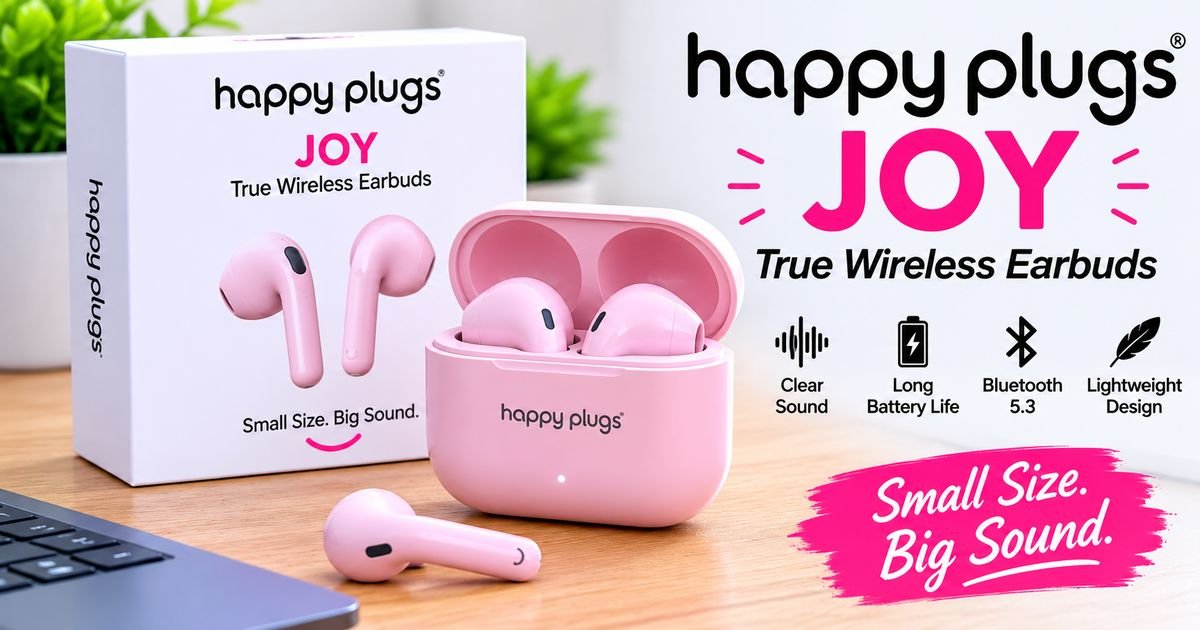
Happy Plugs Joy True Wireless Earbuds are an interesting option for people who want simple wireless audio for everyday use. Wireless earbuds have become popular because they offer a clean design, easy movement, and a convenient way to enjoy music without dealing with tangled cables. Many people now use them with smartphones, tablets, and computers.
The Happy Plugs brand focuses on personal audio products and modern accessories. Its Joy earbuds belong to the growing market of true wireless audio devices. These products allow users to listen to music, watch videos, and enjoy other audio content through a Bluetooth connection.
Choosing the right earbuds can take time because many products look similar. Buyers need to think about sound quality, comfort, battery life, charging, microphone performance, and device support. A good-looking product may not always offer the features someone needs.
This guide explains Happy Plugs Joy True Wireless Earbuds in simple language. You will learn about their design, wireless technology, possible everyday uses, important buying points, and common questions. We will also explain how true wireless earbuds work and what you should check before purchasing this model.
What Are Happy Plugs Joy True Wireless Earbuds?
Happy Plugs Joy True Wireless Earbuds are personal audio accessories that use wireless technology instead of a traditional headphone cable. They connect to compatible devices through Bluetooth and allow users to enjoy audio without keeping their phone physically connected to the earbuds.
The term true wireless means that the left and right earbuds do not need a cable between them. Each earbud works as part of a wireless audio system. This design gives users more freedom while listening to music or watching videos.
A charging case usually forms an important part of a true wireless earbud package. It gives users a place to store their earbuds and provides charging when the case supports that function.
People may consider this type of product for several everyday activities, such as:
- Listening to music at home.
- Watching online videos.
- Enjoying podcasts and audiobooks.
- Attending online classes.
- Making supported Bluetooth calls.
- Listening to entertainment while traveling.
- Using compatible devices for daily audio.
The exact features can depend on the product version and regional package. Always check the official product information before making a purchase.
About the Happy Plugs Brand
Happy Plugs is a brand that focuses on audio accessories and personal technology products. Its product range has included wireless earbuds, headphones, and other accessories for everyday users.
The company connects modern technology with simple product designs. Its audio products target people who want convenient ways to enjoy music and other digital content.
Wireless audio has changed how people use smartphones. Many users now prefer compact earbuds because they can carry them easily and connect them to different compatible devices.
Happy Plugs operates in this growing market by offering products for everyday listening. However, buyers should remember that different models can have different features.
The specifications of one Happy Plugs product do not automatically apply to another. Therefore, anyone interested in Joy True Wireless Earbuds should check the exact model name and product details.
Design and Appearance
Design plays an important role when choosing wireless earbuds. Users wear these products directly in their ears, so their shape and size can affect comfort.
Happy Plugs Joy belongs to the true wireless earbud category. Its cable-free design supports convenient listening without connecting a wire to a smartphone.
Compact Earbud Design
True wireless earbuds have a small design that makes them easy to carry. Each earbud connects wirelessly to a compatible device and works as part of the same audio setup.
This design removes the need for a long headphone cable. Users can move around more freely while listening to their favorite content.
Compact earbuds also fit easily into many everyday bags and storage spaces. Their small size makes them useful for people who travel or move between different locations.
Charging Case Design
A charging case helps users store and manage their earbuds. It keeps both pieces together and makes transportation easier.
Depending on the model, the case can also recharge the earbuds when users place them inside. This feature helps people prepare their audio accessories for another listening session.
Before buying Happy Plugs Joy, check the product package to confirm the included charging case and its charging features.
Build Quality
Build quality matters because users handle earbuds regularly. They remove them from the case, place them in their ears, and store them again after use.
A good maintenance routine can help keep these small devices in better condition. Users should follow the cleaning and storage instructions from the manufacturer.
Do not assume that the product has a waterproof design. Check its official documentation for a confirmed water-resistance rating before using it around water or during exercise.
Sound Quality and Music Performance
Sound quality is one of the main reasons people purchase wireless earbuds. A useful pair should provide clear audio for music, videos, and other content.
Happy Plugs Joy belongs to the everyday wireless audio category. However, personal listening preferences can affect how users judge its performance.
Some people enjoy strong bass, while others prefer clear vocals and balanced sound. The best choice depends on the type of audio someone enjoys.
Listening to Different Music
Music lovers often listen to several genres throughout the day. Their playlists may include pop, rock, classical, electronic, instrumental, and acoustic songs.
Each music style uses different sounds and frequencies. For example, electronic tracks may focus more on bass, while acoustic music often highlights vocals and instruments.
Listeners should test earbuds with familiar songs before deciding whether the sound matches their preferences. This simple step can help them understand the listening experience better.
Bass and Low-Frequency Sound
Bass adds depth to music and helps create a fuller listening experience. It plays an important role in songs that use drums, electronic beats, and low-frequency instruments.
However, strong bass does not always mean better sound. Too much bass can make other parts of a song harder to hear.
A balanced audio experience should keep different sounds clear and natural. Buyers who care about bass performance should look for reliable product reviews and listening tests.
Clear Vocals
Vocal clarity matters when people listen to podcasts, interviews, audiobooks, and spoken content.
Clear speech helps listeners understand conversations without increasing the volume too much. This feature can also matter to students who watch educational videos.
People who mainly listen to spoken content should pay attention to voice clarity when comparing wireless earbuds.
Watching Videos and Movies
Wireless earbuds can make video watching more convenient. Users can enjoy movies, online lessons, and entertainment without disturbing other people nearby.
Bluetooth technology sends audio from the connected device to the earbuds. Sometimes, this connection can create a small delay between the picture and the sound.
The delay can depend on the phone, computer, application, and wireless audio system. Anyone who notices audio delay should test the earbuds with their usual video applications.
Bluetooth Connectivity
Bluetooth allows wireless earbuds to connect with compatible electronic devices. It removes the need for a physical audio cable and supports convenient listening.
Happy Plugs Joy should be checked against its official Bluetooth specifications to confirm compatibility and supported features.
Connecting With Android Phones
Most modern Android smartphones support Bluetooth audio devices. Users can normally connect compatible earbuds through the phone’s Bluetooth settings.
First, open the settings menu and switch on Bluetooth. Next, follow the earbud instructions to enter pairing mode.
Look for the correct device name in the available Bluetooth list. Select it and complete the connection process.
After successful pairing, users can play music through their connected earbuds. The phone may also reconnect automatically during later use, depending on the model.
Connecting With an iPhone
An iPhone can connect to compatible Bluetooth earbuds through its settings menu.
Open Settings and select Bluetooth. Make sure the feature is active, then follow the product instructions to make the earbuds available for pairing.
Select the correct device name when it appears. Once the connection finishes, play a short audio track to check the sound.
Connecting With a Windows Computer
Many Windows laptops and desktop computers support Bluetooth audio. Users can connect compatible wireless earbuds for music, videos, and online meetings.
Open Windows Settings and find the Bluetooth section. Turn on Bluetooth and choose the option to add a new device.
Put the earbuds into pairing mode according to their instructions. Select them from the available devices and follow the steps on the screen.
If the computer does not support Bluetooth, users may need compatible Bluetooth hardware.
Connecting With Tablets
Bluetooth earbuds can also work with supported tablets. This connection can help users enjoy online classes, movies, music, and other digital content.
The pairing process usually follows the same basic steps as a smartphone. However, the exact menus can differ between Android tablets and iPads.
Battery Life and Charging
Battery life affects how long users can enjoy wireless audio before they need to recharge their earbuds.
True wireless earbuds use small batteries inside their individual units. Their charging case may provide extra charging power when the earbuds sit inside it.
The exact battery performance of Happy Plugs Joy should come from the official product specifications. Buyers should avoid relying on numbers from unrelated Happy Plugs models.
Earbud Battery
Each wireless earbud needs power to run its Bluetooth connection and audio functions.
Several factors can affect listening time. These include volume level, battery condition, connection quality, and daily usage.
People who listen to music at high volume may notice different battery performance from users who choose lower settings.
Battery capacity can also change as the product gets older. Regular care and proper charging habits can help users maintain their devices.
Charging Case
A charging case makes wireless earbuds easier to store and recharge.
Users can place the earbuds inside the case when they finish listening. If the case has enough power, it can recharge the earbuds according to the product design.
This setup helps people keep their earbuds together instead of carrying separate charging accessories.
Check the official package details to learn about the case battery, charging connector, and supported charging method.
Useful Charging Tips
Good charging habits can help protect electronic accessories.
- Use a compatible charging cable.
- Keep the charging contacts clean.
- Avoid extreme heat.
- Store the case in a dry place.
- Follow the manufacturer’s charging instructions.
- Check the battery before long trips.
These simple steps can help users avoid common charging problems.
Microphone and Call Quality
Many people use wireless earbuds for more than music. They also use them for phone calls, voice conversations, and online meetings.
A built-in microphone can capture the user’s voice during supported calls. However, microphone quality depends on the hardware and the surrounding environment.
Making Phone Calls
Wireless earbuds can make daily phone calls more convenient. Users can talk without holding their smartphone throughout the conversation.
This can help people who work at a desk or need to keep their hands free during a suitable activity.
Before buying Happy Plugs Joy for regular calls, check whether the exact model includes microphone support.
Online Classes and Meetings
Students and office workers often use Bluetooth audio accessories during online meetings.
Earbuds can provide private sound and help users hear conversations without using laptop speakers.
Microphone performance is equally important. A clear microphone can help other people understand the speaker more easily.
Anyone who attends frequent meetings should test the product before depending on it for important conversations.
Background Noise
Background sounds can affect microphone performance. Traffic, fans, television audio, and nearby conversations may make speech harder to understand.
Some wireless earbuds offer special microphone features to improve calls. However, buyers should not assume that Happy Plugs Joy includes advanced noise reduction without official confirmation.
Comfort and Ear Fit
Comfort can make a major difference during everyday use. Even a product with useful audio features may not suit someone if its shape does not fit properly.
Every person has a different ear shape. Therefore, one earbud design may feel comfortable to one user but less suitable to another.
Choosing a Comfortable Fit
Follow the manufacturer’s fitting instructions when using the earbuds.
Place them gently and avoid forcing them into your ears. If they cause discomfort, stop using them and check the fit.
A comfortable fit can also help users enjoy music without repeatedly adjusting the earbuds.
Long Listening Sessions
People may wear earbuds while studying, working, or watching entertainment.
Long listening sessions can create discomfort or listening fatigue. Taking regular breaks can make audio use more comfortable.
Keep the volume at a reasonable level, especially when listening for extended periods.
Movement and Stability
Wireless earbuds remove the cable that often moves around during daily activities.
This design can make walking and light movement more convenient. However, stability depends on the shape of the earbuds and how well they fit the user’s ears.
Check the official product guidance before using them during sports or exercise.
Noise Isolation and Noise Cancellation
Noise isolation and noise cancellation are common features in modern audio products. However, these terms describe different technologies.
Buyers should understand the difference before choosing a product.
Passive Noise Isolation
Passive noise isolation comes from the physical design of an earbud.
The earbud’s shape and fit can reduce some outside sounds without using electronic noise-control technology.
A suitable fit plays an important role in this process.
Active Noise Cancellation
Active Noise Cancellation, also known as ANC, uses microphones and electronic processing to reduce certain surrounding sounds.
This technology can help people listen in noisy places.
However, not every wireless earbud includes ANC. Check the official Happy Plugs Joy specifications before expecting this feature.
Noise Reduction During Calls
Some products use microphone processing to improve voice quality during phone calls.
This feature does not necessarily reduce background noise for the person wearing the earbuds.
Always check the product description to understand which noise-related functions it supports.
How to Set Up Happy Plugs Joy True Wireless Earbuds
Setting up Bluetooth earbuds usually takes only a few minutes. The exact steps may depend on the product version.
Use the official manual if its instructions differ from this general guide.
Step 1: Check the Battery
Start by checking the battery level of the earbuds and charging case.
Charge them if necessary before trying to connect them to your smartphone.
Step 2: Prepare the Earbuds
Open the charging case and follow the manufacturer’s instructions for removing the earbuds.
Some wireless models enter pairing mode automatically, while others require an additional step.
Step 3: Open Bluetooth Settings
Go to the Bluetooth settings on your smartphone, tablet, or computer.
Switch on Bluetooth so your device can search for compatible accessories.
Step 4: Find the Device Name
Look through the available Bluetooth devices.
Select the correct Happy Plugs device when it appears on the screen.
Step 5: Complete the Connection
Follow any instructions shown by your phone or computer.
After successful pairing, the device should connect to the earbuds.
Step 6: Test the Sound
Play a short music track or video.
Check both earbuds and adjust the volume to a comfortable level.
If the connection fails, review the product manual and repeat the pairing process.
Everyday Uses of Happy Plugs Joy
Wireless earbuds can support several daily activities. Their usefulness depends on comfort, battery performance, and the features included in the exact model.
Listening at Home
People can use wireless earbuds to enjoy music while relaxing or completing everyday tasks.
They also provide private audio when other people share the same room.
Studying and Learning
Students can use compatible earbuds to watch lessons, listen to recorded lectures, and follow educational videos.
A compact design can also make it easier to carry audio accessories between home and school.
Traveling
Travelers often prefer small accessories that take up little space.
A charging case helps users store their earbuds while moving between different locations.
They can listen to downloaded music, podcasts, and supported entertainment content during suitable parts of a journey.
Working at a Desk
Wireless earbuds may help people who work on computers and use audio throughout the day.
They can listen to music or join supported online calls without using laptop speakers.
However, users should check microphone quality and long-term comfort before relying on them for regular work.
Happy Plugs Joy vs. Wired Earphones
Wireless and wired earphones provide similar basic functions, but their designs create different experiences.
Wired earphones use a physical cable to connect with a compatible device. True wireless earbuds use Bluetooth instead.
Freedom of Movement
Wireless earbuds offer freedom from a cable connection. Users can move around without pulling a wire attached to their phone.
Wired earphones may feel less convenient when the connected device stays inside a pocket or bag.
Battery Requirements
Wired earphones generally do not need a separate battery for normal audio playback.
True wireless earbuds require regular charging because their Bluetooth and audio systems use battery power.
Portability
Both types can be easy to carry. However, true wireless earbuds often come with a compact case that keeps both pieces together.
Wired earphones may need careful storage to prevent cable tangles.
Connection
Wired products use a physical audio connection. Wireless models depend on Bluetooth compatibility and a stable connection.
The right option depends on personal habits and device requirements.
Happy Plugs Joy vs. Other Wireless Earbuds
The market includes many wireless earbud models from different brands.
Some products focus on low prices, while others offer advanced audio features, long battery life, or improved call performance.
Buyers should compare important features before selecting Happy Plugs Joy or another product.
Compare Audio Quality
Listen to familiar songs when testing earbuds.
Pay attention to vocals, bass, and the balance between different sounds.
Independent reviews can also help buyers understand real-world listening performance.
Compare Battery Performance
Check the official playback time and charging-case information.
Remember that actual battery performance may differ depending on volume and usage.
Compare Comfort
A comfortable design matters during daily use.
Look for reliable information about the earbud shape and available fitting options.
Compare Bluetooth Support
Check the supported Bluetooth features and device compatibility.
A suitable connection should work with the smartphone or computer you plan to use.
Compare Price and Warranty
Price alone does not determine product value.
Check warranty support, seller reputation, return conditions, and included accessories.
These details can help you choose a product with better long-term value.
Advantages of Happy Plugs Joy True Wireless Earbuds
True wireless earbuds offer several useful benefits for everyday listeners.
Cable-Free Audio
Bluetooth removes the need for a traditional headphone cable.
Users can enjoy supported audio without connecting their phone directly to the earbuds.
Compact Size
Small earbuds are easy to carry in many everyday situations.
A charging case also provides a convenient place to store them.
Everyday Convenience
People can use compatible wireless earbuds for music, videos, and supported phone calls.
This makes them useful for different listening needs.
Wireless Compatibility
Many modern smartphones, tablets, and computers support Bluetooth audio.
This gives users more options when connecting their accessories.
Simple Storage
The charging case keeps both earbuds together when users are not listening.
It can also provide charging when the case supports that function.
Possible Disadvantages
Wireless earbuds also have some limitations.
Regular Charging
Users need to charge the earbuds and case.
People who forget to recharge their accessories may run out of battery at an inconvenient time.
Bluetooth Problems
Wireless connections can sometimes experience interference or disconnections.
Distance, device settings, and compatibility may affect performance.
Different Ear Shapes
Not every earbud design suits every person.
Some users may find a particular shape less comfortable during long listening sessions.
Feature Limitations
Not all earbuds include ANC, multipoint connections, special gaming modes, or advanced microphone technology.
Check the confirmed features before buying.
Easy to Misplace
Small earbuds can be easier to lose than larger headphones.
Keeping them inside the charging case can help prevent accidental loss.
How to Maintain Your Earbuds
Proper care can help users keep their wireless audio accessories in good condition.
Clean the Earbuds
Dust and earwax can collect around the speaker openings during normal use.
Use a soft, dry cleaning material and follow the manufacturer’s instructions.
Avoid using sharp objects that could damage the speaker area.
Store Them in the Case
Place the earbuds in their charging case when you finish listening.
This helps keep both pieces together and reduces the chance of losing them.
Keep Them Dry
Avoid exposing the earbuds to water unless the exact product has a suitable official water-resistance rating.
Moisture can damage electronic components and charging contacts.
Check the Charging Contacts
Keep the charging contacts clean and free from dirt.
Debris can sometimes prevent a proper charging connection.
Follow the User Manual
The manufacturer’s instructions provide the safest guidance for cleaning, charging, storage, and troubleshooting.
Use the recommended methods instead of trying unfamiliar cleaning products.
Common Problems and Their Solutions
Wireless earbuds may sometimes develop simple connection or charging problems.
Users can check a few basic things before contacting customer support.
The Earbuds Will Not Connect
Check whether Bluetooth is active on your smartphone.
Make sure the earbuds have enough battery power and follow the correct pairing instructions.
If the problem continues, remove the old Bluetooth connection and try pairing again according to the manual.
Only One Earbud Works
Check the battery level of both earbuds.
Place them in the charging case and follow the model’s instructions for synchronization or reconnection.
You should also check the audio balance settings on your phone.
The Audio Keeps Disconnecting
Bluetooth interference may affect the connection.
Move closer to the connected device and check whether other nearby wireless equipment causes problems.
You can also restart Bluetooth and reconnect the earbuds.
The Earbuds Do Not Charge
Check whether the charging case has enough power.
Make sure both earbuds sit correctly in their charging positions.
Clean the contacts carefully and use a compatible charging cable.
The Microphone Does Not Work
Check microphone permissions on your smartphone or computer.
Select the correct audio input device in the application you are using.
Test the earbuds with another supported application to see whether the problem continues.
Who Should Consider Happy Plugs Joy?
Happy Plugs Joy may interest people who want to explore compact wireless audio products.
However, the right choice depends on personal requirements and the confirmed features of the model.
Music Listeners
People who regularly listen to songs may appreciate the convenience of wireless earbuds.
Students
Students can consider Bluetooth earbuds for educational videos, recorded lessons, and other audio content.
Smartphone Users
People who prefer cable-free accessories may find true wireless products useful for daily phone use.
Travelers
A compact charging case can help users carry their earbuds more conveniently.
Casual Audio Users
People who mainly listen to music, podcasts, and online videos may consider this product category for everyday entertainment.
Users with specific needs, such as professional calling or advanced noise cancellation, should compare verified features before making a decision.
Things to Check Before Buying
Before purchasing Happy Plugs Joy True Wireless Earbuds, review the product listing and seller information.
Pay attention to these important details:
- Exact product model and version.
- Official Bluetooth specifications.
- Manufacturer-stated battery life.
- Charging case features.
- Charging connector.
- Microphone support.
- Water-resistance information.
- Device compatibility.
- Warranty conditions.
- Return and replacement policy.
- Seller reputation.
These checks can help you avoid buying the wrong model.
You should also compare prices from reliable sellers. A very low price may require extra attention to product authenticity and warranty support.
Are Happy Plugs Joy True Wireless Earbuds Worth Buying?
The value of Happy Plugs Joy depends on its current price, verified features, and your personal audio needs.
People who want everyday wireless listening may find this type of product worth considering.
However, buyers should not choose earbuds based only on appearance or brand name.
Sound quality, comfort, battery life, and Bluetooth compatibility all affect the experience. Someone who makes frequent phone calls may also need better microphone performance.
Compare the official product specifications with other earbuds in the same price range. Reading independent reviews can provide additional information about real-world use.
A good purchase should meet your daily requirements and offer suitable support if something goes wrong.
Frequently Asked Questions
What are Happy Plugs Joy True Wireless Earbuds?
Happy Plugs Joy True Wireless Earbuds are wireless audio accessories designed for cable-free listening through compatible Bluetooth devices.
Do Happy Plugs Joy earbuds work with Android phones?
They can connect to compatible Android phones if the exact model supports standard Bluetooth audio. Follow the product’s pairing instructions.
Can I connect Happy Plugs Joy to an iPhone?
Compatible Bluetooth earbuds can connect to an iPhone through the Bluetooth settings menu.
Do Happy Plugs Joy earbuds come with a charging case?
Check the official product package and seller listing to confirm the included charging case and its features.
Are Happy Plugs Joy waterproof?
Do not assume that the earbuds are waterproof. Check the official specifications for a confirmed water-resistance rating.
Can I use them for phone calls?
You can use them for supported calls if the exact model includes microphone and Bluetooth calling support.
Can I connect them to a laptop?
Compatible Bluetooth earbuds can connect to laptops that support wireless audio devices.
Are Happy Plugs Joy good for gaming?
They may work for casual gaming audio, but Bluetooth delay can affect sound synchronization. Check the product performance before choosing them for competitive games.
How do I reset Happy Plugs Joy earbuds?
The reset process depends on the exact model. Follow the official user manual for the correct procedure.
Are they suitable for everyday listening?
Their suitability depends on comfort, sound preferences, battery performance, and the features included in the exact model.
Where can I buy Happy Plugs Joy True Wireless Earbuds?
Check the official Happy Plugs website and trusted electronics retailers for current availability, pricing, and warranty information.
Final Thoughts
Happy Plugs Joy True Wireless Earbuds are worth researching if you want a compact wireless audio accessory for everyday use. Their product category offers a convenient way to enjoy music and other digital content without traditional headphone cables.
Bluetooth connectivity makes compatible wireless earbuds useful with many modern smartphones, tablets, and computers. A charging case can also make storage and daily use more convenient.
Before purchasing, check the exact model specifications and compare them with your requirements. Battery performance, sound quality, comfort, microphone support, and warranty coverage all deserve attention.
Every listener has different needs. By checking reliable product information and comparing available alternatives, you can decide whether Happy Plugs Joy True Wireless Earbuds are the right choice for your daily audio experience.





One Comment