OLAP Explained: Meaning, Working, Types, Uses, and Benefits
Modern organizations generate enormous amounts of information every day. Sales records, customer activity, financial figures, website data, inventory details, and operational reports can quickly become difficult to understand when they are viewed as raw records.
OLAP, short for Online Analytical Processing, is designed to make this kind of information easier to investigate. Rather than simply showing individual records, OLAP helps people examine data from different angles and discover relationships between numbers.
For example, a business owner may want to compare sales between two years. After that, they might want to see which region produced the largest change and which products contributed to it. An analytical system can make these different views of the same information much easier to explore.
This guide explains OLAP in simple language, including how it works, its major forms, important operations, practical uses, advantages, and differences from transaction-processing systems.
What Is OLAP?
OLAP means Online Analytical Processing.
It refers to technologies and methods used to examine business information through multiple dimensions. Instead of concentrating on one transaction at a time, an OLAP environment is intended for questions that involve summaries, comparisons, historical information, and patterns.
Consider a company selling electronics. Its management might want to examine revenue according to:
- Product type
- Sales territory
- Month
- Store
- Customer group
Each of these represents a different way of viewing the same underlying information.
An analyst can combine these perspectives to answer more specific questions. For instance, they might investigate how laptop sales changed in one region during a particular quarter.
Why Is OLAP Important?
Raw data does not automatically provide useful understanding.
A spreadsheet containing thousands or millions of records may contain valuable information, but finding meaningful patterns manually can be difficult. OLAP systems are built around analytical questions, allowing users to work with summarized information and then investigate specific areas when necessary.
A manager could begin with a company-wide sales figure and gradually examine smaller categories until a particular change becomes visible.
This ability to move between broad and detailed views is one of the central ideas behind OLAP.
How an OLAP System Handles Data
An OLAP environment usually sits within a wider data architecture. Information can originate from multiple operational applications before being prepared for analysis.
A simplified process can be represented as:
Source Systems → Data Preparation → Analytical Storage → OLAP Analysis → Reports
The exact technology used at each stage varies from one organization to another.
Collecting Information
Data may come from different sources, such as sales software, accounting applications, websites, customer platforms, or inventory systems.
These systems are normally created for operational purposes rather than large-scale analysis.
Preparing the Information
Before analytical use, information may need cleaning and transformation.
For example, dates may appear in different formats across source systems. Product names might also be written inconsistently. Data preparation helps create a more consistent foundation.
Structuring Analytical Data
Once information has been prepared, it can be organized in a form that supports analytical queries.
The chosen structure depends on factors such as data size, query patterns, performance requirements, and the technology already used by the organization.
Running Analytical Queries
Users can then investigate the prepared information.
Typical questions might include:
- How much revenue was generated last quarter?
- Which product category changed the most?
- Which locations have experienced declining sales?
- How does this year’s performance compare with earlier periods?
The answers can be displayed through reports, tables, dashboards, or other analytical interfaces.
Important OLAP Operations
OLAP is associated with several operations that let users change their view of information.
Drill-Down
A drill-down moves from a summary toward greater detail.
Imagine a report showing yearly revenue. An analyst could move from:
Year → Quarter → Month → Day
This is useful when a broad result requires further investigation.
Roll-Up
Roll-up moves in the opposite direction by combining detailed information into larger groups.
For example:
Store → City → Region → Country
A company executive may use a rolled-up view to understand overall performance without examining every individual location.
Slice
A slice focuses on one selected part of a dataset.
For example, an analyst could choose a single year from a larger collection of historical sales information.
The resulting view contains only the information relevant to that selection.
Dice
Dice applies several conditions at the same time.
An analyst might select:
- Two product categories
- Three regions
- One financial year
- Several months
This creates a smaller analytical area from the larger dataset.
Pivot
Pivoting changes the arrangement of information.
A report might initially display regions as rows and products as columns. A pivot can reorganize those dimensions so the same data is viewed from another direction.
The underlying information does not necessarily change; the presentation and analytical perspective do.
Main Types of OLAP
OLAP architectures are commonly grouped into three traditional categories: MOLAP, ROLAP, and HOLAP.
Each approach handles analytical data differently.
MOLAP
MOLAP means Multidimensional Online Analytical Processing.
With this approach, information is organized into multidimensional structures designed for analytical work.
Because the data can be arranged specifically around common analytical questions, certain queries can be answered efficiently.
MOLAP can be useful when an organization has well-defined reporting requirements and wants a multidimensional analytical experience.
ROLAP
ROLAP means Relational Online Analytical Processing.
This model works primarily with relational database structures.
Rather than depending entirely on specialized multidimensional storage, ROLAP can use relational database technology to handle analytical workloads.
This can be useful for organizations that already have significant relational database infrastructure.
HOLAP
HOLAP means Hybrid Online Analytical Processing.
As its name suggests, HOLAP combines characteristics associated with multidimensional and relational approaches.
Depending on the implementation, summarized information may be handled differently from detailed records.
The objective is to combine useful aspects of both models while accommodating different analytical requirements.
OLAP and OLTP Are Not the Same
The terms OLAP and OLTP can sound similar, but their purposes are different.
OLTP stands for Online Transaction Processing.
An OLTP system is generally concerned with routine business activity.
For example, when someone places an online order, the system may need to:
- Create the order.
- Record payment information.
- Update inventory.
- Store customer details.
- Confirm the transaction.
OLAP has a different purpose. Instead of processing individual business events, it is concerned with asking questions about accumulated information.
For example:
How did online sales change across different regions over the last three years?
That is an analytical question rather than a routine transaction.
OLAP vs OLTP at a Glance
| Area | OLAP | OLTP |
|---|---|---|
| Primary purpose | Data analysis | Transaction processing |
| Typical focus | Trends and summaries | Individual operations |
| Data perspective | Often historical and aggregated | Frequently current operational data |
| Typical users | Analysts and decision-makers | Employees and applications |
| Common workload | Complex analytical queries | Frequent transactional operations |
Many organizations use both because they address different business requirements.
Where Is OLAP Used?
OLAP concepts can be applied to many forms of organizational analysis.
Sales Reporting
A sales department can investigate revenue by product, location, sales channel, customer group, or period.
For instance, management might compare monthly sales across several territories and then examine individual product categories within a territory.
Financial Reporting
Finance teams can use analytical systems to explore revenue, expenditure, budgets, and historical financial performance.
A broad annual figure can be broken down into smaller categories to identify where changes occurred.
Marketing Analysis
Marketing data can contain information about campaigns, channels, customers, conversions, and engagement.
An analytical environment can help teams compare results across different periods or customer segments.
Inventory Analysis
Retailers and manufacturers need to understand product movement.
Analytical queries can help examine inventory patterns by warehouse, product category, season, or geographical area.
Customer Analytics
Organizations may analyze purchasing behavior, customer segments, order frequency, or revenue contribution.
These views can help businesses understand how different groups behave within their datasets.
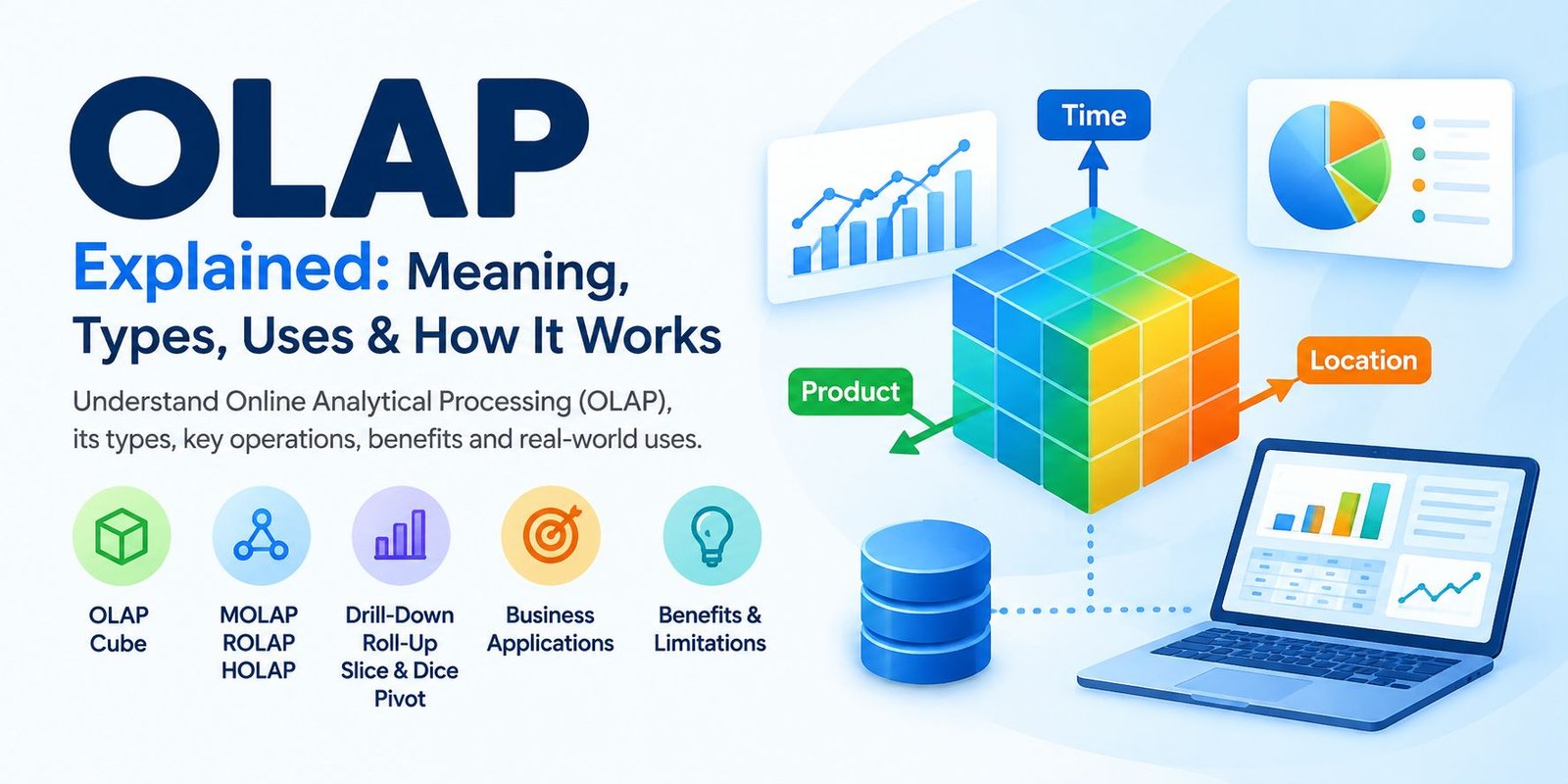
What Is an OLAP Cube?
The term OLAP cube describes a multidimensional way of thinking about analytical information.
Suppose a company records sales according to:
- Product
- Location
- Time
These three dimensions can be imagined as different directions through the dataset.
A user could then examine a particular product in a particular location during a selected period.
The word “cube” is mainly a conceptual representation. Modern analytical platforms can implement multidimensional analysis using different underlying technologies.
A Simple OLAP Example
Imagine a clothing retailer with stores in several cities.
The business has accumulated sales data over multiple years.
A manager first asks:
What were total sales this year?
The next question is:
Which region generated the most revenue?
Then:
Which product category contributed most in that region?
Finally:
During which months did that category perform differently?
Each question moves the analysis toward another level of detail.
This is where the multidimensional nature of OLAP becomes useful. Instead of creating a completely separate analytical process for every question, users can explore related dimensions of the same dataset.
Advantages of OLAP
OLAP can offer several practical benefits when the underlying data and architecture are properly designed.
Multiple Views of the Same Information
Users can examine information according to different dimensions instead of relying on one fixed report.
Historical Comparisons
Long-term datasets can be useful for comparing periods and identifying changes over time.
Interactive Investigation
Operations such as drill-down and pivoting allow users to investigate results instead of stopping at a high-level summary.
Support for Business Reporting
OLAP-style analysis can provide data for dashboards, management reports, financial summaries, and other business intelligence applications.
Easier Pattern Discovery
When information is organized appropriately, relationships and changes can become easier to notice.
Challenges Associated With OLAP
OLAP is not automatically a simple solution just because it is designed for analysis.
Data Quality Matters
If the underlying information is incomplete or inaccurate, analytical results can also be misleading.
Data preparation and validation therefore remain important parts of the overall process.
Architecture Can Become Complex
Large organizations may have numerous source systems, databases, transformation processes, and reporting tools.
Connecting these components can require careful technical planning.
Maintenance Is Required
Business requirements can change.
New products, locations, reporting dimensions, regulations, and data sources may require changes to an analytical environment.
Costs Can Vary
The cost of an OLAP implementation depends on the software, infrastructure, data volume, cloud resources, development effort, and maintenance requirements involved.
OLAP and Data Warehouses
OLAP and data warehousing are closely related concepts, but they are not interchangeable terms.
A data warehouse is primarily concerned with collecting and organizing information for reporting and analysis.
OLAP describes analytical processing techniques and architectures that can be used to examine that information.
A simplified setup might look like:
Operational Applications
↓
Data Integration
↓
Data Warehouse
↓
Analytical Layer
↓
Reports and Dashboards
Modern organizations may use cloud data warehouses, analytical databases, semantic layers, or business intelligence platforms instead of following one traditional architecture.
Is OLAP Still Relevant Today?
Yes, the underlying idea of multidimensional analysis remains important.
Modern data platforms have changed considerably, and many organizations now use cloud-based analytical systems rather than traditional OLAP products.
However, users still need to answer questions involving dimensions such as time, location, product, customer, and business unit.
Modern tools may implement these analytical capabilities differently, but the fundamental requirement remains similar: turning large collections of data into information that people can investigate.
How to Plan an OLAP Solution
Organizations considering an analytical system should begin with their actual requirements rather than choosing technology first.
Identify the Questions
Start by determining what users need to know.
For example:
- Which metrics matter?
- Which historical periods are important?
- Which dimensions should users explore?
- How frequently will reports be updated?
Examine the Data Sources
Determine where the necessary information currently exists and whether those sources contain consistent, reliable records.
Consider Performance
Some workloads require very fast responses, while others can accept longer processing times.
The expected workload should influence the architecture.
Plan Security
Access should be designed according to the sensitivity of the information.
Different employees may need access to different datasets or levels of detail.
Review Future Requirements
An analytical environment should not only support today’s reports. It may also need to accommodate new data sources, metrics, departments, and reporting requirements later.
Frequently Asked Questions
What does OLAP stand for?
OLAP stands for Online Analytical Processing. It refers to technologies and methods used to analyze information across multiple dimensions.
What is an OLAP system used for?
It is primarily used for analytical activities such as reporting, historical comparisons, multidimensional exploration, and business intelligence.
What are MOLAP, ROLAP, and HOLAP?
They are traditional categories of OLAP architecture. MOLAP uses multidimensional structures, ROLAP works with relational databases, and HOLAP combines characteristics of both approaches.
What is an OLAP cube?
An OLAP cube is a conceptual multidimensional representation of data. It allows information to be examined according to dimensions such as time, product, and location.
How is OLAP different from OLTP?
OLAP is focused on analyzing information, while OLTP is primarily designed to process routine business transactions.
Is OLAP a database?
OLAP is better understood as an approach to analytical processing rather than simply a particular type of database. Different OLAP implementations can use different storage technologies.
Conclusion
OLAP provides a way to explore complex datasets through multiple perspectives. Instead of looking only at individual records, users can investigate summaries, historical patterns, categories, locations, time periods, and other dimensions.
Operations such as drill-down, roll-up, slice, dice, and pivot give analysts different ways to explore information. Traditional architectures such as MOLAP, ROLAP, and HOLAP represent different approaches to delivering these capabilities.
Although modern cloud analytics has changed the technology landscape, the central purpose remains familiar: helping organizations examine their information efficiently and answer meaningful analytical questions.