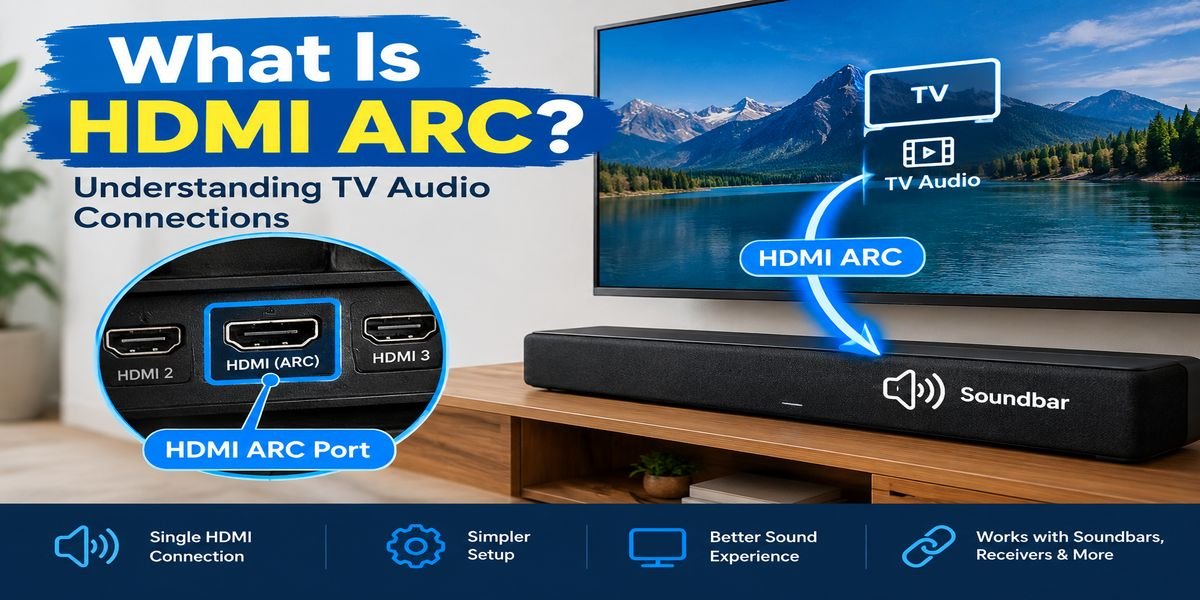
What Is HDMI ARC? Understanding TV Audio Connections
Have you ever looked at the back of a television and wondered why one HDMI socket has the letters ARC beside it? If you are planning to connect a soundbar, receiver, or home theater system, that small label can be important.
So, what is HDMI ARC?
HDMI ARC is a feature that allows a compatible television to send audio to another compatible device through an HDMI connection. It can make a home entertainment system easier to connect because the TV and audio equipment can share a single HDMI link for the supported audio-return function.
For someone who simply wants better sound from a TV, ARC can be a useful feature without requiring a complicated setup.
HDMI ARC Meaning Explained
ARC stands for Audio Return Channel.
The term describes what makes the feature different from a basic HDMI connection. HDMI is commonly used to transfer audio and video from a source device toward a television. ARC adds a way for supported audio to travel back from the TV to an external audio system.
Consider a smart TV running a movie through an app installed on the television. The picture appears on the screen and the TV processes the program’s audio. If a soundbar is connected through an ARC-compatible HDMI connection, supported sound can be sent from the television to that soundbar.
In simple terms:
TV audio → HDMI ARC connection → External audio device
That is the main idea behind ARC.
Why Was HDMI ARC Introduced?
Before ARC became common, connecting TV audio to external equipment often required another type of cable.
For example, a user might connect a television to a soundbar with an optical cable while using HDMI connections for other devices.
ARC offered another approach.
By providing an audio-return path through HDMI, compatible equipment could communicate over a connection that many home entertainment systems already use.
This can make a setup cleaner and reduce the number of separate cables running between the television and audio equipment.
Where Is HDMI ARC Located?
ARC is not necessarily available on every HDMI port.
Look carefully at the labels around the HDMI sockets on your television. One port may have a marking such as:
- HDMI ARC
- HDMI 2 (ARC)
- HDMI (ARC)
- ARC
The exact label can differ between television manufacturers.
The same principle applies to a soundbar or AV receiver. Its ARC-compatible HDMI port may have a specific label indicating that it supports the feature.
Why You Should Use the Correct HDMI Port
A television can have several HDMI sockets, but that does not mean every socket supports ARC.
If you connect the soundbar to an ordinary HDMI input, the TV may still recognize the cable, but the audio-return feature may not function.
Checking the labels first can save considerable troubleshooting time.
How Does HDMI ARC Actually Work?
Think of ARC as an additional audio route built into a compatible HDMI connection.
Normally, you might use HDMI to send information from an external source toward the TV. With ARC, the television can also send supported audio in the opposite direction toward a compatible audio device.
For example, a smart TV could be playing:
- A streaming service
- Live television
- Music
- A movie stored on a connected device
- Other compatible TV content
Instead of relying on the TV’s internal speakers, the audio can be directed to an ARC-connected soundbar or receiver.
The exact audio formats that can pass through the connection depend on the equipment.
What Do You Need to Use ARC?
A successful ARC setup requires more than simply owning an HDMI cable.
A Television With ARC
First, the TV must include an HDMI port that supports ARC.
Check the specifications or inspect the labels around the HDMI connections.
An ARC-Compatible Audio Device
The soundbar, AV receiver, or home theater equipment receiving the TV audio must also support ARC.
If only one side supports ARC, the feature will not work as intended.
A Suitable HDMI Cable
You need an HDMI cable to connect the two devices.
For a conventional ARC setup, a suitable High Speed HDMI cable is generally sufficient. If you are using newer HDMI features or eARC, pay attention to the cable capabilities recommended for your equipment.
Appropriate TV Settings
Some televisions require changes to the audio-output menu before ARC becomes active.
You may also need to enable HDMI-CEC or a manufacturer-specific version of that feature.
HDMI ARC Setup: A Simple Walkthrough
If your equipment supports ARC, the basic installation can be completed in a few stages.
1. Inspect the Television
Find the HDMI socket labeled ARC.
Write down which HDMI number it uses if the TV has several ports.
2. Check the Soundbar
Locate the corresponding ARC-compatible HDMI port on the soundbar or receiver.
3. Make the Connection
Insert one end of the HDMI cable into the TV’s ARC socket.
Connect the other end to the ARC-compatible HDMI port on the sound system.
4. Open the TV’s Sound Menu
Go into the television’s audio settings and look for the external audio or HDMI audio option.
Different brands may use different wording.
5. Check HDMI Control
If the TV has an HDMI-CEC option, make sure it is configured appropriately.
This feature may have a brand-specific name.
6. Test the System
Play some content through the television.
If the connection is configured correctly, the sound should be delivered through the external audio system rather than only through the TV speakers.
HDMI ARC and HDMI-CEC Are Not the Same Thing
These two terms often appear together, which can make them confusing.
ARC deals with the return of audio from a compatible TV to an external audio device.
HDMI-CEC is a control feature that allows compatible HDMI devices to exchange commands.
For example, CEC may allow the TV remote to adjust the volume of a compatible soundbar.
Therefore, ARC and CEC have different jobs even though they can work together.
What Is HDMI ARC Used For?
ARC is primarily useful when a television needs to send sound to an external audio system.
Common examples include:
Soundbars
A soundbar is probably the most familiar ARC application. You can use the TV as the source while allowing the soundbar to handle the audio output.
AV Receivers
People with larger home theater systems can use ARC to transfer compatible TV audio to an AV receiver.
Home Theater Systems
ARC can also be useful in a multi-speaker entertainment setup when the equipment supports the required HDMI features.
HDMI ARC vs Optical: What Is the Difference?
Optical audio is another common method of connecting a TV to external audio equipment.
The two connections have different characteristics.
| Aspect | HDMI ARC | Optical |
|---|---|---|
| Main connection | HDMI | Optical cable |
| TV-to-audio connection | Supported | Supported |
| HDMI device control | Can work with CEC | Generally not available |
| Video capability of connection | HDMI supports video | Audio only |
| Common use | TV and soundbar/receiver | Digital TV audio |
For users with ARC-compatible equipment, HDMI can provide a convenient all-in-one connection.
Optical is still useful when ARC is unavailable or when the particular equipment supports optical but not ARC.
HDMI ARC vs eARC
Another term you will frequently see is HDMI eARC.
The “e” means enhanced.
eARC is an improved form of the audio-return technology and provides substantially greater bandwidth than traditional ARC.
Traditional ARC
Standard ARC is designed for common TV audio applications.
It can transmit supported audio formats, but it has more limited bandwidth.
Enhanced ARC
eARC provides a larger data path for audio and is designed to accommodate more advanced audio formats when the connected devices support them.
This can be particularly relevant to people using sophisticated home theater equipment.
Should You Choose eARC?
There is no need to choose eARC simply because it is newer.
If your TV and soundbar only need ordinary supported audio, ARC may be perfectly adequate.
If your equipment supports advanced audio formats and you want to take advantage of them, eARC may provide capabilities that standard ARC cannot.
Does HDMI ARC Support Dolby Atmos?
This depends on the equipment and the type of Atmos signal being transmitted.
Some Dolby Atmos implementations can work through traditional ARC when the format is compatible with the connection’s limitations.
Other higher-bandwidth audio configurations may require eARC.
If Dolby Atmos is important to your setup, check the specifications for the exact TV, soundbar, receiver, and source device instead of assuming that every ARC connection provides identical support.
Can ARC Send Sound From TV Apps?
Yes, this is one of the practical reasons ARC is useful.
Suppose you open a streaming application directly on your smart TV. There may be no external streaming box involved.
The television receives the content, and compatible TV audio can be sent through the ARC connection to the soundbar or receiver.
This means you can use the TV’s built-in applications while listening through your external speakers.
Does ARC Carry Video?
ARC specifically refers to audio return.
HDMI itself is capable of carrying both digital audio and video, but the ARC feature concerns the direction in which supported audio travels.
For example, a gaming console may send video and audio to the TV through HDMI. Separately, the TV can send audio back to a soundbar using its ARC connection.
The complete signal path depends on the devices and how they are connected.
Why Is My HDMI ARC Not Working?
ARC problems are often related to settings, ports, or compatibility.
Here are some things worth checking.
Confirm the Port
Make sure the cable is connected to the HDMI socket marked ARC on the TV.
Then check that the other end is connected to the appropriate ARC connection on the soundbar or receiver.
Check Audio Output
The TV may still be configured to use its internal speakers.
Open the sound settings and select the appropriate external audio option.
Look at HDMI-CEC
If the equipment requires CEC for certain ARC functions, verify that the corresponding HDMI control feature is enabled.
Select the Correct Soundbar Input
If your soundbar has several input modes, make sure HDMI is selected.
Restart the Equipment
Power off the television and soundbar and restart them.
This can sometimes restore communication between HDMI devices.
Test Another Cable
If the connection still does not work, try another known-good HDMI cable that meets the requirements of your setup.
Check Audio Compatibility
If some content plays normally while another source produces no sound, the problem could be related to the audio format rather than the physical connection.
Can You Connect a Game Console Through ARC?
ARC does not normally mean that the game console itself connects to the ARC port specifically for the purpose of sending its video to the TV.
A common arrangement is:
Game console → TV → ARC → Soundbar
The console sends its content to the TV, and the TV can then send compatible audio toward the soundbar.
Another option is to connect the console directly to an AV receiver, depending on the available ports and the requirements of the setup.
Does ARC Improve Sound Quality?
ARC should not be viewed as a sound-enhancement technology by itself.
Its primary role is to provide a convenient way to transfer supported audio.
The final listening experience depends on many factors, including:
- The original audio source
- Supported audio format
- TV capabilities
- Soundbar or receiver capabilities
- Speaker quality
- Connection configuration
Moving from TV speakers to a capable external sound system may make a noticeable difference, but ARC itself is mainly the connection method.
Is a Special HDMI ARC Cable Required?
For normal ARC use, you generally do not need a cable marketed as an “ARC-only” cable.
A properly rated HDMI cable can support ARC when the connected devices support it.
However, HDMI systems can involve different bandwidth requirements. If you are using eARC or other demanding HDMI features, use a cable that meets the specifications recommended for those features.
Can an Older TV Use ARC?
Some older televisions include ARC, while others do not.
The age of the TV alone does not determine whether ARC is available.
Check:
- The HDMI port labels
- The TV manual
- The manufacturer’s specifications
If one of the HDMI ports is specifically identified as ARC, the television may support the feature.
ARC Without a Soundbar: Is It Possible?
Yes.
A soundbar is only one possible destination for ARC audio.
Depending on the equipment, the TV can send audio through ARC to a compatible:
- AV receiver
- Home theater system
- External audio system
- Other ARC-capable device
The important requirement is that the receiving equipment supports the appropriate HDMI audio-return functionality.
Frequently Asked Questions
What is HDMI ARC in simple language?
HDMI ARC is an HDMI feature that lets a compatible TV send audio to a compatible external audio device through an HDMI connection.
Is ARC the same as a normal HDMI port?
No. ARC is a specific capability of an HDMI connection. A TV can have several HDMI ports while only one supports ARC.
Is optical better than HDMI ARC?
They are different connection methods with different capabilities. ARC can offer HDMI-based control features, while optical provides a straightforward digital audio connection.
Can ARC work with a soundbar?
Yes. Connecting an ARC-compatible TV to an ARC-compatible soundbar is one of the most common uses of the technology.
What does eARC add?
eARC provides greater audio bandwidth and supports more advanced audio formats than traditional ARC when the connected equipment supports those capabilities.
Why is there no sound after connecting ARC?
Check the ARC ports, TV audio-output setting, HDMI-CEC configuration, soundbar input, cable, and audio-format compatibility.
Does every HDMI cable support ARC?
Cable requirements depend on the HDMI features being used. A suitable High Speed HDMI cable is generally sufficient for ordinary ARC, while more advanced setups may require a higher-capability cable.
Conclusion
So, what is HDMI ARC?
It is a feature that gives compatible HDMI equipment a way to send TV audio back to an external audio system. This makes it useful for soundbars, AV receivers, and home theater setups.
The biggest advantage is convenience. A compatible TV and audio device can use an HDMI connection to handle the supported audio-return function, potentially reducing the need for an additional optical cable.
Standard ARC is suitable for many everyday entertainment setups, while HDMI eARC offers greater bandwidth for compatible modern equipment.
If you are setting up ARC for the first time, start by checking the HDMI labels on both devices. Using the correct ports and selecting the appropriate audio settings will usually give you the clearest path to a working connection.