How Big Is the iPhone 13? Dimensions, Screen Size & Weight
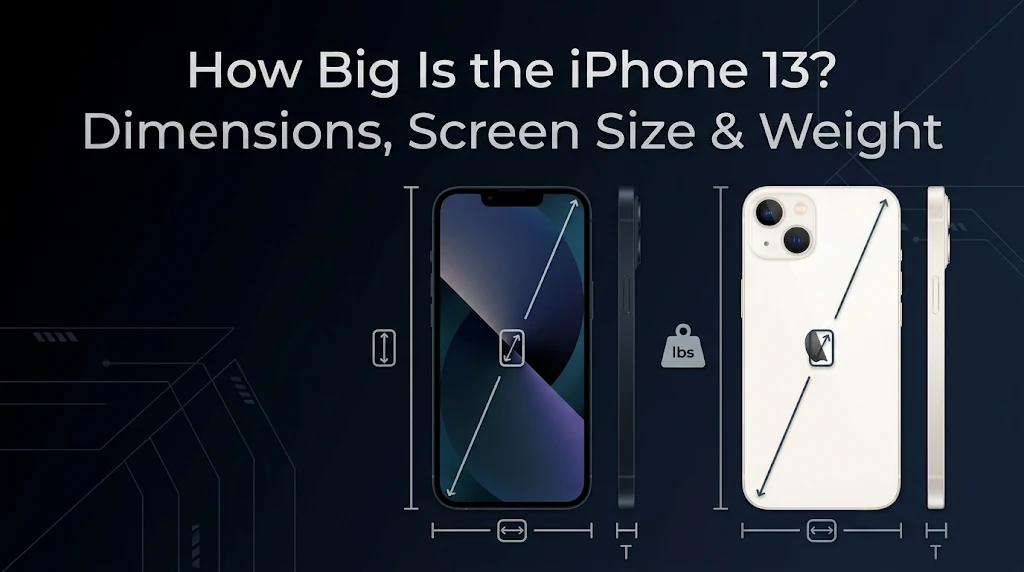
How Big Is the iPhone 13 If you are asking how big is the iPhone 13, the standard model measures 5.78 inches (146.7 mm) tall, 2.82 inches (71.5 mm) wide, and 0.30 inch (7.65 mm) thick. It weighs approximately 174 grams (6.14 ounces) and features a 6.1-inch Super Retina XDR OLED display. These measurements place the device in the middle-sized smartphone category, offering a balance between screen space, portability, and everyday comfort.
The physical size of a smartphone matters more than many people realize. It affects how comfortably you can hold the device, type messages, watch videos, carry it in your pocket, and use it for extended periods. A phone may have an impressive display, but its weight and body dimensions can determine whether it feels practical in daily life.
Apple introduced the iPhone 13 in 2021, and its familiar design remains relevant to people considering a used or refurbished model. This guide explains its measurements, screen technology, handling experience, and differences from other models in the same generation.
iPhone 13 Dimensions and Specifications
Before looking at individual measurements, it helps to understand the complete physical profile. The standard model has a glass front, glass back, and aluminum frame. Its flat edges give it a recognizable appearance and help distinguish it from some older rounded-edge iPhones.
Here is a quick specification overview: How Big Is the iPhone 13
| Specification | Measurement or detail |
|---|---|
| Height | 5.78 inches (146.7 mm) |
| Width | 2.82 inches (71.5 mm) |
| Thickness | 0.30 inch (7.65 mm) |
| Weight | 174 grams (6.14 ounces) |
| Display | 6.1-inch OLED |
| Resolution | 2532 × 1170 pixels |
| Pixel density | 460 pixels per inch |
| Display type | Super Retina XDR |
| Front protection | Ceramic Shield |
| Frame | Aluminum |
| Back | Glass |
These are Apple’s published specifications for the standard model. They do not describe the iPhone 13 mini, Pro, or Pro Max, which have different physical designs.
The measurements also describe the main body rather than the additional bulk created by a protective case. A thick case can change the overall dimensions and make the device feel noticeably larger.
Understanding the Height
The handset stands 5.78 inches tall, equivalent to 146.7 millimeters. Height refers to the distance between the bottom and top edges when you hold the phone upright.
This measurement gives the manufacturer enough space to include a 6.1-inch display without creating an especially tall device. It also makes the phone easier to carry than many larger smartphones.
The height affects several everyday activities:
- Reading: More vertical display space lets you view longer sections of a webpage or message.
- Browsing: Websites have room for images, menus, and text.
- Messaging: The screen provides enough space for a standard on-screen keyboard.
- Pocket storage: The body fits many ordinary pockets, although pocket depth varies.
- Video viewing: The display provides a useful viewing area for mobile entertainment.
People with smaller hands may need to move their grip to reach the upper corners. This is normal for a phone with a display larger than five inches.
Grip and Overall Width
The device measures 2.82 inches wide, or 71.5 millimeters. Width plays an important role in how a smartphone feels because it determines how much space your fingers must cover when holding it.
A phone that is too wide can become difficult to grip securely. It may also make one-handed typing uncomfortable. The standard model’s width provides a reasonable balance between display space and handling for many users.
The flat aluminum sides create a firm, defined edge. Some people like this shape because it gives them a clear grip, while others prefer rounded frames that feel softer against the palm.
Your experience will depend on your hand size and how you normally hold a phone. If possible, try the device in person before buying it, especially if you currently use a smaller smartphone.
Slim Design and Thickness
Its body is 0.30 inch thick, which equals 7.65 millimeters. This relatively slim profile helps the phone slide into pockets, handbags, and small storage spaces.
Thickness can also affect how a device feels during long sessions. A slim phone may be easier to carry, but the addition of a protective cover changes the experience.
The rear camera lenses extend beyond the back surface. As a result, the phone does not sit completely flat on a table when you place it down without a case. This raised camera area is common in modern smartphones.
If you want to preserve the slim feel, choose a lightweight case. Rugged covers offer additional protection but usually add more bulk.
Everyday Carrying Comfort
The standard model weighs approximately 174 grams. In practical terms, this is a moderate weight for a smartphone with a 6.1-inch display.
Weight matters when you carry a phone throughout the day. A heavy device can become tiring during long video calls, extended reading sessions, or gaming. A lighter model may feel more comfortable when held for several minutes at a time.
The glass construction and aluminum frame contribute to the overall weight. A screen protector, case, magnetic wallet, or other accessory will increase it.
For many users, the weight is manageable. However, people who strongly prefer lightweight phones may want to compare it with the smaller mini model before making a decision.
Exploring the OLED Display
The front features a 6.1-inch Super Retina XDR OLED display. Apple measures screen size diagonally, from one corner of the display to the opposite corner.
The advertised diagonal measurement does not mean that the entire front of the phone is a usable screen. The device has rounded display corners and a notch at the top. Apple notes that the screen measures 6.06 inches diagonally when treated as a standard rectangle, with a smaller actual viewable area.
The display resolution is 2532 × 1170 pixels, with a density of 460 pixels per inch. This helps text, photographs, icons, and video appear sharp.
OLED technology also provides deep blacks because individual pixels can switch off when displaying black content. This can make compatible movies and images look more contrast-rich.
Other display features include:
- HDR support for compatible content
- True Tone for adjusting the display’s appearance to ambient lighting
- Wide color (P3)
- Haptic Touch
- A typical contrast ratio of 2,000,000:1
- Up to 800 nits typical maximum brightness
- Up to 1,200 nits peak brightness for HDR content
These features make the screen suitable for browsing, watching videos, viewing photographs, and using everyday apps.
Handling and One-Handed Use
A 6.1-inch display gives you a useful amount of viewing space, but it does not guarantee that every part of the screen will be easy to reach with one hand.
People with larger hands may be able to operate many controls without changing their grip. Those with smaller hands may need to move the phone slightly to reach the top corners.
You can still perform many common tasks with one hand, such as scrolling through social media, opening applications, checking notifications, and reading short messages.
Apple also offers a feature called Reachability on supported iPhone models. It moves the upper portion of the screen downward so that controls are easier to reach. You can look for it under Settings, then Accessibility, then Touch.
A protective case can also affect handling. Some cases provide textured sides that improve grip, while smooth or bulky covers may change how securely the phone sits in your hand.
Comparing the Standard and Mini Models
Apple released a smaller version of the same generation for people who prefer compact smartphones. The mini has a shorter body, narrower frame, and smaller display. How Big Is the iPhone 13
| Measurement | Standard model | Mini model |
|---|---|---|
| Height | 146.7 mm | 131.5 mm |
| Width | 71.5 mm | 64.2 mm |
| Thickness | 7.65 mm | 7.65 mm |
| Weight | 174 g | Approximately 141 g |
| Display | 6.1 inches | 5.4 inches |
The mini is easier to carry for people who value a small device. Its reduced width may also make one-handed operation more comfortable.
The standard version is better suited to users who want more room for reading, videos, games, and typing. Its display is noticeably larger, although the device is also heavier.
Neither option is automatically better. Your preference depends on whether you value portability or screen space more.
Comparing the Standard and Pro Models
The standard and Pro versions share nearly identical main body dimensions. Both have a 6.1-inch display, so they can feel similar in the hand.
The main physical difference is weight. The iPhone 13 Pro weighs approximately 204 grams, compared with 174 grams for the regular model.
| Measurement | Standard model | Pro model |
|---|---|---|
| Height | 146.7 mm | 146.7 mm |
| Width | 71.5 mm | 71.5 mm |
| Thickness | 7.65 mm | 7.65 mm |
| Weight | 174 g | Approximately 204 g |
| Display | 6.1 inches | 6.1 inches |
The Pro model has a different rear camera arrangement and additional camera hardware. It also offers ProMotion display technology, which supports adaptive refresh rates up to 120Hz.
Although their main body dimensions are the same, do not assume that their protective cases are interchangeable. Camera openings and other physical details can differ.
Standard Model vs. Pro Max
The Pro Max is designed for people who want a much larger screen. It has a 6.7-inch display and a taller, wider body.
| Measurement | Standard model | Pro Max model |
|---|---|---|
| Height | 146.7 mm | 160.8 mm |
| Width | 71.5 mm | 78.1 mm |
| Display | 6.1 inches | 6.7 inches |
| Weight | 174 g | Approximately 240 g |
The larger model provides more room for watching videos, playing games, and viewing documents. However, it may feel less comfortable for people who prefer compact phones.
The standard model is easier to carry and may be more convenient for everyday one-handed tasks. The Pro Max is worth considering if screen space is more important than portability.
Is It Comfortable for Watching Videos?
The OLED display offers a good viewing experience for streaming services, social media clips, and downloaded movies. Its resolution helps images look detailed, while HDR support can improve compatible content.
A 6.1-inch screen is large enough for casual entertainment, but it is not comparable to a tablet. People who watch long movies frequently may prefer a larger phone or separate tablet.
Video aspect ratios also matter. Some movies and online videos may show black bars because their shape does not match the display. This is normal and does not indicate a problem with the screen.
For everyday video watching, the display offers a practical balance between viewing space and portability.
Gaming on a 6.1-Inch Display
The screen provides enough room for many mobile games, including racing titles, puzzle games, strategy apps, and action games.
Virtual controls can take up part of the display, so a larger screen may feel more comfortable for certain games. Players with larger fingers may also prefer additional space between on-screen buttons.
The phone is easier to hold than many large-screen devices, which can be helpful during shorter gaming sessions. However, extended play can still cause hand fatigue.
If gaming is your main reason for choosing a phone, consider more than its physical size. Performance, battery condition, software support, heat management, and game compatibility also matter.
Pocket Fit and Portability
The body can fit into many standard trouser, jacket, and coat pockets. However, the result depends on the pocket’s depth, width, and material.
Fitted jeans and sportswear may provide less room than loose trousers or jacket pockets. A bulky protective cover can also make the phone harder to carry.
Before choosing a case or bag, consider these points:
- Pocket depth: Make sure the device sits securely and does not stick out.
- Pocket width: Check that it can slide in and out without catching.
- Case design: Thick protective covers add noticeable bulk.
- Camera protection: Raised edges help keep the lenses away from flat surfaces.
- Daily movement: A tight pocket may become uncomfortable when sitting or walking.
If portability is your main priority, compare the standard model with smaller alternatives before purchasing.
Choosing the Correct Protective Case
A case should be designed for the exact model rather than selected only by screen size. Two phones can have similar displays but different camera arrangements, button positions, and body dimensions.
Check these details before ordering an accessory:
- Model compatibility: Look for a label that specifically lists iPhone 13.
- Camera opening: Confirm that the rear cutout matches the camera layout.
- Button placement: Volume and power controls should align correctly.
- Charging access: The bottom opening should allow access to the Lightning port.
- Screen edges: Raised borders can help protect the front glass.
- Material: Choose a material that suits your preferred grip and protection level.
A slim silicone or TPU case generally keeps the original feel. A rugged case may offer more protection against drops but makes the phone larger and heavier.
Screen protectors are another useful accessory. Make sure the protector is compatible with the model and does not interfere with the front sensors or case.
Does the Camera Area Affect the Overall Profile?
The published thickness measurement describes the main body. The rear camera lenses extend beyond the back surface, which creates a raised area.
This is why the phone may rock slightly when placed on a desk without a protective cover. The camera module is not perfectly level with the glass back.
A case with a raised camera border can help prevent the lenses from touching surfaces directly. Some covers also make the device sit more steadily, although results depend on their shape.
If you prefer a slim appearance, look for a case that protects the camera without adding excessive thickness.
Who Should Choose This Size?
The standard model is suitable for people who want a smartphone that does not feel as large as a Pro Max device but still offers a comfortable display.
It may suit:
- Students: The screen provides room for reading notes, viewing documents, and using learning apps.
- Everyday users: Messaging, browsing, social media, and video calls work well on the display.
- Photographers: The screen is useful for reviewing pictures and adjusting camera settings.
- Travelers: Its weight and body dimensions make it manageable to carry.
- Casual gamers: The display provides useful space for many mobile games.
- Video viewers: The OLED panel is suitable for watching streaming content.
It may not be the best option for people who want the smallest possible phone or the largest available display. Those users should compare the mini and Pro Max alternatives.
Frequently Asked Questions
What are the exact dimensions of the iPhone 13?
The standard model measures 146.7 mm tall, 71.5 mm wide, and 7.65 mm thick. In inches, these measurements are 5.78 × 2.82 × 0.30.
Is the display really 6.1 inches?
Yes. Apple advertises a 6.1-inch diagonal display. When measured as a standard rectangle, the screen is 6.06 inches diagonally, while the actual viewable area is smaller because of the rounded corners.
How much does the phone weigh?
It weighs approximately 174 grams, equal to 6.14 ounces. A case and accessories will increase the total weight.
Is the standard model bigger than the mini?
Yes. The standard version has a 6.1-inch display, while the mini has a 5.4-inch display. The standard body is also taller and wider.
Is it the same size as the Pro version?
The main body dimensions are almost identical, and both models have 6.1-inch displays. The Pro version is heavier and has a different rear camera system.
Is the Pro Max larger?
Yes. The Pro Max has a 6.7-inch display and a larger body. It is also considerably heavier than the standard version.
Can I use a Pro case on the regular model?
Do not assume that the cases are interchangeable. Their camera layouts and other physical details can differ. Choose an accessory that specifically lists compatibility with your exact model.
Is it suitable for small hands?
It may be comfortable for some people with smaller hands, but reaching the upper corners can require adjusting your grip. If you prefer a very compact phone, consider trying the mini model.
Is the screen large enough for gaming?
The 6.1-inch OLED display is suitable for many mobile games. However, people who prefer larger controls or more viewing space may enjoy a bigger device.
Does a protective cover change its size?
Yes. A case adds thickness and width, and some rugged designs also add noticeable weight. Slim cases usually preserve more of the original feel.
Final Verdict
The standard How Big Is the iPhone 13 offers a practical combination of screen space, portability, and manageable weight. Its 6.1-inch OLED display is suitable for browsing, messaging, streaming, photography, and everyday gaming.
Its body is neither extremely compact nor unusually large. That middle-ground design makes it a reasonable choice for people who want enough screen space without carrying a much bigger smartphone.
Before buying one, think about your hand size, preferred screen space, pocket habits, and case choice. The best device is not necessarily the biggest or smallest one; it is the one that feels comfortable during your everyday activities.