Elgato Wave 3 Review: Features, Sound Quality and Setup
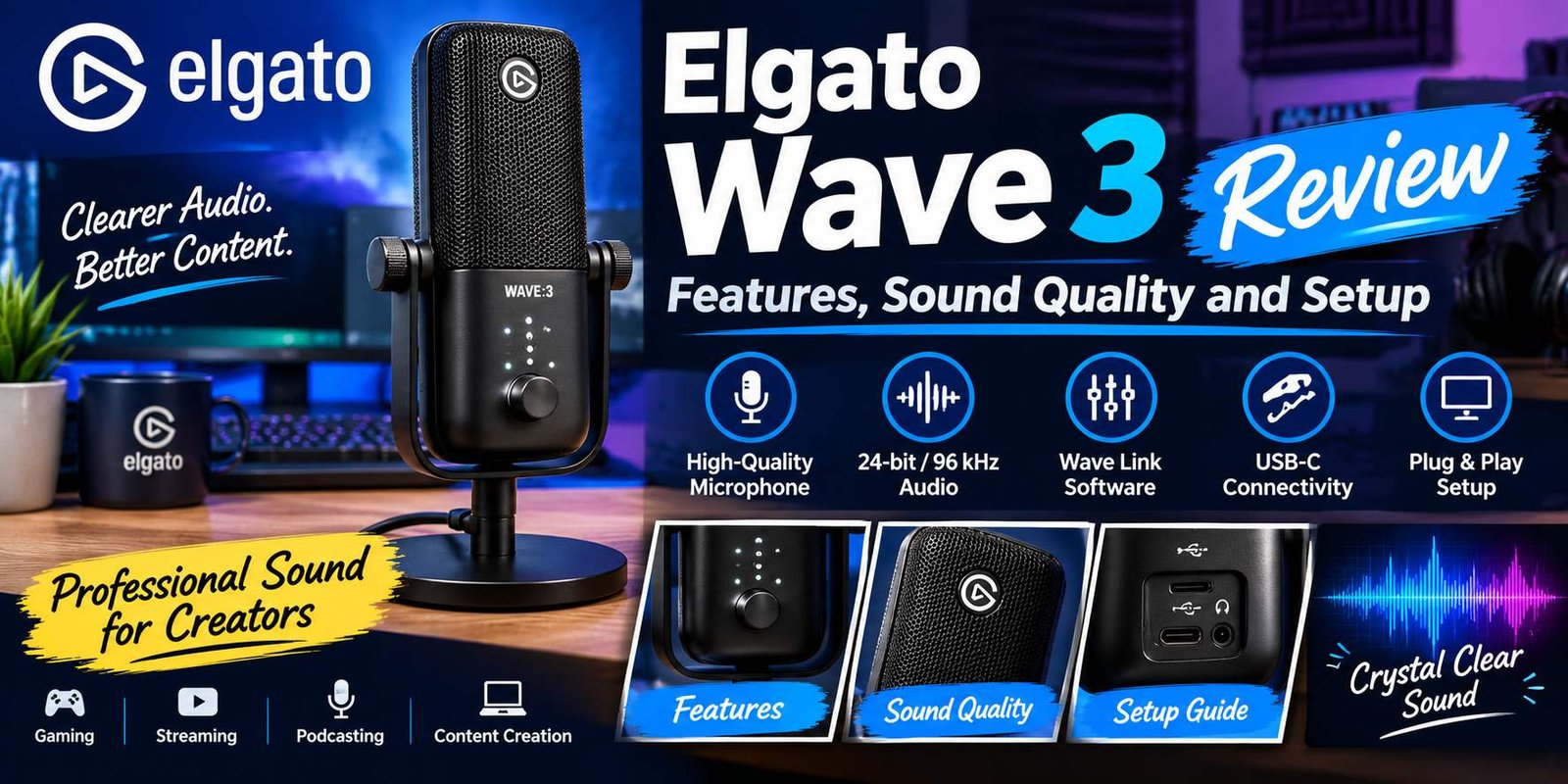
The Elgato Wave 3 is a USB condenser microphone designed for streamers, podcasters, gamers, and content creators who want clear audio without a complicated recording setup. It combines high-quality sound capture with useful features such as Clipguard technology, onboard controls, and Wave Link software. In this review, we explore its features, sound quality, setup process, advantages, and limitations to help you decide whether it is the right microphone for your needs.
Voice Clarity
The Wave:3 is designed primarily for voice applications. It can capture spoken words with good detail when positioned correctly.
This makes it suitable for:
- YouTube voiceovers.
- Gaming commentary.
- Podcast recordings.
- Online meetings.
- Livestream conversations.
- Educational videos.
- Voice communication.
The microphone can capture natural vocal characteristics, but the final result depends on the speaker’s distance, room acoustics, and recording settings.
For example, someone recording in a quiet room with soft furnishings may achieve a cleaner result than someone recording beside a noisy computer fan in an empty room.
Cardioid Polar Pattern
The Wave:3 uses a cardioid polar pattern, meaning it is most sensitive to sound coming from the front.
This is useful for individual creators who want their voice to remain the primary audio source.
The directional pickup pattern can help reduce unwanted sounds from behind the microphone. However, it does not completely eliminate background noise.
Keyboard typing, nearby conversations, fans, and other environmental sounds can still enter a recording.
For better results, users should position the microphone correctly and reduce unnecessary noise in their recording environment.
Frequency Response
The original Wave:3 has a frequency response of 70 Hz to 20 kHz.
This range covers much of the audible spectrum relevant to voice recording.
The microphone can capture important vocal details, including lower vocal tones and higher-frequency speech characteristics.
However, frequency response alone does not determine how good a microphone sounds. Capsule design, room acoustics, microphone positioning, and audio processing all influence the final recording.
24-Bit Audio Recording
The Wave:3 supports 24-bit audio resolution and sample rates of 48 kHz and 96 kHz.
These settings provide flexibility for different recording workflows.
For example, 48 kHz is commonly used for video production, streaming, and general digital audio applications. The 96 kHz option can be useful for higher-resolution recording workflows.
Most casual users do not need to select the highest available sample rate to achieve good voice quality. Consistent microphone positioning and suitable recording levels are often more important.
What Is Clipguard Technology?
Clipguard is one of the notable features of the original Elgato Wave:3.
Audio clipping occurs when an incoming signal becomes too loud for the recording system to handle correctly. When this happens, the recorded sound may become harsh, distorted, or unpleasant.
This problem can occur when someone suddenly shouts, laughs loudly, or speaks much louder than expected.
Clipguard is designed to help prevent this type of distortion.
How Clipguard Works
The original Wave:3 uses an additional lower-gain signal path to help manage loud audio peaks.
When the main signal approaches clipping, the system can use the secondary signal to help maintain a cleaner recording.
This is particularly useful for streamers and gamers because their voices may change dramatically during exciting moments.
For example, a person may speak quietly during normal gameplay and suddenly shout after an unexpected event. Clipguard can help reduce the risk of a distorted recording.
It is not a replacement for proper gain settings, but it provides an additional layer of protection.
Why Clipguard Matters for Streamers
Live content is unpredictable.
A streamer cannot always pause a broadcast to adjust microphone settings whenever their voice becomes louder.
Clipguard helps make audio levels more manageable during these moments.
It can be especially useful for:
- Gaming livestreams.
- Excited commentary.
- Group conversations.
- Podcast discussions.
- Dynamic voice recordings.
The feature helps protect recordings from certain loud audio peaks, although it cannot guarantee distortion-free results in every situation.
Elgato Wave Link Software
The Wave Link software is one of the biggest reasons the original Wave:3 stands out from simpler USB microphones.
Many microphones provide basic volume controls and recording functionality. Wave Link adds an audio mixing environment that gives creators more control over how different sound sources are handled.
Users can manage microphone input, computer audio, applications, and other supported sources through the software.
Multiple Audio Sources
A creator may use several audio sources at the same time.
For example, a gaming streamer may need to manage:
- Microphone audio.
- Game sound.
- Music.
- Voice chat.
- Browser audio.
- Notification sounds.
Without a proper mixing setup, controlling these sources individually can become difficult.
Wave Link provides a centralized place to manage supported inputs and their levels.
Independent Audio Mixes
Wave Link supports multiple independent audio mixes.
This means users can create different audio arrangements for different purposes.
For example, a streamer may want game audio to be louder in their headphones but quieter in the livestream.
A separate mix can help achieve this without changing every audio source manually.
The original Wave:3 works with Wave Link to provide a more organized audio workflow.
Audio Effects and Plugins
Wave Link also supports compatible audio effects and VST plugins.
These can help users shape their voice and improve the overall sound of recordings.
Common audio processing options include:
- Equalization.
- Compression.
- Noise reduction.
- Noise gating.
- Other compatible VST effects.
The availability and performance of individual plugins depend on the software version and computer configuration.
Users should apply effects carefully. Excessive processing can make a voice sound unnatural rather than improving it.
Is Wave Link Necessary?
No. The original Wave:3 can operate as a USB microphone without requiring users to build a complicated Wave Link setup.
However, Wave Link is important for people who want to use the microphone’s broader mixing capabilities.Someone who only needs a microphone for basic meetings may not need all its advanced software features.
A streamer or content creator who manages several audio sources may find the software much more valuable.
Elgato Wave:3 Controls and Everyday Operation
The microphone includes physical controls designed to make common adjustments easier.
Instead of opening software every time a user wants to change a basic setting, the Wave:3 provides access to important functions directly on the device.
Multifunction Control Dial
The multifunction dial is used for different audio adjustments.
Depending on the selected control mode, users can adjust:
- Microphone input gain.
- Headphone volume.
- Microphone and computer audio monitoring balance.
This design helps reduce the number of separate controls needed on the microphone.
Touch-Sensitive Mute Button
The Wave:3 includes a capacitive mute control.
Users can touch the top of the microphone to mute or unmute the audio input.
This can be useful during meetings, livestreams, and recording sessions.
For example, a creator may need to cough, speak to someone outside the recording, or handle an unexpected interruption. The touch-sensitive control offers a quick way to mute the microphone.
Users should still check their streaming or recording software to confirm the correct microphone status.
Headphone Monitoring
The microphone includes a headphone output for monitoring audio.
This allows users to hear their voice while speaking.
Monitoring is helpful because it makes it easier to identify problems such as excessive volume, unwanted noise, and incorrect microphone positioning.
It also helps creators maintain a comfortable speaking level during longer sessions.
Elgato Wave:3 Setup Guide
Setting up the Elgato Wave:3 is relatively simple because it uses a USB connection.
Users do not need to purchase a separate audio interface for normal USB recording. The microphone can connect directly to a compatible computer.
Follow these steps to get started.
Step 1: Unbox the Microphone
Remove the microphone and its accessories from the packaging.
The original Wave:3 package includes:
- Elgato Wave:3 microphone.
- USB-A to USB-C cable.
- Desktop stand.
- Boom arm adapter.
- Quick-start guide.
Package contents can vary depending on the retailer and product version.
Step 2: Position the Microphone
Place the microphone on a stable desk or attach it to a compatible boom arm.
For good voice capture, Elgato recommends positioning the Wave:3 approximately 10–20 cm (4–8 inches) from your mouth.
Speak toward the front of the microphone, which is the side with the multifunction dial.
Avoid speaking directly into the top of the microphone because its pickup design is intended for front-facing use.
Step 3: Connect the USB Cable
Connect the USB cable to the microphone and a compatible computer port.
The computer should recognize the microphone as an audio input device.
Make sure the connection is secure before opening your recording software.
Step 4: Install Wave Link
Download the appropriate Wave Link software from Elgato’s official website.
Install the application and follow the instructions provided during setup.
Wave Link provides access to additional mixing and audio management functions.
Step 5: Select the Microphone
Open your computer’s sound settings or preferred recording application.
Select Elgato Wave:3 as the microphone input.
If you want to monitor your voice, connect compatible wired headphones to the microphone’s headphone output.
Step 6: Adjust the Input Gain
Speak at your normal recording volume and adjust the input gain using the multifunction dial.
Avoid setting the gain unnecessarily high.
A suitable recording level should provide a clear signal without frequently reaching the maximum level.
Step 7: Test Your Recording
Open a recording application and capture a short sample.
Listen carefully to check whether your voice sounds clear and natural.
If the recording includes excessive background noise, move closer to the microphone, reduce the gain, and improve the recording environment.
Once everything sounds right, the microphone is ready for regular use.
Elgato Wave:3 for Gaming and Streaming
Gaming creators often need a microphone that can capture clear speech while handling game audio, voice chat, and other sounds.
The Wave:3 is designed to support this type of workflow.
Its USB connection makes it relatively easy to integrate into a gaming computer, while Wave Link helps organize different audio sources.
Better Communication During Gameplay
Clear communication is important in multiplayer games.
Players need to communicate with teammates without making every conversation difficult to understand.
The Wave:3 can capture voice commentary and team communication when positioned and configured correctly.
Its cardioid pattern is particularly useful for players who speak directly toward their desk microphone.
Streaming With OBS Studio
OBS Studio is widely used for recording and livestreaming.
The Wave:3 can be selected as an audio input within supported OBS configurations.
Wave Link can also help route different audio sources into the streaming workflow.
For example, creators can manage microphone levels separately from game audio and other supported inputs.
This provides greater flexibility when building a livestream.
Managing Background Noise
A gaming desk can contain several sources of unwanted sound.
Mechanical keyboards, computer fans, speakers, and nearby conversations may enter microphone recordings.
The Wave:3’s cardioid pattern and suitable placement can help reduce some unwanted sounds.
Users can also apply compatible noise reduction and other processing through their software setup.
However, microphone software cannot completely fix every noisy recording environment.
Elgato Wave:3 for Podcasting
Podcasts depend heavily on understandable speech.
Listeners should be able to follow conversations without constantly adjusting their volume or struggling to hear individual speakers.
The Wave:3 can serve as a USB recording microphone for solo podcasts and other voice-focused projects.
Solo Podcast Recording
For a single presenter, the Wave:3 offers a convenient desktop recording option.
The microphone can connect directly to a computer, and Wave Link provides additional control over supported audio sources.
A creator can record commentary, discussions, interviews, and educational content without purchasing a traditional XLR recording system.
Recording With Multiple People
The original Wave:3 is primarily a single-speaker desktop microphone.
For a podcast involving several people, each speaker may benefit from a separate microphone.
This helps provide more control over individual voices during editing.
A single Wave:3 can still be used for informal group recordings, but microphone placement and room acoustics become more important.
Elgato Wave:3 vs. Other USB Microphones
Before purchasing a microphone, it is worth comparing it with other products in the same category.
Two popular alternatives are the and the .
Elgato Wave:3 vs. HyperX QuadCast
Both microphones are designed for computer-based recording, streaming, and gaming.
However, their feature sets are different.
The Wave:3 focuses on software-based audio mixing through Wave Link, while the HyperX QuadCast family offers features such as multiple pickup patterns on supported models.
The Wave:3 is particularly interesting for creators who want to manage multiple audio sources.
The QuadCast may appeal to users who prefer additional pickup pattern choices and a different physical design.
Elgato Wave:3 vs. Shure MV7
The Shure MV7 is another well-known microphone for podcasting and voice recording.
It uses a dynamic microphone design, while the original Wave:3 uses a condenser capsule.
Dynamic microphones can be useful in less controlled environments because they are generally less sensitive to distant sounds at comparable recording levels.
The Wave:3 offers a straightforward USB desktop setup and convenient Wave Link integration.
The Shure MV7 may be a better option for people who prefer a dynamic microphone and want a product that supports both USB and XLR connections.
Comparison Table
| Feature | Elgato Wave:3 | HyperX QuadCast | Shure MV7 |
|---|---|---|---|
| Microphone type | Condenser | Condenser | Dynamic |
| USB connection | Yes | Yes | Yes |
| XLR connection | No | Depends on model | Yes |
| Audio software | Wave Link | HyperX software | Shure software |
| Main use | Streaming and recording | Gaming and streaming | Podcasting and voice |
| Pickup pattern | Cardioid | Multiple patterns on supported models | Cardioid |
| Best feature | Audio mixing | Pickup pattern options | Dynamic microphone design |
The best choice depends on your recording environment, budget, and preferred workflow.
Elgato Wave:3 Price and Availability
The price of Elgato Wave:3 depends on the retailer, region, stock availability, and whether the product is new or used.
The original Wave:3 and the newer Wave:3 MK.2 should also be treated as separate products when comparing prices.
The original model may be available through selected retailers, while the newer model has its own hardware and pricing.
Before buying, consider the following expenses:
- Microphone hardware.
- Compatible boom arm, if needed.
- Headphones for monitoring.
- Optional microphone accessories.
- Any additional software or plugin costs.
Wave Link is available as Elgato software, but some third-party effects or additional tools may have separate costs.
Buyers should also check the seller’s warranty and return policy, particularly when purchasing an older model.
Advantages of Elgato Wave:3
The original Elgato Wave:3 offers several benefits for creators.
1. Simple USB Connection
The microphone connects directly to a compatible computer without requiring a separate audio interface.
This makes the initial setup easier for beginners.
2. Wave Link Integration
Wave Link provides useful tools for managing multiple audio sources.
It can be especially helpful for creators who stream games, record videos, and communicate through voice applications.
3. Clipguard Technology
Clipguard helps reduce distortion caused by sudden loud sounds.
This can be valuable during energetic livestreams and gaming sessions.
4. Clear Voice Recording
Its condenser capsule and cardioid pickup pattern provide a useful combination for individual voice recording.
5. Convenient Physical Controls
The multifunction dial and touch-sensitive mute button make everyday adjustments easier.
6. Headphone Monitoring
Users can monitor their voice through connected headphones and identify audio problems during recording.
Disadvantages of Elgato Wave:3
Although the microphone has useful features, it also has some limitations.
1. Sensitive Condenser Design
Condenser microphones can capture unwanted room sounds.
People recording in noisy environments may need to improve their surroundings or adjust microphone placement.
2. No XLR Connection
The original Wave:3 uses USB connectivity.
Users who want to build a traditional XLR-based studio setup may prefer another microphone.
3. Software Learning Curve
Wave Link offers useful controls, but beginners may need time to understand audio routing, independent mixes, and plugins.
4. Additional Accessories May Be Needed
The included desktop stand is useful for basic recording, but some creators may prefer purchasing a compatible boom arm or shock mount.
5. Not Designed for Every Recording Situation
The Wave:3 is mainly intended for desktop voice applications.
It may not be the best choice for professional multi-microphone studio recording or situations requiring specialized recording equipment.
Is Elgato Wave:3 Worth Buying?
The Elgato Wave:3 can be a worthwhile microphone for people who want a straightforward USB recording solution with useful audio management features.
Its biggest advantage is the combination of microphone hardware and Wave Link software.
For streamers, the ability to manage game audio, microphone input, and other sources can make the recording process more organized.
Podcasters and YouTube creators may also appreciate its convenient setup and voice-focused design.
However, the original Wave:3 is not automatically the right choice for every user.
People recording in noisy rooms may prefer considering a dynamic microphone. Users who want an XLR setup should also look at microphones designed for that connection type.
It is also important to compare the price of the original model with the newer Wave:3 MK.2 before purchasing.
Frequently Asked Questions About Elgato Wave:3
1. What is Elgato Wave:3 used for?
Elgato Wave:3 is a USB condenser microphone used for livestreaming, gaming communication, podcasting, voiceovers, video recording, and online meetings.
2. Is Elgato Wave:3 good for streaming?
Yes. It is designed for streaming and includes useful features such as cardioid audio pickup, Clipguard protection, headphone monitoring, and Wave Link software integration.
3. Does Elgato Wave:3 need an audio interface?
No. The original Wave:3 connects directly to a compatible computer through USB. It does not require a separate XLR audio interface for normal operation.
4. Does Elgato Wave:3 work with OBS?
Yes. The microphone can be selected as an audio input in supported OBS configurations. Wave Link can also help manage different audio sources for streaming.
5. Is Elgato Wave:3 a condenser microphone?
Yes. The original Wave:3 uses a 17 mm electret condenser capsule with a cardioid polar pattern.
6. Does Elgato Wave:3 have noise cancellation?
It does not provide complete environmental noise cancellation. Its cardioid pattern helps focus on sound from the front, while Clipguard helps manage loud audio peaks. Compatible software effects can also help reduce certain unwanted sounds.
7. Can I use Elgato Wave:3 without Wave Link?
Yes. The original Wave:3 can function as a USB microphone without Wave Link. However, users who want its additional mixing and software-based audio features should install the application.
8. Does Elgato Wave:3 work with Mac?
Yes. The original Wave:3 supports compatible Mac systems. Users should check Elgato’s current software requirements before installation.
9. Can I connect headphones to Elgato Wave:3?
Yes. The microphone includes a headphone output that supports real-time audio monitoring.
10. What is the difference between Elgato Wave:3 and Wave:3 MK.2?
The original Wave:3 uses a 17 mm capsule, supports 48 kHz and 96 kHz recording, and relies on software for its audio processing workflow. Wave:3 MK.2 introduces a different capsule, onboard DSP, updated Clipguard technology, and additional hardware processing features.
11. Is Elgato Wave:3 good for podcasting?
Yes. It can be a useful option for solo podcast recording and voice-focused content. Multiple-speaker podcasts may benefit from using separate microphones.
12. Does Elgato Wave:3 come with a stand?
Yes. The original retail package includes a desktop stand. It also includes a mounting adapter for compatible boom arm setups.
Final Verdict
The Elgato Wave:3 remains an interesting USB microphone for streamers, gamers, podcasters, and online content creators who want clear voice capture and convenient audio controls.
Its cardioid condenser capsule, Clipguard technology, headphone monitoring, and Wave Link integration give it more flexibility than a basic USB microphone.
The microphone is especially useful for creators who manage multiple audio sources and want a more organized recording setup without purchasing a separate audio interface.
Its main limitations include the sensitivity of its condenser design, lack of an XLR connection, and the additional time needed to understand its software features.
Overall, the Elgato Wave:3 is worth considering if your priority is convenient desktop recording, livestreaming, and software-based audio management. Before buying, compare the original model with the newer MK.2 and choose the version that best matches your recording needs and budget.