
Braille Translator: How to Convert Text to Braille Online
A Braille translator is a digital tool that converts written text into Braille patterns or helps convert Braille input into readable text. It can help students learn Braille, writers explore Braille symbols, and users prepare simple text for accessibility. The correct result depends on the language, Braille code, contraction settings, and intended use.
Table of Contents
- What Is a Braille Translator?
- How Does a Braille Translator Work?
- How to Translate Text Into Braille Online
- Contracted vs. Uncontracted Braille
- Braille Translator vs. Other Accessibility Tools
- Practical Examples
- Common Mistakes to Avoid
- How to Choose the Right Braille Translator
- Frequently Asked Questions
- Conclusion
Key Takeaways
- A Braille translator converts text into Braille notation according to supported rules.
- Braille is a writing code, not a separate spoken language.
- Contracted and uncontracted Braille serve different purposes.
- Unicode Braille symbols do not automatically guarantee correct linguistic translation.
- Online converters are useful for simple tasks, but important documents may need specialist review.
- Always check the selected language, code, punctuation, numbers, and final output.
What Is a Braille Translator?
A Braille translator is a software tool that represents written language using Braille characters or converts supported Braille input into ordinary text. It helps bridge digital text and the tactile writing system used by many people who are blind or have low vision.
Braille uses patterns of raised dots arranged in cells. A reader identifies those patterns by touch, while digital tools can display their corresponding Unicode symbols on a screen. The Library of Congress’s National Library Service for the Blind and Print Disabled provides further information about Braille reading and literacy.
What can you use one for?
A Braille translator may help you:
- Explore how words appear in Braille.
- Practice recognizing basic Braille patterns.
- Convert short passages for educational exercises.
- Review Braille symbols in a digital document.
- Prepare text for a more complete Braille transcription workflow.
- Understand Braille input and output when using compatible assistive technology.
However, displaying Braille symbols on a screen is not the same as producing a properly formatted, tactile document.
Is Braille a language?
No. According to the Braille Authority of North America, Braille is a code used to represent written language. English, Spanish, and other languages can be represented through appropriate Braille conventions.
That distinction matters because a translator must follow the rules of the language and Braille code being used. A tool designed for English may not correctly translate another language.
How Does a Braille Translator Work?
A Braille translator processes ordinary text and applies rules that map letters, punctuation, numbers, and sometimes groups of letters or words to Braille representations. The exact process depends on the software and the selected Braille code.
1. Text input
You enter a word, sentence, or passage into the translator. Some tools also support Braille input that can be converted back to print text.
2. Code and rule selection
The software uses a supported code, such as Unified English Braille (UEB) for English-language material in the United States and Canada. The appropriate code may vary by language, country, and specialist subject. The Library of Congress describes UEB as the code adopted by the US National Library Service in 2016.
3. Text conversion
The translator applies the relevant rules. Depending on its capabilities, it may handle capitalization, punctuation, number indicators, and contractions.
4. Braille output
The result may appear as Unicode Braille characters, a downloadable file, or a format designed for Braille hardware. Not every online tool supports all these output options.
Unicode includes a dedicated block for Braille patterns, but those character shapes alone do not determine the correct linguistic meaning.
Why the result may vary
Two tools can produce different results if they use different codes, contraction settings, or translation rules. A simple character-mapping tool may be useful for demonstrations but unsuitable for producing a complete book or official sign.
How to Translate Text Into Braille Online
You can use an online Braille translator by entering a short passage, choosing the correct settings, and checking the resulting output.
Step 1: Choose a suitable tool
Look for a translator that clearly identifies its supported languages, Braille code, and output formats. If you need contracted Braille, verify that the tool explicitly supports it.
Step 2: Enter your text
Start with a short, simple example such as:
Hello, world!
A short test makes it easier to spot unexpected punctuation or formatting before you convert a longer passage.
Step 3: Select the appropriate settings
Check whether the tool offers contracted or uncontracted Braille, language selection, or other code options. Do not assume that the default setting is appropriate for every purpose.
Step 4: Convert the text
Use the conversion command and review the displayed Braille patterns. If the tool supports reverse conversion, you may also be able to test the output by converting it back to text.
Step 5: Verify the result
Check the spelling, punctuation, numbers, capitalization, and meaning. For educational, public-facing, or printed material, have the output reviewed by someone familiar with the relevant Braille code.
Step 6: Export or share the result
Copy the output or download it in a supported format. If the final destination is a Braille display or embosser, confirm that the file format and code match the device or production workflow.
Important: The steps above describe a general workflow. Individual translators may use different controls or support different features.
Contracted vs. Uncontracted Braille
Contracted and uncontracted Braille are two approaches to representing English text. The best option depends on the reader’s needs, familiarity with Braille, and the document’s purpose.
| Feature | Uncontracted Braille | Contracted Braille |
|---|---|---|
| Basic approach | Generally represents letters individually | Uses approved contractions for common letter groups and words |
| Learning use | Often helpful for beginners | Requires knowledge of contraction rules |
| Reading material | Useful for learning and selected materials | Commonly used for books and other general reading material |
| Translation requirements | Must still handle punctuation and numbers correctly | Requires additional rules for contractions and context |
| Main limitation | Can take more space | Incorrect contraction use can change meaning or produce errors |
BANA explains that contracted English Braille uses combinations representing frequently occurring words and letter groups, while uncontracted Braille represents text more directly.
Which one should you choose?
Choose uncontracted Braille when learning basic letter patterns or when a learning resource specifically requests it. Choose contracted Braille when the intended reader and document require that form and the translator supports the appropriate code.
Do not assume one setting is universally better. Follow the reader’s preference and any applicable production standards.
Braille Translator vs. Other Accessibility Tools
A Braille translator is useful when you need Braille notation, but other accessibility tools solve different problems. Selecting the right tool can save time and prevent inaccessible results.
| Tool | Main purpose | Best use |
|---|---|---|
| Braille translator | Converts text according to supported Braille rules | Braille learning and text conversion |
| Screen reader | Reads digital content aloud or sends it to a Braille display | Navigating websites, documents, and apps |
| Text-to-speech tool | Converts written text into spoken audio | Listening to articles or documents |
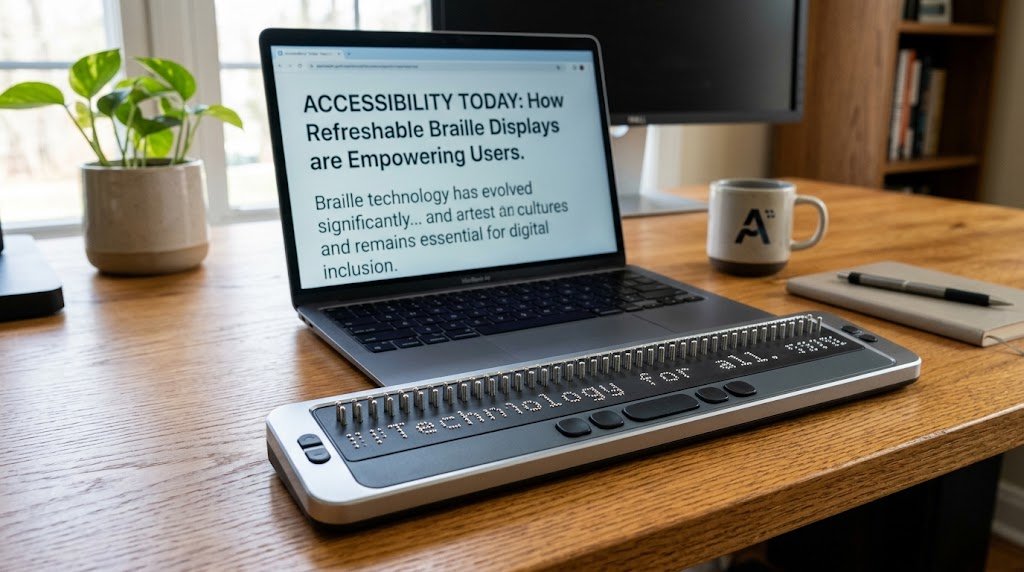
| Braille display | Presents digital information through refreshable tactile cells | Reading digital content by touch |
| Braille embosser | Produces tactile Braille on paper | Creating physical Braille documents |
These tools can work together. For example, a screen reader may send content to a compatible refreshable Braille display. The Library of Congress explains how such displays use moving pins to represent Braille characters.
Can a Braille translator replace a screen reader?
No. A translator converts text representations, while a screen reader helps users interact with digital content. Someone browsing a website may need a screen reader, keyboard navigation, or a Braille display rather than a standalone conversion website.
Practical Examples
These examples show how to select and evaluate a Braille translator without assuming every tool behaves identically.
Example 1: A student learning Braille
A student wants to understand how a short English word appears in Braille.
A sensible approach is to:
- Choose an educational translator that supports English.
- Use uncontracted Braille if the lesson teaches individual letters.
- Compare the displayed symbols with a trusted Braille alphabet reference.
- Practice identifying the dot positions rather than memorizing the appearance of the symbols alone.
This approach makes the translator a learning aid instead of treating it as an unquestionable answer key.
Example 2: A business preparing an accessible notice
A business wants to prepare a Braille version of a notice containing a room number, opening hours, and contact information.
The business should not simply paste the notice into any converter and send it to print. It should:
- Select the correct Braille code for the intended readers.
- Check the handling of numbers, punctuation, abbreviations, and formatting.
- Confirm the requirements for the intended sign or document.
- Arrange review by a qualified Braille transcriber or production specialist.
- Inspect the final tactile output before distribution.
This additional review matters because an apparently readable screen preview may not meet the requirements of the final printed material.
Common Mistakes to Avoid
The most common mistakes involve choosing the wrong code, trusting an unverified output, or confusing a digital Braille symbol with a complete translation.
1. Assuming all Braille is identical
Braille conventions can differ by language and subject. Mathematical notation, music, and computer-related material may require specialized codes rather than ordinary literary Braille. The Library of Congress documents several distinct Braille codes for different uses.
2. Ignoring contractions
A translator that handles individual letters may not support contracted Braille. Check the tool’s documentation before converting a long passage or preparing material for a reader who expects contracted text.
3. Forgetting numbers and punctuation
Numbers and punctuation follow Braille-specific rules. Review them carefully, especially in addresses, phone numbers, dates, prices, and instructions.
4. Treating Unicode output as proof of accuracy
Unicode makes it possible to represent Braille patterns digitally. It does not guarantee that a tool has correctly applied the relevant language and transcription rules.
5. Skipping human review
For a classroom exercise, a simple converter may be sufficient. For safety information, public signage, official notices, or lengthy documents, use an appropriate review and production process.
How to Choose the Right Braille Translator
The best Braille translator is the one that supports your language, intended Braille code, and required output format.
Use this checklist before choosing a tool.
- Language: Does it support the language you want to convert?
- Braille code: Does it use the correct code for your intended readers?
- Contractions: Can you select contracted or uncontracted Braille when needed?
- Punctuation and numbers: Does the tool handle these according to the selected code?
- Direction: Can it convert text to Braille, Braille to text, or both?
- Output: Can you copy, download, or export the result in the required format?
- Accessibility: Can you operate the website using a keyboard and assistive technology?
- Privacy: Does the service explain how it handles submitted text?
- Verification: Can you compare the result against a trusted reference or arrange expert review?
Should you use a free online translator?
A free tool can be a practical starting point for learning, testing simple text, and exploring Braille patterns. However, price alone does not determine whether a translator is suitable.
Check its supported features and documentation. If the output will be used by someone who relies on Braille for essential information, prioritize accuracy, accessibility, and qualified review over convenience.
[AUTHOR EXPERIENCE: Add a genuine example of testing a translator, including the tool used, the text tested, and any limitations observed. Do not claim testing that has not taken place.]
Frequently Asked Questions
1. What is a Braille translator?
A Braille translator is a digital tool that converts written text into Braille notation or translates supported Braille input into readable text. Its capabilities depend on the language, code, and software rules it supports. A simple online converter may be useful for learning, but important documents need appropriate verification.
2. Can I translate English into Braille for free?
Yes, some online services provide free English-to-Braille conversion. Before using one, check whether it supports the Braille code and contraction settings you need. Free access does not guarantee complete transcription features or publication-ready accuracy, so review the result before sharing or printing it.
3. Can a Braille translator convert Braille back to English?
Some tools support both directions, but reverse translation depends on the input format and the code used. Contractions and contextual rules can make the original wording difficult to recover perfectly. If you need to interpret existing Braille, choose a tool that explicitly supports the relevant format and verify uncertain results.
4. Is Braille a language?
No. Braille is a writing code that represents languages through tactile patterns. English, for example, can be represented using English Braille conventions. Braille is not the same as a spoken language or a signed language, and different languages may use different Braille rules.
5. What is the difference between contracted and uncontracted Braille?
Uncontracted Braille generally represents text letter by letter, while contracted Braille uses established contractions for common words and letter groups. Uncontracted Braille can help beginners learn basic patterns. Contracted Braille can be more compact, but readers and translators must understand its rules to use it correctly.
6. Can I use a Braille translator on my phone?
Yes, if the website or app works with your mobile browser and accessibility settings. You may be able to copy the result into another app or use compatible assistive technology. Check keyboard and screen-reader compatibility, and remember that visible Braille characters on a phone are not themselves tactile output.
7. Are online Braille translators accurate?
Accuracy varies with the translator, supported language, code, and input. A basic character mapper may not handle contractions, context, or specialist notation correctly. Use online tools for suitable low-risk tasks, compare results against reliable references, and arrange qualified review when accuracy is important.
8. Can I print the result from a Braille translator?
You can print ordinary text containing Braille Unicode symbols, but that does not automatically produce readable tactile Braille. Tactile documents require an appropriate production method, such as a Braille embosser, and the document must follow the applicable transcription and formatting rules. Confirm the output before distributing it.
Conclusion
A Braille translator can make it easier to explore Braille patterns, convert simple text, and understand digital accessibility. The most important step is choosing a tool that supports the correct language and Braille code.
For learning and basic experiments, an online converter may be enough. For signs, formal documents, or information that people depend on, verify the translation and arrange specialist review. A correct Braille result must communicate the intended meaning, not merely display a series of Braille symbols.



One Comment