iPhone Size Comparison: Screen Sizes, Dimensions & Weight
iPhone Size Comparison: Choosing an iPhone is not only about camera quality, storage, or performance. iPhone size comparison is equally important because the physical size of a phone affects how comfortably you hold it, how easily it fits in your pocket, and how much screen space you get for everyday tasks. Two iPhones can have similar display measurements but feel quite different because of their height, width, thickness, and weight.
Apple offers iPhone Size Comparison, from compact older models to large Pro Max devices. Some models are designed for people who prefer a phone they can use with one hand, while others provide a bigger display for videos, gaming, reading, and multitasking.
This guide compares popular iPhone models by screen size, body dimensions, and weight. It also explains what those numbers mean in everyday use, so you can choose a phone that fits your hands, habits, and budget.
Understanding iPhone Screen Size and Physical Dimensions
Before comparing individual models, it helps to understand the measurements Apple uses.
What Does Screen Size Mean?
An iPhone’s screen size is measured diagonally from one corner of the display to the opposite corner. It is usually listed in inches, such as 6.1 inches, 6.3 inches, or 6.9 inches.
A larger diagonal measurement generally means more display space. However, it does not tell you the complete physical size of the phone. Screen borders, rounded corners, and the shape of the device also affect the final design.
For example, two phones with 6.1-inch displays may have slightly different body dimensions. One may be taller, wider, or heavier than the other.
What Do Height, Width, and Thickness Mean?
Physical dimensions describe the outside of the phone:
- Height: The distance from the top edge to the bottom edge.
- Width: The distance from the left edge to the right edge.
- Thickness or depth: How thick the phone is from front to back.
- Weight: How heavy the device feels when you hold it.
These measurements matter when choosing a phone for one-handed use, pocket storage, or long periods of reading and gaming.
Why Weight Matters
A phone’s weight can make a noticeable difference over time. A lighter model may feel more comfortable during long calls or while reading. A heavier model may provide a larger display and a more substantial feel, but it can become tiring for some users.
Do not judge a phone by screen size alone. Consider its complete dimensions and weight before making a decision.
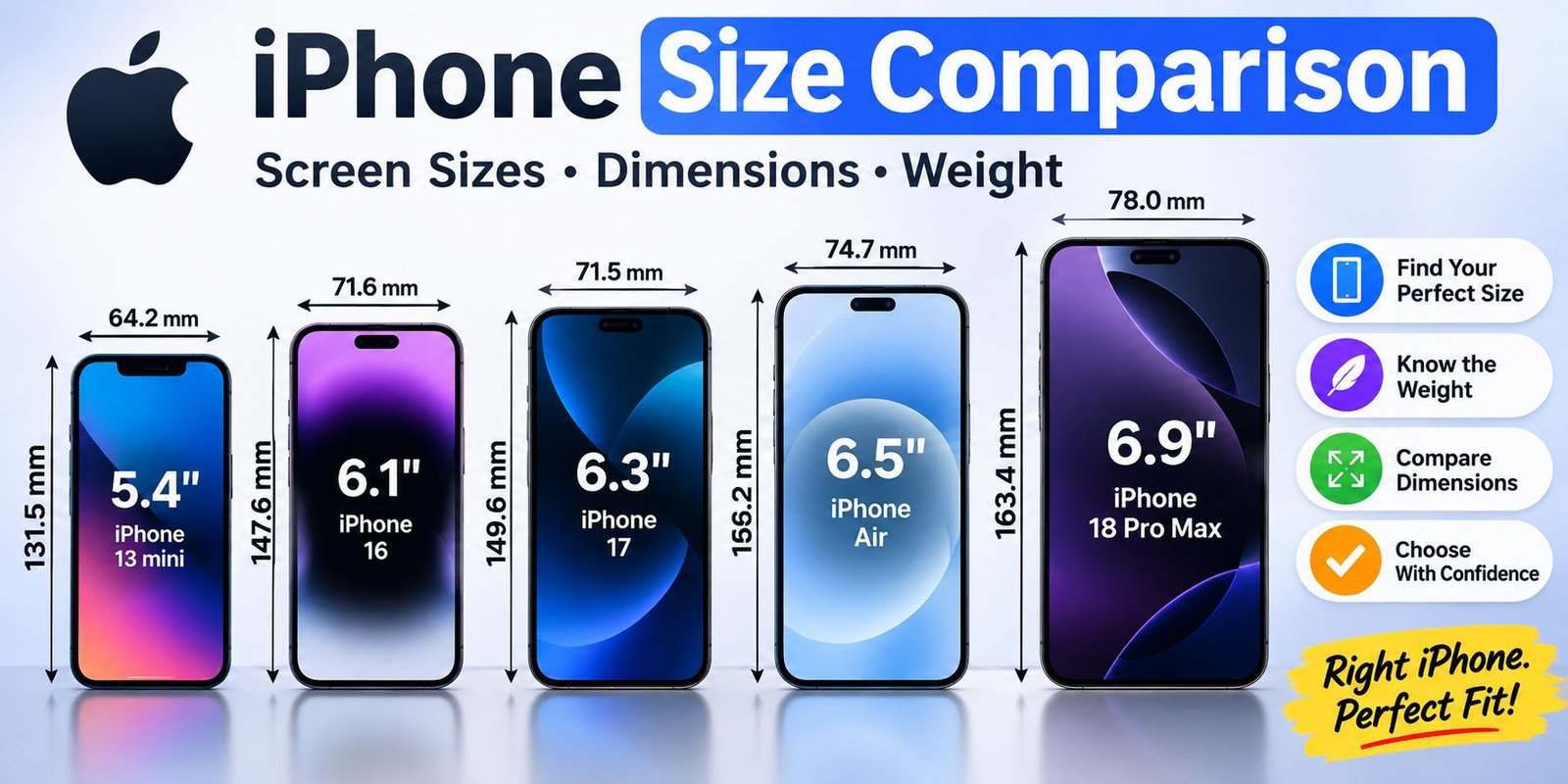
iPhone Size Comparison Chart
The following table highlights selected recent and popular iPhone models. Measurements are approximate conversions of Apple’s published specifications and can vary slightly by model configuration.
| iPhone model | Display size | Height | Width | Thickness | Weight |
|---|---|---|---|---|---|
| iPhone 18 Pro Max | 6.9 inches | 163.4 mm | 78.0 mm | 8.75 mm | 249 g |
| iPhone 18 Pro | 6.3 inches | 150.0 mm | 71.9 mm | 8.75 mm | 211 g |
| iPhone 17 Pro Max | 6.9 inches | 163.4 mm | 78.0 mm | 8.75 mm | 233 g |
| iPhone 17 Pro | 6.3 inches | 150.0 mm | 71.9 mm | 8.75 mm | 206 g |
| iPhone 17 | 6.3 inches | 149.6 mm | 71.5 mm | 7.95 mm | 177 g |
| iPhone Air | 6.5 inches | 156.2 mm | 74.7 mm | 5.64 mm | 165 g |
| iPhone 17e | 6.1 inches | 146.7 mm | 71.5 mm | 7.80 mm | 169 g |
| iPhone 16 | 6.1 inches | 147.6 mm | 71.6 mm | 7.80 mm | 170 g |
| iPhone 15 | 6.1 inches | 147.6 mm | 71.6 mm | 7.80 mm | 171 g |
| iPhone 13 | 6.1 inches | 146.7 mm | 71.5 mm | 7.65 mm | 174 g |
| iPhone 13 mini | 5.4 inches | 131.5 mm | 64.2 mm | 7.65 mm | 141 g |
Note: The chart is a selection of models, not a complete list of every iPhone ever released. Check Apple’s technical specifications for the exact model you plan to purchase.
The chart shows why display size and physical size should be considered separately. The iPhone Air, for example, has a 6.5-inch screen but is notably thin and relatively light. The iPhone 17 and iPhone 17 Pro have similar display measurements, but their weights and thicknesses differ.
iPhone Size Comparison: Models by Size
iPhone 18 Pro Max: A Large Display for Media and Multitasking
The iPhone 18 Pro Max is one of the largest options in Apple’s current lineup. Its 6.9-inch display provides a generous viewing area for movies, games, documents, and websites.
Its body measures approximately 163.4 mm in height and 78 mm in width. That makes it wider and taller than standard iPhone models. The larger body may be comfortable for people who prefer a spacious screen, but it can be harder to operate with one hand.
The Pro Max size may suit you if you:
- Watch videos frequently on your phone.
- Play games that benefit from a larger display.
- Read long articles or documents.
- Prefer a spacious keyboard.
- Do not mind carrying a larger device.
However, users with smaller hands may find it difficult to reach the top corners without adjusting their grip. It is also worth considering the phone’s weight before buying it.
iPhone 18 Pro: A More Manageable Pro Option
The iPhone 18 Pro offers a 6.3-inch display in a smaller body than the Pro Max. It is designed for people who want a premium iPhone without choosing the largest available model.
Its approximate height is 150 mm, and its width is 71.9 mm. These dimensions make it easier to carry than the Pro Max, although its weight is still higher than some standard models.
The smaller display does not mean it is unsuitable for entertainment. It can still provide plenty of space for browsing, watching videos, taking photos, and playing games.
Choose this size if you want a premium device but prefer a phone that is less wide and tall than the largest model.
iPhone 17 Pro Max: Large-Screen Comfort
The iPhone 17 Pro Max also has a 6.9-inch display. Its body is approximately 163.4 mm tall and 78 mm wide, giving it a similar overall footprint to the newer Pro Max model listed above.
Its larger screen is useful for people who regularly watch videos, edit content, read, or use demanding apps. The trade-off is portability. A phone of this size may take up more room in a pocket and can be harder to operate with one hand.
If you are upgrading from a smaller iPhone, try holding a Pro Max model in a shop before purchasing it. A large display can look appealing in photographs but feel very different in everyday use.
iPhone 17 Pro: A Smaller Premium Alternative
The iPhone 17 Pro has a 6.3-inch display and a body that is shorter and narrower than the Pro Max. It is a practical option for people who want a smaller premium phone.
Its approximate dimensions are 150 mm high, 71.9 mm wide, and 8.75 mm thick. It is still heavier than the standard iPhone 17, so the two models may feel different even though their display sizes are close.
This model may be a better fit if you want a premium feature set but do not need the largest screen Apple offers.
iPhone 17: A Balanced Everyday Size
The iPhone 17 has a 6.3-inch display and measures approximately 149.6 mm in height and 71.5 mm in width. Its weight is around 177 grams.
These measurements make it a balanced option between compact handling and a spacious display. It provides more screen area than older 6.1-inch models while keeping its body relatively manageable.
The iPhone 17 may suit people who want:
- A screen for videos and social media.
- Enough space for reading and browsing.
- A phone that is not as large as a Pro Max.
- A moderate weight for everyday carrying.
It is worth remembering that a 6.3-inch display does not automatically make a phone difficult to handle. The width, weight, and shape of the body also affect comfort.
iPhone Air: A Thin and Lightweight Design
The iPhone Air stands out because of its slim body. It has a 6.5-inch display, measures approximately 156.2 mm tall and 74.7 mm wide, and is around 5.64 mm thick.
Despite its larger screen, its listed weight is approximately 165 grams. This makes it a relatively light option compared with several other large-screen iPhones.
The thin design may appeal to people who want a larger viewing area without carrying a thick, heavy phone. However, a thin phone can feel different in the hand from a more conventional design. A protective case may also change its overall thickness.
If you are considering this model, compare how it feels in person rather than relying only on its measurements.
iPhone 17e: A Familiar 6.1-Inch Size
The iPhone 17e has a 6.1-inch display and a body measuring approximately 146.7 mm tall and 71.5 mm wide. Its weight is around 169 grams.
This size is useful for people who prefer a traditional iPhone shape. It is not as compact as the old mini models, but it is smaller than the large Plus and Pro Max designs.
A 6.1-inch phone can be a good middle ground. It provides enough display space for messaging, browsing, videos, and everyday apps without becoming as wide as a large-screen model.
iPhone 16 and iPhone 15: Similar Physical Dimensions
The iPhone 16 and iPhone 15 have very similar body measurements. Both feature a 6.1-inch display and measure approximately 147.6 mm in height and 71.6 mm in width.
Their thickness is around 7.8 mm. The iPhone 16 weighs approximately 170 grams, while the iPhone 15 weighs approximately 171 grams.
Because their physical dimensions are so close, the difference in everyday handling is small. If you are deciding between these two models, other factors such as performance, camera features, software support, and price may matter more than size.
iPhone 13: A Popular 6.1-Inch Design
The iPhone 13 has a 6.1-inch display and measures 146.7 mm tall, 71.5 mm wide, and 7.65 mm thick. Its weight is approximately 174 grams.
Although it is an older model, its body size remains a useful reference when comparing newer standard iPhones. The iPhone 13 is close in overall dimensions to several later 6.1-inch models.
If you are upgrading from an iPhone 13, moving to a standard 6.1-inch or 6.3-inch model may not feel like a dramatic change in hand size. A Pro Max model, on the other hand, will feel substantially larger.
iPhone 13 mini: A Compact Phone
The iPhone 13 mini is one of the most compact models in this comparison. It has a 5.4-inch display and measures approximately 131.5 mm tall and 64.2 mm wide.
At around 141 grams, it is also considerably lighter than the larger models listed in the chart.
The mini design is useful for people who value portability and one-handed use. Its smaller screen, however, leaves less room for videos, games, typing, and reading.
If you prefer compact phones, the 13 mini is a useful size reference. Keep in mind that it is an older model, so availability, battery condition, and software support should be considered when buying one today.
6.1-Inch vs. 6.3-Inch vs. 6.9-Inch iPhones
Display measurements can help narrow your choices, but each size offers a different balance.
6.1-Inch iPhones
A 6.1-inch display is a practical choice for everyday use. It provides enough room for messaging, browsing, video calls, and social media while keeping the phone’s body relatively manageable.
This size may be suitable if you:
- Prefer a phone that fits comfortably in most pockets.
- Use your phone with one hand.
- Do not need the largest possible screen.
- Want a balance between portability and viewing space.
6.3-Inch iPhones
A 6.3-inch screen provides a little more viewing space than a 6.1-inch display. It can make reading, watching videos, and using apps more comfortable without moving to a large Pro Max device.
The difference may seem small on paper, but the overall experience also depends on the phone’s bezels, aspect ratio, and body design.
6.9-Inch iPhones
A 6.9-inch display is designed for people who enjoy a large screen. It can be helpful for gaming, streaming, reading, and working with documents.
The main disadvantage is the larger body. It may be harder to use with one hand, and some users may find it uncomfortable to carry for long periods.
A large screen is not automatically the best choice. Think about how often you use your phone with one hand and whether you are comfortable carrying a wider device.
Which iPhone Size Is Best for One-Handed Use?
One-handed comfort depends on more than the diagonal display measurement. A phone’s width is particularly important because it affects how far your thumb must stretch across the screen.
Shorter phones can also be easier to reach from top to bottom. Weight matters because a heavy device may become uncomfortable when held for long periods.
If one-handed use is your priority, consider these points:
- Look for a narrower body.
- Compare the phone’s height as well as its screen size.
- Check the weight before purchasing.
- Hold the phone in one hand if possible.
- Consider how a protective case will change its size.
The iPhone 13 mini is a strong example of a compact design, while standard 6.1-inch models offer a more modern middle ground. Large Pro Max models are better suited to people who value display space over compact handling.
Which iPhone Is Best for Watching Videos and Gaming?
A larger display can make entertainment more enjoyable. Videos are easier to view, on-screen controls have more room, and games may feel less cramped.
The 6.9-inch Pro Max models provide the largest conventional screen size in this comparison. A 6.5-inch iPhone Air and 6.3-inch models can also offer a comfortable viewing experience.
However, screen size is only one part of the experience. Consider display quality, refresh rate, brightness, battery life, speakers, and performance as well.
For frequent gaming, a larger screen may be helpful, but it can also make the phone heavier. If you play games for long sessions, grip comfort should be part of your decision.
Does a Bigger iPhone Always Have a Better Display?
No. A larger display does not automatically mean better picture quality.
Screen size describes the diagonal measurement. Display quality depends on other specifications, including:
- Resolution: The number of pixels used to create the image.
- Pixel density: How closely pixels are packed together.
- Brightness: How clearly the display can be viewed in different lighting.
- Refresh rate: How often the screen updates each second.
- Display technology: The panel technology used to produce colors and contrast.
A smaller iPhone can have an excellent display, while a larger phone may offer more viewing space. The right choice depends on whether you value image quality, screen area, or both.
Does an iPhone Case Change the Phone’s Size?
Yes. A protective case adds extra thickness and width to the device. A slim case may make only a small difference, while a rugged case can make the phone noticeably bulkier.
This matters when comparing two phones that already have similar dimensions. A case can make one model feel much larger than its official measurements suggest.
Before purchasing a case, check that it is made for your exact iPhone model. Similar screen sizes do not guarantee that two phones share the same body shape, camera placement, or button positions.
Do not assume that a case for one 6.1-inch iPhone will fit another 6.1-inch model. Always confirm compatibility with the manufacturer or seller.
How to iPhone Size Comparison Two iPhones Before Buying
If you are choosing between two models, use a simple comparison process.
Step 1: Compare Height and Width
Start with the physical dimensions. Height affects how much of the phone extends above and below your hand, while width affects how comfortably you can grip it.
Step 2: Check the Weight
A difference of several grams may seem minor, but it can affect comfort during long periods of use. Consider whether you prefer a lightweight phone or do not mind a heavier device.
Step 3: Compare Display Measurements
Look at the diagonal screen size, but also consider the display’s resolution and features. A larger screen is useful only if it suits your viewing habits.
Step 4: Think About Your Daily Routine
Ask yourself how you use your phone. If you mostly send messages, make calls, and browse, a standard model may be enough. If you watch videos or play games regularly, a larger screen may be more appealing.
Step 5: Check Accessories
If you already own chargers, cases, mounts, or other accessories, confirm whether they work with the model you want to buy. Physical similarity does not guarantee accessory compatibility.
Common Mistakes When iPhone Size Comparison
People sometimes choose a phone based on one specification and overlook other important details.
iPhone Size Comparison: Two phones with the same diagonal measurement can have different body dimensions.
Ignoring weight: A large phone may offer more viewing space but feel tiring during long use.
Assuming every case fits: Screen size alone does not determine case compatibility.
Forgetting the camera design: Camera bumps and different back-panel layouts can affect how a phone sits on a flat surface and which cases fit.
Choosing the biggest model automatically: A larger phone is not necessarily more comfortable or practical for every user.
Ignoring your current phone: If you are upgrading, iPhone Size Comparison your existing device with the new one. This gives you a better idea of how much larger or smaller the new phone will feel.
Frequently Asked Questions
1. Which iPhone has the biggest screen?
Among the conventional models in this comparison, the iPhone 18 Pro Max has a 6.9-inch display. Apple’s folding iPhone Duo offers a larger inner display when opened, so it belongs to a different design category.
2. Which iPhone is the smallest in this comparison?
The iPhone 13 mini is the smallest phone in the chart, with a 5.4-inch display and a body measuring approximately 131.5 mm by 64.2 mm.
3. Is a 6.1-inch iPhone big enough?
For many people, yes. A 6.1-inch display provides useful space for messaging, browsing, social media, video calls, and watching content. It is a balanced option if you do not need a very large screen.
4. Is the iPhone Pro Max too big for one hand?
It may be difficult for some people to operate comfortably with one hand because of its height and width. Hand size and personal preference make a difference, so try holding one before buying.
5. Are the iPhone 15 and iPhone 16 the same size?
Their published body dimensions are very similar. Both have a 6.1-inch display and measure approximately 147.6 mm tall and 71.6 mm wide.
6. Is the iPhone 17 bigger than the iPhone 16?
The iPhone 17 has a 6.3-inch display, while the iPhone 16 has a 6.1-inch display. Their body dimensions are close, but the iPhone 17 is slightly taller.
7. Does a bigger screen mean a bigger phone?
Usually, a larger screen requires a larger display area, but the relationship is not exact. Screen borders, body design, and aspect ratio affect the phone’s overall dimensions.
8. Which iPhone size is best for gaming?
A larger display can provide more room for game controls and visuals. A 6.3-inch or 6.9-inch model may suit some players, but weight, performance, battery life, and grip comfort also matter.
9. Do iPhone dimensions include the camera bump?
Published body dimensions describe the phone’s main physical measurements. Camera modules can extend beyond the rear surface, so the camera area may add to the effective thickness at that point.
10. Should I buy a large or small iPhone?
Choose a smaller model if portability and one-handed use are your priorities. Choose a larger model if you regularly watch videos, play games, or read on your phone. Your comfort matters more than choosing the model with the biggest display.
Final Thoughts
An iPhone size comparison helps you understand how different models balance screen space, portability, and comfort. A 6.1-inch iPhone can be a sensible everyday choice, while 6.3-inch models provide additional viewing room without reaching the size of a Pro Max device. Large 6.9-inch phones are useful for people who want an expansive display, but they require more space in your hand and pocket.
Before making a decision, iPhone Size Comparison height, width, thickness, and weight alongside screen size. If possible, hold the phone in person and test how it feels with one hand. The best iPhone is not necessarily the biggest or smallest one. It is the model that feels comfortable and works well with your daily routine.