What Is a Webhook? A Beginner’s Guide
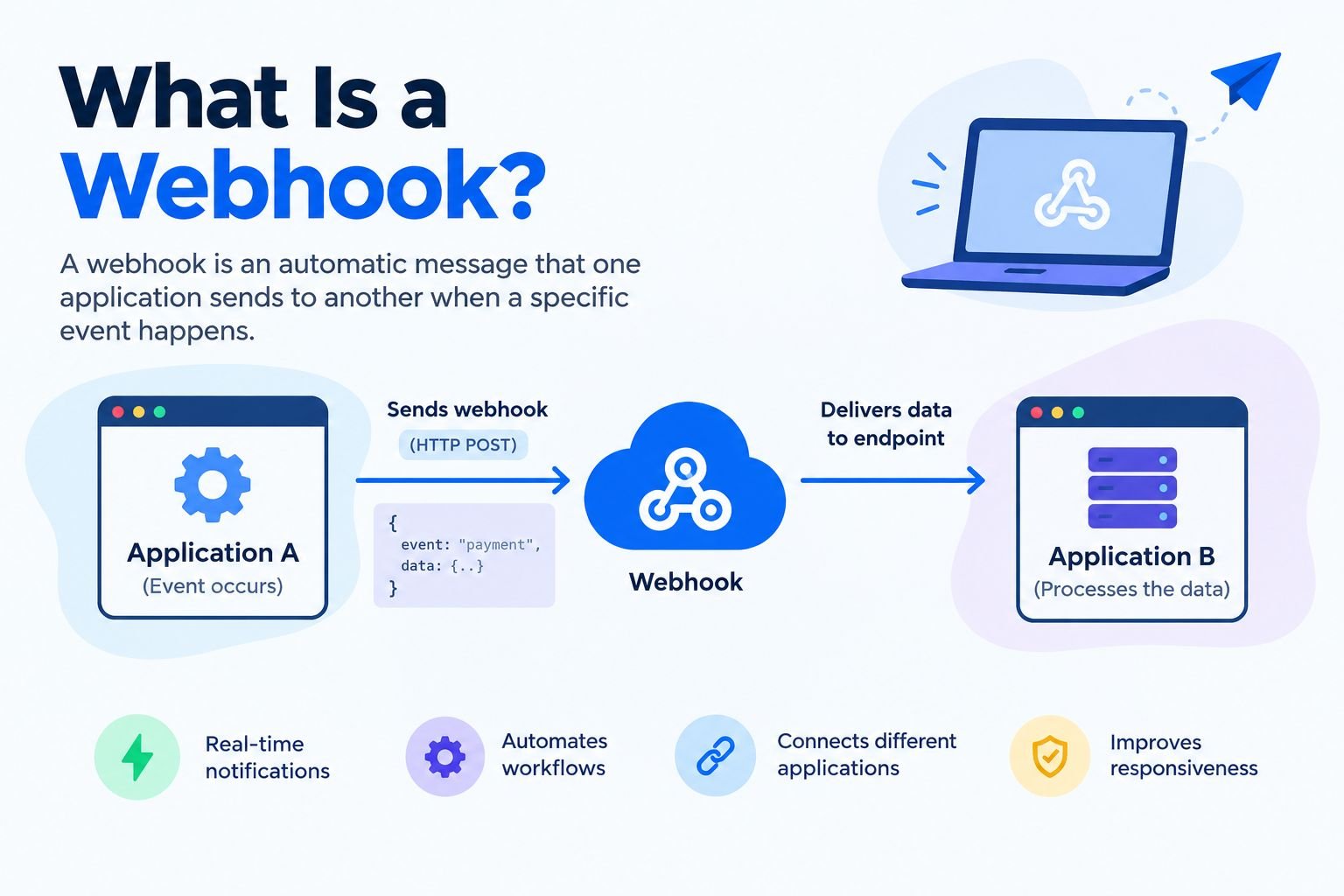
A webhook is an automatic message that one application sends to another when a specific event happens. It allows applications to share information and respond to changes without repeatedly checking for updates. Webhooks are commonly used for payment notifications, website integrations, messaging systems, and business automation.
What Is a Webhook?
A webhook is a communication method that allows one application to notify another application when something happens. It usually sends information to a specific web address called an endpoint.
Think of a webhook like a delivery notification. Instead of repeatedly checking whether your package has shipped, you receive a notification when its status changes. Webhooks work similarly by sending automatic notifications between software applications.
For example, when a customer completes an online payment, a payment service can send a webhook to the store. The store can then update the order status and begin processing the purchase.
What Information Does a Webhook Send?
A webhook request usually contains information about the event that triggered it. The exact information depends on the service and its configuration.
Common components include:
- Event: The action that happened, such as a payment or account update.
- Endpoint URL: The address that receives the webhook.
- HTTP request: The method used to send the information, often POST.
- Payload: The data describing the event.
- Headers: Additional information used for content handling and security.
Many webhooks send data in JSON format. However, some services use other formats depending on their requirements.
What Is a Webhook URL?
A webhook URL is the destination where an application sends event notifications. The receiving application uses this address to accept and process incoming requests.
For example, an online store might use a dedicated endpoint to receive payment updates. When the payment provider sends a notification, the store’s system checks the request and updates the relevant order.
A webhook URL alone does not create a working integration. The receiving application must also be configured to handle the incoming information.
How Do Webhooks Work?
Webhooks work through an event-driven process. When a specific event occurs, the sending application creates a request and delivers it to the configured endpoint.
Step 1: An Event Occurs
The process begins when something happens in an application. This event could be a successful payment, a new customer registration, or a file update.
The application monitors the events selected in its webhook settings.
Step 2: The Application Sends a Request
When the selected event occurs, the sending service prepares a request containing relevant information.
The service then sends the request to the destination URL. Many webhook systems use an HTTP POST request to deliver the event data.
Step 3: The Receiving Application Checks the Request
The receiving application accepts the incoming request and checks whether it is valid.
For security, the receiver should verify the request using the authentication or signature-verification method recommended by the provider. It should also confirm that the event is relevant to its workflow.
Step 4: The Receiver Confirms Delivery
After receiving a request, the endpoint usually returns an HTTP status code. Many services expect a successful response in the 2xx range.
If the receiver responds too slowly or returns an error, the sending service may retry the delivery. However, retry behavior varies between providers.
Step 5: The Application Performs an Action
Once the receiver accepts a valid event, it can perform the required task.
For example, it might update an order, send an email notification, create a support ticket, or start an automated workflow.
This process helps applications communicate without requiring users to perform every step manually.
Webhook Examples in Everyday Use
Webhooks are useful whenever one application needs to respond to events in another system. They help businesses automate routine tasks and keep connected applications updated.
1. Online Payment Notifications
Online stores often use webhooks to receive payment updates.
For example, a customer purchases a product and completes the payment. The payment service sends a notification to the store when the transaction reaches the relevant status.
The store can then update the order and prepare it for fulfillment. However, it should verify the notification before taking important actions, such as shipping an order.
2. Website Notifications
A website can use webhooks to notify another application when new content is published.
For example, when a blog post becomes public, a webhook could notify an automation service. That service might send a message to a team or update a publishing checklist.
This approach reduces repetitive work and helps teams coordinate their activities.
3. Software Development
Developers use webhooks to connect code repositories with other development tools.
For example, when someone pushes new code to a repository, the system can notify a testing or deployment service. The receiving service may then start automated tests or begin a build process.
This helps development teams respond quickly to changes.
4. Customer Support Systems
Customer support software may send a webhook when a new ticket arrives or an existing ticket changes status.
Another application can receive that event and update a dashboard, notify a support agent, or start a workflow.
The receiving system still needs appropriate permissions and rules to process the information correctly.
5. Business Automation
Webhooks can connect different business applications to reduce manual tasks.
For example, when someone submits a form, a webhook may send the submission details to an automation platform. The platform could then add the contact to a customer management system or notify the relevant team.
The available actions depend on the connected applications and their features.
Webhook vs API: What Is the Difference?
A webhook and an API both help applications communicate, but they work in different ways. An API allows an application to request information or perform an action, while a webhook typically sends a notification when a particular event occurs.
| Feature | Webhook | API |
|---|---|---|
| Communication method | Sends event notifications | Handles requests and responses |
| Typical trigger | A selected event occurs | An application makes a request |
| Timing | Often near real time | Depends on when requests are made |
| Repeated checking | Usually unnecessary for subscribed events | Polling may require repeated requests |
| Common use | Notifications and automated reactions | Retrieving data and requesting actions |
| Main limitation | Delivery may fail or be delayed | Frequent polling may use extra resources |
When Should You Use a Webhook?
Use a webhook when an application needs to react to a particular event automatically.
For example, a store can receive a payment notification without repeatedly asking the payment provider whether the transaction has changed.
Webhooks are especially useful for event notifications, alerts, and automated workflows.
When Should You Use an API?
Use an API when an application needs to request information or perform a specific operation.
For example, a dashboard may call an API to retrieve a customer’s current account details when the page opens.
APIs are also useful when an application needs information that was not included in a webhook payload.
Can Webhooks and APIs Work Together?
Yes. Many integrations use both technologies.
A webhook might notify an application that an order has changed. The application can then call the provider’s API to retrieve additional order information.
This combination provides automatic event notifications and access to more detailed data when needed.
Types of Webhooks
Webhook implementations vary according to the application, event, and delivery method. The following are common examples.
Incoming Webhooks
An incoming webhook allows an application to receive information from another service.
For example, a messaging platform may provide an incoming webhook that allows another application to send notifications to a channel.
Outgoing Webhooks
An outgoing webhook sends information from a service to an external endpoint when a configured event occurs.
For example, a website might send a notification to an automation service when a new form submission arrives.
Payment Webhooks
Payment webhooks report transaction-related events, such as successful payments or subscription changes.
They help online businesses update records and coordinate payment-related workflows.
Development Webhooks
Development webhooks notify tools about activities in a code repository or software project.
These notifications can trigger testing, deployment, or other automated development tasks.
These categories can overlap. The most important factors are the event being reported, the data included, and how the receiving application processes it.
How to Set Up a Webhook
Setting up a webhook generally involves choosing an event, configuring a destination, and testing the receiving application. The exact steps depend on the service you use.
Step 1: Choose the Event
Decide which action should trigger the webhook.
Examples include a successful payment, a new order, a published article, or a new support ticket.
Choose only the events needed for your workflow. This makes the integration easier to manage.
Step 2: Configure the Webhook URL
Open the sending service’s integration or developer settings and find the webhook configuration option.
Enter the destination URL provided by your receiving application or automation platform.
Some services require additional verification before allowing webhook deliveries.
Step 3: Configure the Receiving Application
The receiving application must know how to handle incoming requests.
It should understand the payload format, validate the request, and determine what action to perform.
If you do not write code, check whether your existing software provides a built-in webhook integration or a visual automation tool.
Step 4: Configure Security
Use HTTPS and follow the provider’s recommended authentication or signature-verification process.
Keep secrets and credentials private. Do not expose sensitive information in public URLs or client-side code.
Step 5: Test the Webhook
Send a test event if the service provides that option.
Confirm that the receiving application gets the request and performs the expected action. Also test what happens when the endpoint is unavailable or receives invalid information.
Step 6: Monitor the Integration
After enabling the webhook, review delivery logs and error messages.
Make sure you understand the provider’s retry policy and have a way to identify failed deliveries.
Testing and monitoring help prevent small configuration problems from disrupting an important workflow.
Are Webhooks Secure?
Webhooks can be secure when implemented correctly. However, an endpoint that accepts requests without verification may allow unauthorized users to trigger actions.
Security should be part of the initial setup rather than something added after a problem occurs.
Verify Incoming Requests
Use the sender’s documented signature-verification method when available. This helps the receiving application determine whether the request came from the expected service and whether its contents have been changed.
Do not trust a request simply because it contains familiar event names or data.
Use HTTPS
HTTPS helps protect information while it travels between applications.
It also helps the receiving application establish a secure connection to the intended service. However, HTTPS alone does not prove that a request came from an authorized sender.
Protect Secrets
Store webhook secrets and API credentials in secure configuration or secret-management systems.
Limit access to the people and applications that need it. Avoid including credentials in public repositories, URLs, or unnecessary logs.
Prevent Duplicate Processing
A service may send the same event more than once because of retries or delivery problems.
The receiving application should recognize duplicate events and prevent them from triggering repeated actions.
For example, a duplicate payment notification should not cause an order to be fulfilled twice.
Limit Access and Permissions
A webhook should only be able to trigger actions that are appropriate for its purpose.
Avoid giving an integration unnecessary access to private information or important administrative functions.
Common Webhook Problems and Their Solutions
Webhook problems often occur because of incorrect configuration, network issues, security checks, or application errors.
| Problem | Possible Cause | Solution |
|---|---|---|
| No webhook arrives | Incorrect URL or event settings | Check the destination and selected events. |
| The endpoint returns an error | Application or server problem | Review error responses and server logs. |
| The request times out | Processing takes too long | Acknowledge requests quickly and process lengthy tasks in the background. |
| Verification fails | Incorrect secret or signature handling | Follow the provider’s verification instructions. |
| An event is processed twice | Duplicate delivery or retry | Track event identifiers and make processing safe to repeat. |
| Delivery arrives late | Network problems or provider retries | Review delivery records and retry behavior. |
| Information is missing | The payload contains limited data | Check the event format or retrieve additional details through an API. |
What Happens When a Webhook Fails?
The result depends on the sending service. Some providers retry failed deliveries automatically, while others require manual or programmatic recovery.
Check the service’s documentation to understand its retry rules and delivery history.
For important workflows, maintain a recovery process so that missed events can be identified and handled.
Why Is Idempotency Important?
Idempotency means that processing the same event more than once does not accidentally repeat an important operation.
For example, if an application receives the same order notification twice, it should not create two separate orders.
Applications can use event identifiers and appropriate database checks to detect repeated deliveries. This is particularly important for payments and other sensitive business operations.
Webhook Best Practices
Following good practices can make webhook integrations more reliable, secure, and easier to maintain.
- Select relevant events: Subscribe only to events the application needs.
- Verify requests: Use the security method recommended by the provider.
- Use HTTPS: Protect data during transmission.
- Respond quickly: Avoid keeping the sender waiting for lengthy processing.
- Use background tasks: Process time-consuming operations separately when appropriate.
- Handle duplicates: Ensure repeated events do not cause unwanted actions.
- Monitor deliveries: Record relevant errors and processing outcomes.
- Plan for failures: Understand retries and establish a recovery procedure.
- Protect sensitive data: Avoid logging secrets or unnecessary private information.
- Test before launch: Check successful requests, invalid requests, and temporary outages.
Webhook Setup Checklist
Before relying on a webhook in a production workflow, confirm the following:
- The destination URL is correct and reachable.
- The required events are enabled.
- Incoming requests are authenticated or verified appropriately.
- HTTPS is configured correctly.
- The endpoint responds within the provider’s required time.
- Duplicate events cannot trigger repeated critical actions.
- Failed deliveries can be identified and recovered.
- Logs do not expose secrets or unnecessary private information.
- Normal and failure scenarios have been tested.
Completing these checks can help reduce common integration problems and improve reliability.
Frequently Asked Questions
1. What Is a Webhook in Simple Words?
A webhook is an automatic notification sent from one application to another when a particular event occurs. For example, a payment service can notify an online store when a transaction succeeds. The store can then update its records without repeatedly asking the payment service whether anything has changed.
2. How Do Webhooks Work?
A webhook starts when a configured event occurs in the sending application. The sender sends an HTTP request to the receiving endpoint with information about the event. The receiver validates the request, acknowledges delivery, and performs the appropriate action. The exact process depends on the provider’s configuration and delivery rules.
3. What Is the Difference Between a Webhook and an API?
An API allows applications to exchange information through defined requests and responses. A webhook typically sends an event notification automatically to a configured endpoint. APIs are useful for retrieving information or requesting actions, while webhooks help applications respond to changes. Many software integrations use both technologies together.
4. Do Webhooks Require Coding?
Not always. Some automation platforms and business applications offer visual tools for receiving webhook events and connecting workflows. However, advanced requirements such as custom request processing, signature verification, and duplicate-event protection may require technical configuration. Check whether your chosen service supports the integration features you need.
5. Are Webhooks Real-Time?
Webhooks can deliver notifications shortly after an event occurs, making them useful for near-real-time workflows. However, delivery is not always instantaneous. Network delays, server outages, queues, and retry policies can affect timing. Review the provider’s delivery guarantees before using a webhook for a workflow with strict timing requirements.
6. Are Webhooks Safe to Use?
Webhooks can be secure when implemented correctly. Use the provider’s recommended request verification, HTTPS, secure secret storage, and replay protection where supported. Also, restrict the actions a valid event can trigger. These measures help reduce the risk of unauthorized requests and repeated processing.
7. What Happens When a Webhook Fails?
A failed delivery may be retried, recorded for manual recovery, or discarded, depending on the service. Review the provider’s delivery logs and retry documentation to understand what happened. For important workflows, implement monitoring and recovery procedures so that missed notifications do not leave business records out of date.
8. Can a Webhook Send Data to Multiple Applications?
Yes, depending on the integration design. A sending service may support several webhook destinations, or one receiving endpoint may forward an event to multiple systems. The available options depend on the provider. When forwarding events, validate requests, protect sensitive information, and plan for failures in individual destinations.
Conclusion
A webhook allows applications to exchange event notifications automatically. Instead of repeatedly checking for changes, a receiving system can respond when a subscribed event occurs.
Webhooks are useful for payment notifications, website integrations, messaging, software development, and business automation. However, a reliable integration needs more than a working URL. Request verification, monitoring, retry handling, and duplicate-event protection are all important.
If you are learning about software integrations, understanding the difference between webhooks and APIs is a useful starting point. Choose a simple workflow, test the integration carefully, and review the provider’s documentation before using it for important tasks.