
Google Flow AI: Create Stunning Videos, Images, and More with AI
What Is Google Flow AI?
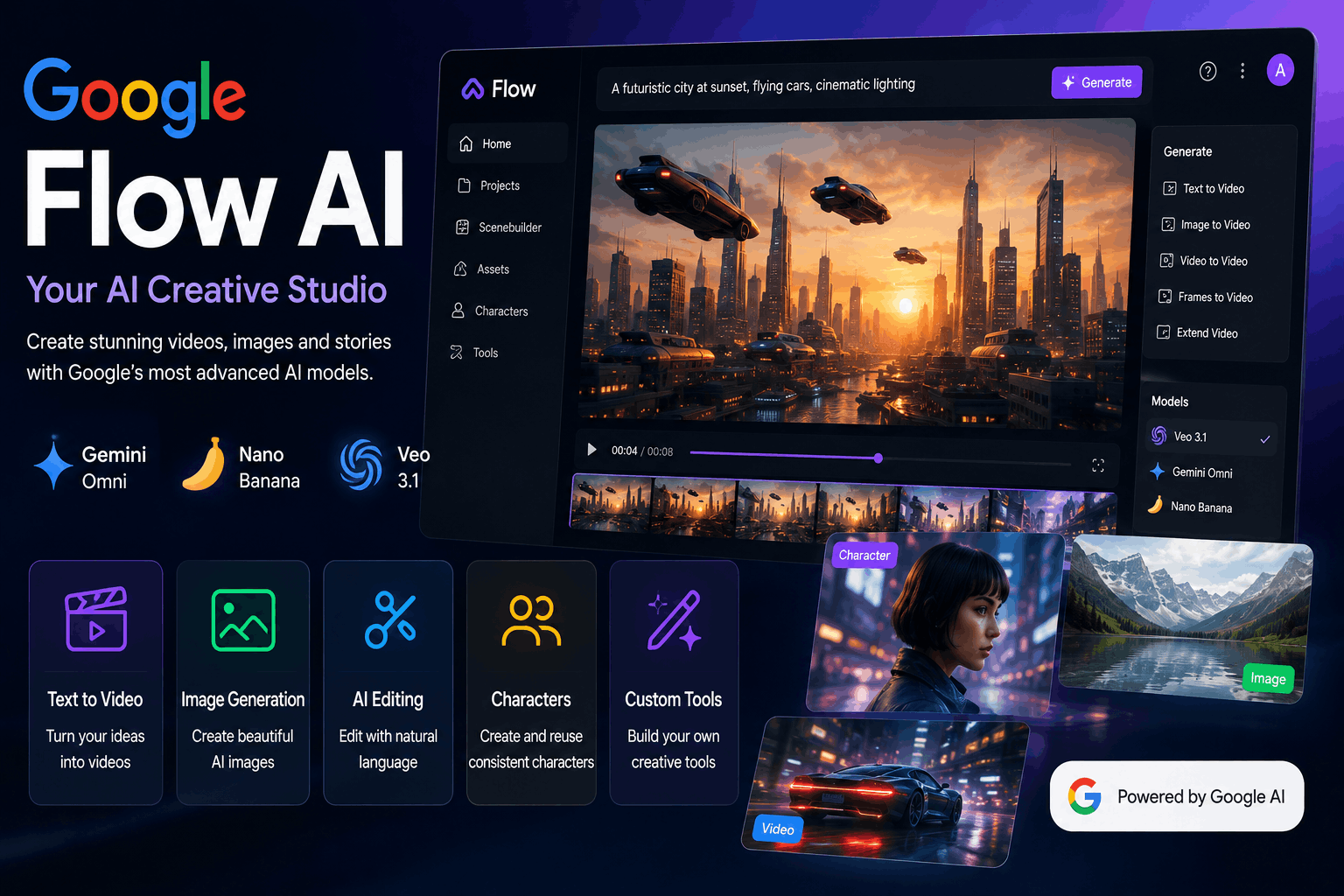
Google Flow AI is an AI-powered creative studio designed to help users turn ideas into images, videos, stories, and other visual projects. Instead of relying entirely on traditional editing software, creators can use natural-language instructions to generate and refine creative content.
Google describes Flow as an AI creative studio built around its advanced generative models. The platform currently brings together models and capabilities such as Gemini Omni, Nano Banana, and Veo 3.1.
Flow can be useful for filmmakers, content creators, designers, marketers, artists, and anyone who wants to experiment with AI-generated visual content.
What Can You Do With Google Flow AI?
Google Flow is more than a simple text-to-video generator. It combines planning, creation, editing, and creative experimentation in one workspace.
Here are some of its main capabilities.
1. Generate AI Videos
One of the biggest reasons creators may want to use Google Flow is AI video generation.
You can provide an idea or visual reference and use Google’s generative models to create video content. Flow supports workflows such as:
- Text-to-video
- Frames-to-video
- Ingredients-to-video
- Video extension
- Video-to-video editing
This makes it possible to start with a simple concept and gradually build it into a more complete visual project.
2. Create AI Images
Flow also works with image generation and editing.
Its image capabilities can help creators produce visual concepts, characters, scenes, backgrounds, and other assets. Google’s Nano Banana models are designed for image generation and editing, including tasks where maintaining visual consistency is important.
For example, a creator could generate a character image first and then use that visual as part of a larger video project.
3. Edit Images and Videos With Natural Language
Traditional editing software often requires learning many different controls. Flow aims to make some editing tasks easier by allowing users to describe changes using natural language.
You can use AI-assisted editing to modify assets, make adjustments, and refine images or videos without manually performing every step.
This can be especially useful when experimenting with different versions of the same creative idea.
Google Flow AI Models
Google Flow brings several advanced AI models into its creative workflow.
Gemini Omni
Gemini Omni can work with different types of input and supports video creation and editing workflows. It can help creators work with real or generated reference material and interact with projects conversationally.
Nano Banana
Nano Banana focuses primarily on image generation and editing. It is designed to provide detailed image control and help maintain subjects and visual elements across creative work.
Veo 3.1
Veo 3.1 is Google’s video generation model available inside Flow. Google highlights its creative controls, realism, prompt adherence, and native audio capabilities.
Together, these models give Flow a broader creative workflow than a tool that only generates short AI videos.
Google Flow AI Features
Google Flow includes several features designed for different stages of the creative process.
Creative Agent
Flow includes an AI-powered agent designed to act as a creative partner. It can help users explore ideas and iterate on projects while working inside the Flow environment.
This can be useful if you have a general concept but need help developing it into a more detailed visual idea.
Scenebuilder
Scenebuilder helps creators work with generated scenes and build projects from multiple visual elements.
This type of workflow is useful when you want more than a single AI-generated clip and need to organize several pieces into a larger story.
Characters
Flow also includes character-focused functionality, allowing creators to work with recurring visual characters across their projects.
Character consistency is particularly important for storytelling because the appearance of a character can otherwise change between generated clips.
Video Extension
If a generated clip ends too quickly, Flow provides a video extension workflow that can help continue the scene. This gives creators more flexibility when developing longer sequences.
2K Image Upscaling
Flow also provides image upscaling capabilities, including 2K image upscaling on supported plans and workflows.
Create Custom Tools Inside Google Flow
One interesting part of Google Flow is that users can create certain custom creative tools using natural-language instructions.
Google currently showcases tools such as:
- Type Overlays – add animated text to videos
- Video Resizer – change video aspect ratios
- Image Editor – edit objects, text, and image sizing
- Storyboard Studio – develop scripts, casts, and storyboards
- Shader Effects – apply visual effects
- Mockup – place images into different environments
- Character X-ray – develop characters and their backstories
- Grid Architect – create image grids and extract individual images
- Scout360 – create 360-degree environments from an image
The availability and capabilities of these tools can change over time.
Is Google Flow AI Free?
Yes. Google currently offers a free way to try Flow with a Google Account.
The current free tier includes 50 daily Google Flow credits and access to several Flow capabilities, including text-to-video, frames-to-video, ingredients-to-video, video extension, video-to-video editing, Scenebuilder, characters, avatars, and other supported features.
Google also offers paid AI subscription tiers with additional monthly credits and higher limits.
Current Google Flow Pricing
| Plan | Monthly Price* | Flow Credits |
| Free | $0 | 50 daily credits |
| Google AI Plus | $4.99/month | 50 daily + 200 monthly |
| Google AI Pro | $19.99/month | 50 daily + 1,000 monthly |
| Google AI Ultra | $99.99/month | 50 daily + 10,000 monthly |
| Google AI Ultra | $199.99/month | 50 daily + 25,000 monthly |
*Prices and availability can vary by market and plan. Google’s current Flow page lists these tiers and their included benefits.
For someone who only wants to experiment with AI video creation, the free option can be a useful starting point. Users with heavier creative workloads may need a paid plan because video and image generations consume credits.
How to Use Google Flow AI
Getting started with Flow is relatively straightforward.
Step 1: Open Google Flow
Go to Google’s Flow platform and sign in with your Google Account.
Step 2: Start a Creative Project
Think about what you want to create. It could be:
- An AI short film
- A product video
- A cinematic scene
- A social media video
- A character concept
- A music video
- A visual story
Step 3: Write a Detailed Prompt
Describe the scene you want to generate.
Instead of writing something extremely short like:
“A man walking in a city.”
Try describing the subject, environment, camera movement, lighting, mood, and visual style.
For example:
“A young traveler walking through a futuristic city at night, cinematic lighting, rain-covered streets, slow camera movement, realistic atmosphere, detailed background.”
A more specific prompt generally gives the AI more information about your creative direction.
Step 4: Generate Your Content
Choose the appropriate generation workflow and create your image or video.
The result may not be perfect on the first attempt, so experimentation is an important part of the process.
Step 5: Refine the Result
Use Flow’s editing capabilities to improve the generated content.
You can experiment with different instructions, references, assets, and edits until the result is closer to your goal.
Who Should Use Google Flow AI?
Google Flow can be useful for many different types of creators.
Content Creators
You can use AI-generated visuals for social media concepts, YouTube projects, advertisements, and other creative content.
Filmmakers
Filmmakers can use Flow to explore scenes, characters, visual ideas, and story concepts before or during production.
Designers
Designers can experiment with visual concepts and quickly create different variations.
Marketers
Marketing teams can use AI-generated visuals for campaigns, concepts, product presentations, and promotional content.
Beginners
Because Flow supports natural-language interaction, beginners can experiment with AI creative workflows without mastering complex professional editing software first.
Google Flow AI vs Traditional Video Editing
Traditional video editors give you detailed manual control over footage, effects, transitions, audio, and timelines.
Google Flow takes a different approach. Instead of requiring every element to be manually created or edited, AI can help generate and modify visual content from instructions.
This makes Flow particularly interesting for idea generation and rapid experimentation.
However, professional editors may still prefer traditional editing software for projects that require precise timeline editing, advanced audio production, color grading, or complete manual control.
In many workflows, AI and traditional editing can work together rather than replacing one another.
Advantages of Google Flow AI
There are several reasons creators may want to try Flow.
Fast Creative Experimentation
You can quickly test different ideas without creating every visual asset manually.
Multiple AI Capabilities in One Place
Flow combines image generation, video generation, editing, story development, and other creative workflows.
Natural-Language Editing
Users can describe certain changes instead of performing every adjustment manually.
Advanced Google AI Models
Flow integrates Google’s latest generative models, including Gemini Omni, Nano Banana, and Veo 3.1.
Free Tier Available
Users can start experimenting without immediately paying for a subscription.
Limitations to Consider
Google Flow is powerful, but it is not perfect.
AI-generated content can sometimes contain unexpected results, visual inconsistencies, or inaccuracies. Google also notes that AI outputs can be offensive or inaccurate.
Another important consideration is that generation uses credits. Heavy video creation can consume credits faster than simple image experimentation.
Features can also vary depending on your subscription, platform, and region.
Is Google Flow AI Worth Trying?
For people interested in AI-generated videos and visual storytelling, Google Flow AI is definitely worth exploring.
Its biggest advantage is that it brings several creative workflows together instead of focusing on only one task. You can develop an idea, generate images or videos, edit assets, work with characters, and experiment with custom tools.
The free tier also makes it easier for beginners to test the platform before deciding whether they need a paid subscription.
Frequently Asked Questions
Is Google Flow AI free?
Google currently offers a free Flow option with 50 daily credits. Paid Google AI plans provide additional monthly credits and other benefits.
Can Google Flow create videos?
Yes. Google Flow supports multiple video-generation workflows, including text-to-video, frames-to-video, ingredients-to-video, and video extension.
Does Google Flow use Veo?
Yes. Google Flow currently includes Veo 3.1 among its supported generative models.
Can Google Flow generate images?
Yes. Flow supports image generation and editing through Google’s image-generation models, including Nano Banana.
Who is Google Flow for?
Flow is designed for people who want to explore visual ideas and turn them into creative projects, including filmmakers, artists, content creators, and other visual creators.
Is Google Flow available everywhere?
Availability and individual features can vary by country, subscription plan, and platform. Google recommends checking the current availability information for your region.
Final Thoughts
Google Flow AI is becoming a broader creative platform rather than simply another AI video generator. By combining AI image generation, video creation, natural-language editing, characters, story development, and custom creative tools, Flow gives creators more ways to turn ideas into visual content.
If you are interested in AI video generation, AI filmmaking, visual storytelling, or generative design, starting with the free Flow tier is a practical way to see what the platform can do.

2 Comments